
Every legal or procurement team hits the same wall eventually. Contracts live in five different places. Someone’s inbox has the signed PDF. Someone else’s Google Drive has “final_v2.” Nobody remembers where the actual final version sits. And when a renewal deadline sneaks up, the scramble begins.
That’s the exact problem contract repository software is built to fix. But not all repositories are built the same way, and picking the wrong one just moves the chaos somewhere new. This checklist walks through what actually matters when you’re evaluating options, using real capabilities from platforms like HyperStart CLM as a reference point for what “good” looks like.
Why a Contract Repositoryis Important
A lot of teams think a shared drive counts as a contract repository. It doesn’t. Storage is passive. A repository should be active: it should know what’s inside your contracts, flag what’s coming due, and let the right people find things fast.
Think of it this way. A filing cabinet stores paper. A librarian knows where every book is, what it’s about, and when it’s due back. Legal and procurement teams need the librarian, not the cabinet.
That distinction is why AI extraction, structured search, and reminders matter so much more than raw storage space.
Must-Have Feature 1: AI-Powered Metadata Extraction
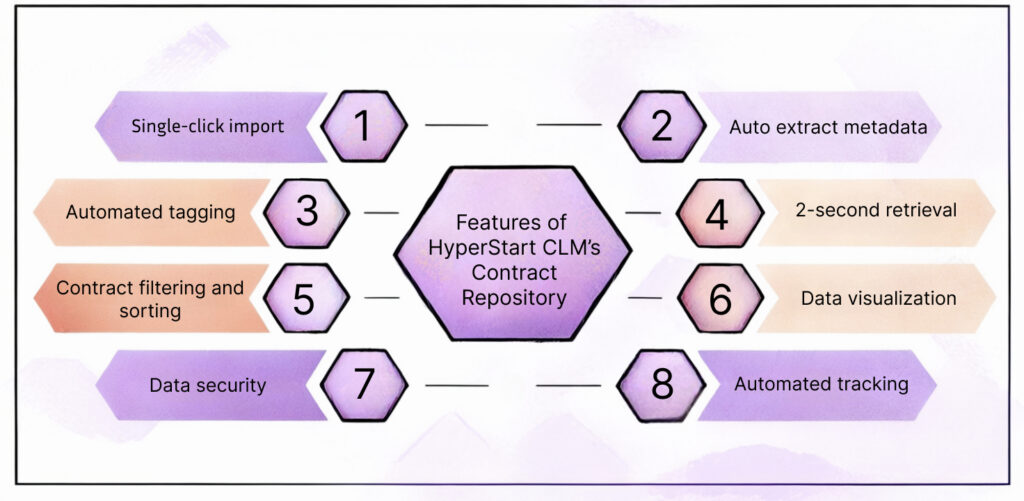
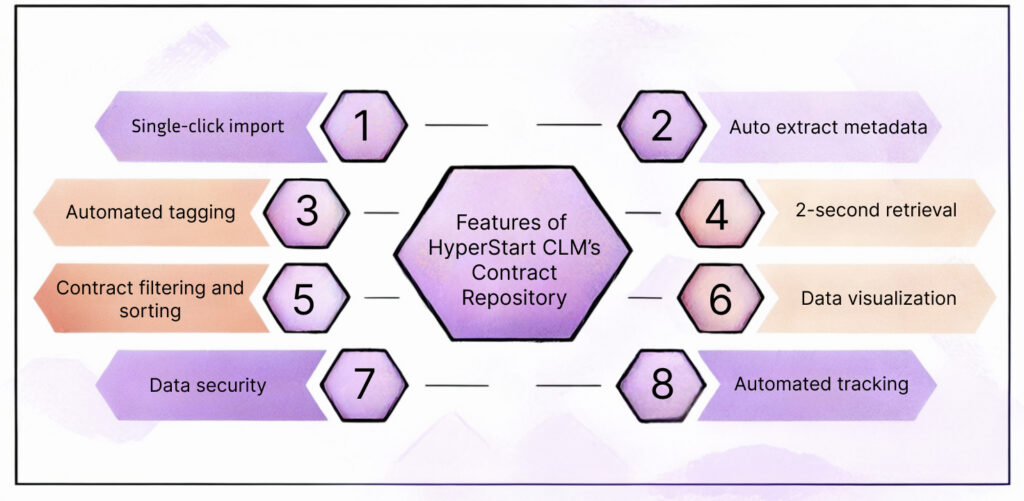
If your repository can’t tell you what’s inside a contract without you opening it, it’s not doing its job. Look for software that automatically pulls out key terms, things like renewal dates, governing law, liability caps, payment terms, and termination clauses, the moment a document lands in the system.
HyperStart’s repository, for instance, auto-extracts more than 30 key data points from both digital and scanned contracts. That last part matters. A lot of legacy contracts sit as scanned PDFs or even old paper copies. Software that only reads clean digital text is going to miss a huge chunk of your contract portfolio. OCR-backed extraction closes that gap, so old paper agreements get the same visibility as anything signed yesterday.
Ask vendors directly: does this work on scanned documents, or only native digital files? The answer separates a real solution from a half-built one.
Search That Actually Understands Contracts
Extraction is only half the job. You also need to search across that extracted data, not just keyword-match file names. A good repository lets you filter by clause type, expiry window, contract family, or counterparty, and pull results back in seconds rather than minutes.
Two seconds. That’s the retrieval benchmark some CLM platforms are hitting now. If a tool takes longer than a coffee break to surface a contract, that’s a red flag worth asking about during your demo.
Must-Have Feature 2: Role-Based Access Control
Not every contract needs to be visible to everyone in your organization. Procurement doesn’t necessarily have to see HR agreements. A regional sales lead doesn’t need to see your M&A paperwork anyway.
Role-based access lets admins decide who gets access to what, to the document or clause level if necessary. It is not merely a nice-to-have for neatness. It’s often a compliance requirement, particularly in regulated industries such as healthcare, government or financial services, where data exposure has real legal consequences.
When evaluating software, ask how granular the permissions get. Can access be set at the folder level only, or down to specific fields within a contract? The difference matters more than it sounds.
Must-Have Feature 3: Bulk Import and Easy Migration
Nobody wants to manually upload thousands of legacy contracts one by one. That’s a project that eats weeks of someone’s life for no good reason.
Look for bulk import from email, shared drives, CRMs, and cloud storage like Google Drive, OneDrive, or SharePoint. HyperStart, as an example, lets teams import legacy contracts in a single click while preserving existing folder structures, so nothing gets reorganized into a mess halfway through migration.
Implementation speed varies a lot between vendors. Some platforms promise onboarding within 48 hours for the initial setup, with full implementation, integrations, and team training wrapped up in four to six weeks. Compare that against vendors quoting six-month rollouts. The difference adds up fast when you’re paying for a tool that sits half-configured for a quarter.
Must-Have Feature 4: Renewal and Obligation Alerts
A repository without reminders is basically a very organized filing cabinet. The real value shows up when the system proactively tells you what’s coming.
Automated alerts for renewal dates, notice periods, and key obligations mean legal and procurement teams stop relying on someone’s calendar reminder or, worse, sticky notes. These alerts should be configurable too. Different contract types need different lead times. A 90-day notice period on a major vendor deal needs earlier warning than a month-to-month software subscription.
Must-Have Feature 5: Reporting and Visibility
Leadership will ask questions eventually: how many contracts are up for renewal this quarter? What’s our total obligation exposure? Which vendors carry the most risk?
Good repository software should generate these answers without a manual spreadsheet exercise. Look for dashboards that surface contract status, risk flags, and portfolio-level trends at a glance. Saved views and contract family mapping (linking a master agreement to its amendments and related documents) also save real time when auditors or executives come asking.
Must-Have Feature 6: Implementation Support That Doesn’t Disappear After Sign-Off
This one gets overlooked constantly. A slick demo means nothing if the vendor vanishes after the contract is signed. Ask pointed questions about onboarding: Is there a dedicated team helping with data migration? What does support look like in month three, not just week one?
Vendors offering a proof-of-concept trial, something like a seven-day test run on your actual use case, give you a much clearer signal than a canned sales demo ever could. Try before you commit budget. It’s a small ask, and any vendor confident in their product shouldn’t hesitate.
Final Thought
Choosing contract repository software isn’t really about picking the tool with the longest feature list. It’s about finding one that fits how your legal and procurement teams actually work day to day. Test the search. Check how it handles a messy scanned contract from 2018. Ask the vendor what happens in week twelve, not just week one.
Get that right, and contract chaos stops being a monthly fire drill. It becomes, honestly, kind of a non-issue.