

Playing Pokémon Go in 2026 has become tougher. Rural areas’ trainers find their maps empty courtesy of no raids, no gyms nearby, and rare Pokémon that don’t spawn naturally. Add extreme weather, mobility limitations, or simply a packed work schedule, and getting outside to walk for eggs or PokéStops becomes unrealistic for many players.
The traditional workaround, such as changing your device’s GPS location, used to mean jailbreaking an iPhone or rooting an Android phone. That approach carries real risk: voided warranties, bricked devices, and an increased chance of an instant game ban, since Niantic actively flags rooted devices as tampered.
This is exactly the gap PoGoskill was built to fill. The PoGoskill Android app lets you change your GPS location safely, without touching your phone’s core system, as no jailbreak or root is required. It works through Android’s own developer settings, keeping your device fully intact while giving you complete control over where you’re in-game avatar stands.
- What Makes the PoGoskill Android App Stand Out?
So, what does this tool actually do? Instead of just teleporting you instantly and hoping for the best, the PogoSkill GPS location changer acts as a full-fledged movement simulator.
Here is what you get under the hood:
360° Virtual GPS Joystick for Precise Control
You don’t just teleport blindly. The app features an intuitive GPS Joystick that lets you walk, turn, and navigate real-world streets in real-time. It feels exactly like playing an open-world RPG.
Customized Speeds
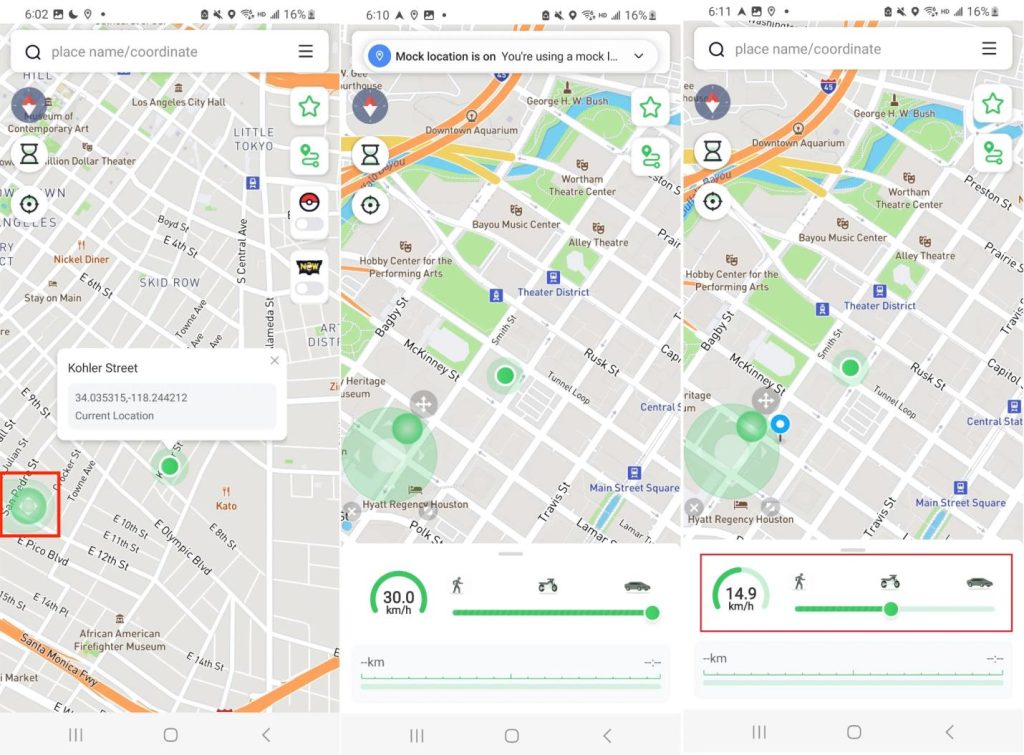
Want to simulate walking, cycling, or driving? You can slide the speed bar to match realistic human movement. This keeps your activity looking completely organic to the game’s servers.
Auto-Walk Route Simulation
If you want to hatch some 10km eggs while you do chores, you can map out a multi-spot custom route. The app will automatically simulate natural movement along those roads.
- Step-by-Step: How to Change Your Location with PoGoskill Android
Setting up this Best Android Location Changer is remarkably simple. You don’t need a computer science degree; just follow these quick steps.
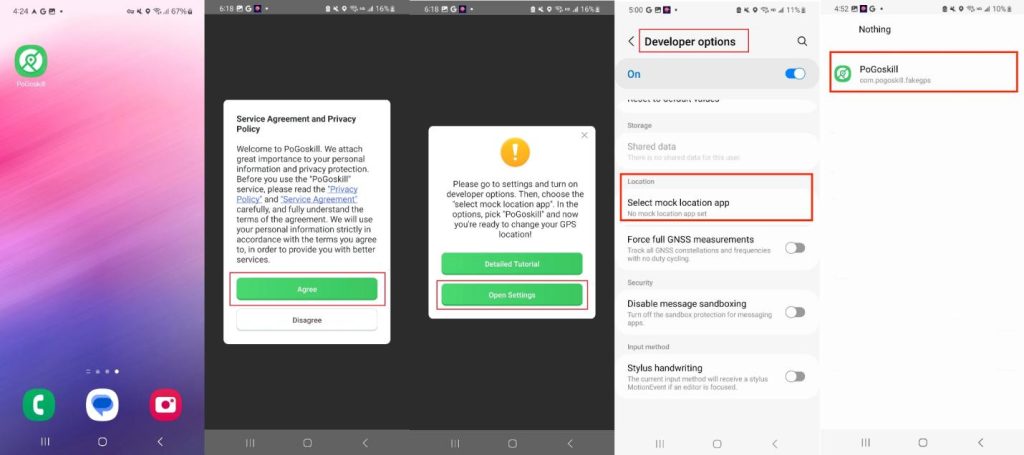
Step 1: Download PoGoskill from the Google Play Store and accept the service agreement.
Step 2: Go to Settings, enable Developer Options, then tap “Select Mock Location App” and choose PoGoskill.
Step 3: Open the app and either search for an address/coordinates or simply tap a spot on the map.
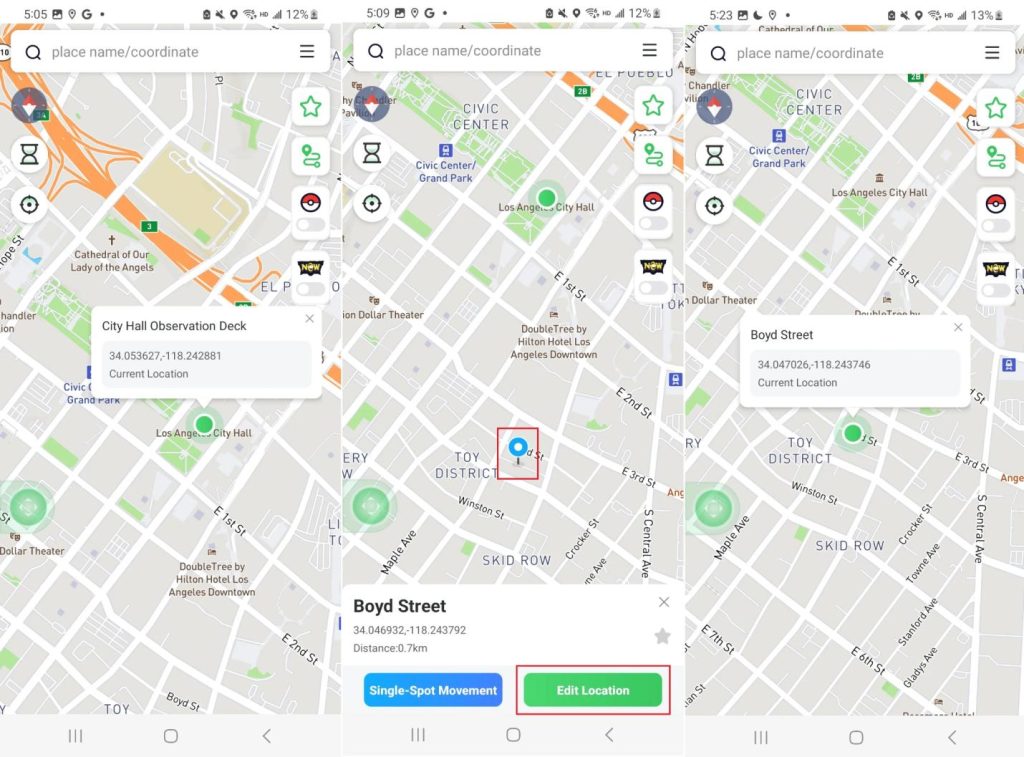
Step 4: Choose how you want to move. Tap Edit Location for an instant teleport. Use Single-Spot or Multi-Spot Movement to auto-walk a route at a set speed. Or grab the Joystick for free-roam, real-time control. Enter Pokémon GO game mode and start playing, as your avatar will now reflect the spoofed location.
- Pro-Tips: Play Smart and Avoid the Ban Hammer
Using a GPS spoofer is highly effective, but you have to play your cards right. To keep your account perfectly safe, keep these essential Pokémon Go Tips in mind:
- Respect the Cooldown Timer
If you teleport from Chicago to Paris, don’t immediately spin a PokéStop or throw a ball. Wait out the standard 2-hour cooldown period to mimic realistic travel time.
- Keep Your Speed Natural
Stick to walking speeds (under 4 m/s) when hatching eggs or hunting. Moving at highway speeds will trigger the game’s speed caps.
- Don’t Jump Around the Globe
Try to stay in one city per play session. Going from London to Sydney in ten minutes is a dead giveaway.
- Keep Things Updated
Anti-cheat systems evolve, and so does this Pokémon GO spoofer. Always keep your PoGoskill app up to date to ensure you have the latest security patches.
- Quick FAQ
Q1: If Pokémon Go is not working on Android, what should I do?
GPS errors, crashes, and loading issues are usually fixable. PoGoskill’s site has a full list of 15 troubleshooting steps, from clearing cache to checking Developer Options, in its Pokémon GO Not Working on Android guide.
Q2: Is GPS spoofing safe in Pokémon GO?
Yes, provided you use a high-quality utility and play realistically. Because PoGoskill doesn’t modify the game’s internal code or require system-level root access, it is much more secure than traditional methods.
Q3: What is the best location app for Pokémon Go?
For Android users, PoGoskill is widely considered the best choice due to its stability, built-in joystick controls, and direct availability on Google Play.
Q4: How do I change my location on an iOS device? Can I also use PoGoskill?
Absolutely. PoGoskill offers a companion version for iOS devices that requires no jailbreaking to get up and running.
Summary
Between rural spawns, bad weather, and the risks of rooting a phone, spoofing GPS the old-fashioned way just isn’t worth it anymore. PoGoskill gives Android trainers a reliable, no-jailbreak, no-root path to a full 360° joystick, custom walking speeds, and automated routes, all while staying closer to Niantic’s radar than clunky root-based tools. For anyone looking for a genuinely hassle-free Pokémon GO spoofer heading into the rest of 2026, PoGoskill is worth the download.