A model menu invites the wrong kind of confidence. Someone recognizes a name, remembers a good demo, and routes every brief through it. When the result fails, the team changes several prompt details and tries another name. An AI Video Generator with multiple models is more useful when each route is chosen by an observable acceptance rule.
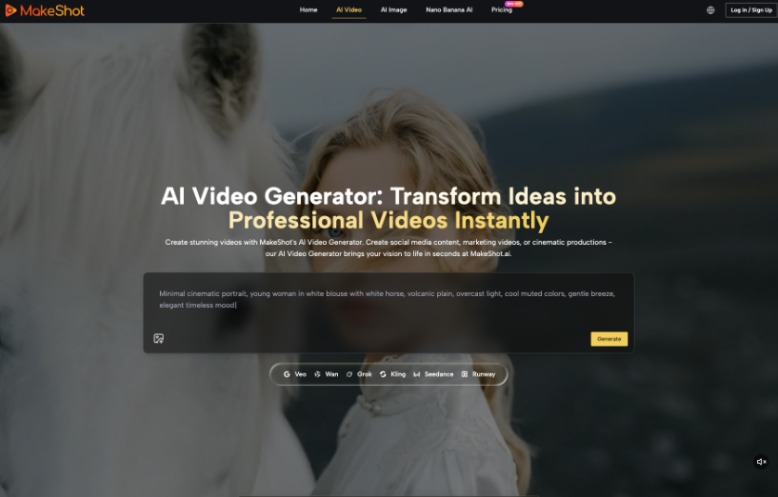
MakeShot.ai currently presents more than eight video models in one browser workspace, including Veo 3 and 3.1, Wan 2.5, Grok, Kling, and Seedance. The platform describes different strengths, but those descriptions should begin a test rather than end the decision. A team needs one fixed brief and a record of what each accepted clip actually did.
Turn a Creative Brief Into Observable Checks
Start with the output decision. A product clip may need a stable label, one clear hand action, and a vertical crop. A scene concept may need readable spatial relationships and no exact identity. Write three to five conditions that can be seen in the result.
Replace Quality Words With Pass Signals
Words such as cinematic, realistic, dynamic, and high quality do not tell two reviewers how to agree. “The package label remains unchanged,” “the subject stays inside the center crop,” and “one action is clear without sound” do. The prompt may still carry style language, but the review sheet needs visible signals.
Add one stop signal for the highest-risk failure. If a face change invalidates the clip, stop there. If a false product label is unacceptable, do not award points for lighting after the label bends. The stop signal keeps a polished failure from winning on average.
Give every condition an owner. Brand review may own the label, a social editor may own the crop, and a subject specialist may own the claim. One person can coordinate the sheet, but they should not silently approve a field outside their expertise.
Compare Routes With the Same Source Brief
Hold the source image or text brief, intended crop, requested action, and acceptance rules steady. Change only the route being tested. Otherwise, the team is comparing different creative ideas rather than learning which model fits the task.
Keep the review set small. Two or three comparable candidates per route reveal more than a large folder built from changing prompts. The goal is not to crown a model after one lucky result; it is to find a repeatable route for a bounded kind of brief.
| Acceptance need | Official positioning to test | Observable review |
| Smooth still-image motion | Kling image-to-video | Edges, subject shape, and action remain stable |
| Detailed scene control | Wan | Requested spatial relation survives the clip |
| Fast drafting | Seedance | Usable first review set arrives without relaxing rules |
| Video with audio potential | Veo native audio | Picture, speech, and effects agree after separate review |
Treat Product Positioning as a Hypothesis
The table does not claim that one route will always win. It translates the current platform descriptions into questions. A route presented for smooth motion still fails if the product changes shape. A route presented for detailed control still fails if the key spatial relation drifts.
Reviewers should see clips in a random order without route names on the first pass. That reduces the pull of brand reputation. Reveal the route only after the pass signals and failure frames have been recorded.
This approach also avoids empty brand debates. A reviewer does not need to argue that one model is generally better. They only need to show which condition passed, where the first failure appeared, and whether that failure matters for the placement.
Keep the First Prompt Deliberately Plain
A long prompt can hide why a route succeeded. Start with the subject, action, camera behavior, and protected detail. If the result passes, add style or atmosphere later. If it fails, the team has a cleaner signal about motion, control, or source quality.
Save the plain prompt as a baseline. When a later draft adds dramatic lighting or a faster camera, compare it with that baseline rather than relying on memory. A single versioned note is enough; the process does not need a complicated benchmark system.
MakeShot.ai makes switching routes convenient, but convenience can encourage random changes. Record every prompt version and change one variable at a time. That discipline matters more than generating a large pile of visually unrelated candidates.
Route the Next Brief From Recorded Failures
The middle use of an AI Video Generator should produce a routing note, not a permanent ranking. The note connects a type of brief with the conditions that passed, the failures that appeared, and the source quality required.
Record the Earliest Useful Failure Frame
Save the frame where the result first became unusable and label the reason. “Hand shape changes during the turn” is actionable. “Model B looked weird” is not. The frame may show that the source image lacks space, the action is too broad, or the route struggles with a protected detail.
Use that evidence when a similar brief arrives. If the same failure recurs, change the source or visual idea before switching models again. If a route passes under the old conditions, test the new risk rather than rerunning the entire comparison by habit.
A useful routing note also records what was not tested. A silent product turn says nothing about speech quality. A distant figure says little about face stability. Naming those gaps prevents a narrow success from expanding into an unsupported platform-wide claim.
Retest When the Brief Changes Its Risk
A route that worked for a distant landscape should not inherit approval for a close face. A silent teaser does not establish that native audio will be accurate. Retest whenever the protected detail, action complexity, crop, identity requirement, or audio role changes.
Set an expiration cue instead of a fixed winner. Retest after a material platform update, when a route’s controls change, or when the team enters a new content category. The routing note remains useful history, but it should not become an untouchable rule.
This keeps the routing library honest. It stores bounded decisions instead of model folklore. Teams can update it as the platform changes without pretending that last month’s result is a universal benchmark.
Keep a Routing Note Instead of Favorites
MakeShot.ai fits teams that want several current routes in one place and are willing to compare them under a fixed brief. It is less useful when model switching replaces a clear acceptance standard.
Choose the route that passes the job in front of you, record why it passed, and keep the conclusion narrow. Use familiar names only to form the first routing hypothesis. Let the recorded result decide whether that route returns.
Share the routing note with the people who prepare source assets and approve final placements. Their changes may improve acceptance more than another model switch. A better crop, clearer protected-detail list, or narrower action often removes the failure before generation begins.