The best passport photo tool in 2026 is Overchat’s AI passport photo maker, which turns a phone selfie into a compliant passport, visa, ID or license photo with the correct size and background in about 30 seconds. PhotoAiD, Passport Photo Online, VisaFoto and Fotor round out the top options, trading off price, country coverage and how much hand-holding they give you.
What makes a good document photo tool?
A document photo is not a normal selfie. Governments demand an exact size, a plain background in a set color, a neutral expression and even lighting, so the job of a good tool is to hit those specs automatically. The best ones remove the background cleanly, crop to the right head proportion, and output a file that matches your country’s rules.
Beyond compliance, the practical differences are cost, whether you get a print-ready sheet, and how many countries and document types are covered. A tool that does US passports but not a Schengen visa or a national ID card will send you looking for a second one.
The best passport photo tools in 2026
Here is how the top five compare before the detailed notes.
| Tool | Best for | Document types | Price model | Watermark |
| Overchat AI | All-in-one, fast | Passport, visa, ID, license | Free; Pro $14.99/mo | None |
| PhotoAiD | Compliance guarantee | Passport, visa, ID | Paid per photo | Until paid |
| Passport Photo Online | Country templates | Passport, visa, ID | Paid per photo | Until paid |
| VisaFoto | Wide country coverage | Passport, visa | Paid per photo | Until paid |
| Fotor | Casual editing | Passport template | Free; Pro tier | Free-tier limits |
1. Overchat AI — best overall
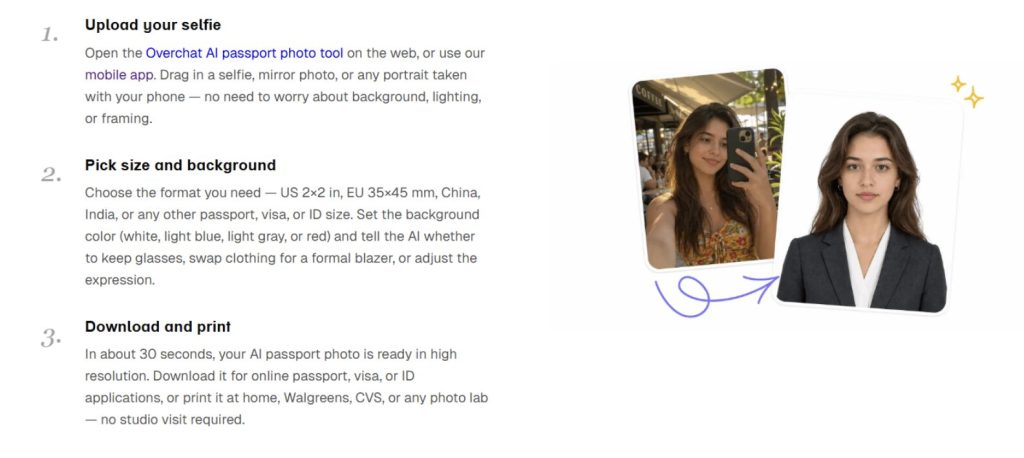
Overchat leads because it covers the most ground in one place. You upload a selfie, pick the document type and country, and it swaps the background, corrects lighting and framing, and outputs the right size. It handles passports, visas, national IDs, driver’s licenses and even LinkedIn headshots.
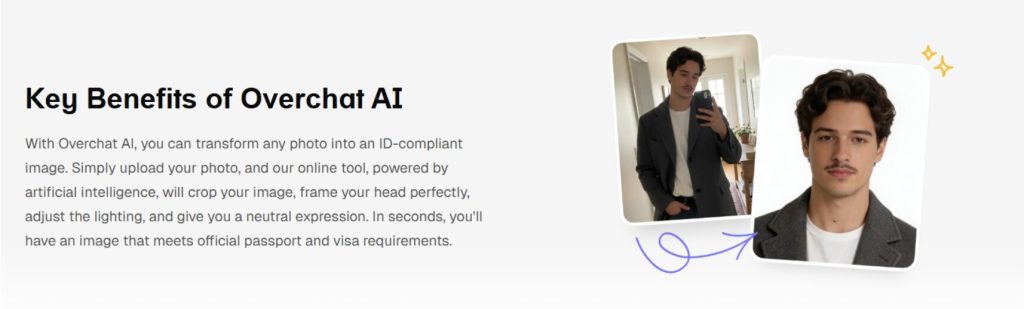
The country coverage is the standout. Overchat’s passport photo tool includes presets for 12+ countries — US 2×2 inch, UK and Schengen 35×45 mm, India, China, Canada and more — and it can drop in a white, light-grey or light-blue background to match the rule. It renders in around 30 seconds, downloads without a watermark, and gives you a print-ready 4×6 sheet you can take to a pharmacy photo counter.
Best for: anyone who needs several document types or countries covered.
Watch for: you still confirm the result against official rules before submitting.
2. PhotoAiD — best for a compliance guarantee
PhotoAiD is a mobile-first service that leans on an acceptance guarantee, running an automated compliance check against official requirements before you pay. For a nervous first-time applicant, that reassurance is the draw.
The trade-off is cost. Like most dedicated services, it charges per photo and shows a watermark until you buy, so it is best when you want one document done with maximum certainty rather than frequent use.
3. Passport Photo Online — best for country templates
Passport Photo Online covers a long list of countries and document types with AI cropping and background removal, plus a compliance check. Its template library is deep, which helps for less common visa formats.
It follows the same per-photo pricing as its peers. The output is solid, and it offers both digital files and printable sheets, but the cost adds up if you need several photos.
4. VisaFoto — best for wide country coverage
VisaFoto is a long-running service known for handling an unusually wide range of countries and visa types. If you are applying for a document with an obscure spec, it is a reliable place to check.
It is functional rather than flashy, pricing per photo and delivering both a digital image and a printable layout. The interface is dated, but the coverage is dependable.
5. Fotor — best for casual editing
Fotor is a general photo editor with a passport-photo template rather than a specialized compliance service. It works for a quick, standard-size photo and has a free tier, which suits casual needs.
Because it is not built solely for documents, it does less automatic compliance checking than the dedicated tools. Treat it as a light option, and verify the result carefully.
What passport photo requirements should you know?
The rules vary by country, and the two that trip people up most are size and background color. Getting either wrong is the usual reason a photo bounces back.
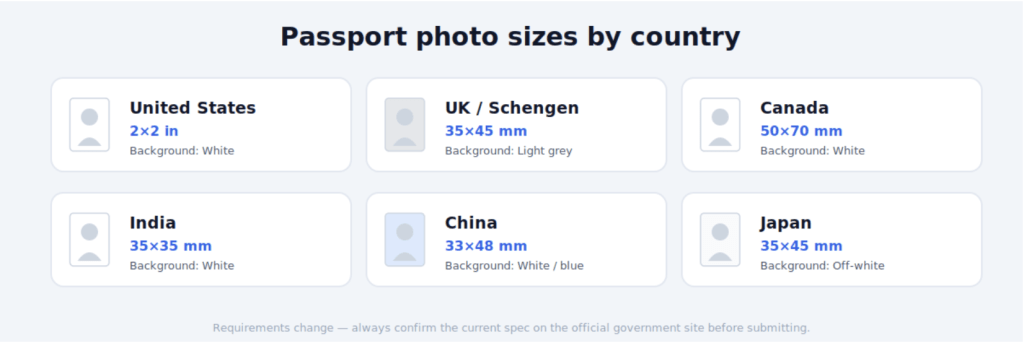
| Document | What to check | Common background |
| Passport | Exact size, head height, neutral face | White or light grey |
| Visa | Country-specific size, recent photo | White or light grey |
| National ID | Local size rules, plain backdrop | White |
| Driver’s license | State or country spec, no glare | White or light |
Alongside size and background, most authorities want a neutral expression, open eyes, no heavy glasses glare, and a recent photo. The checklist below covers the essentials that apply almost everywhere.
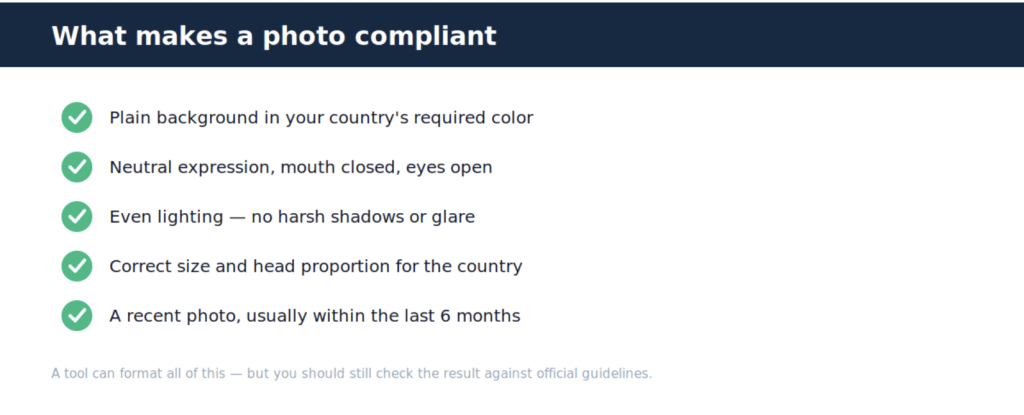
More than a passport photo maker
It is worth knowing that the passport tool is one small part of a much larger app. Overchat AI is an all-in-one platform with more than 150 purpose-built tools across image, video, audio and text, built on models from OpenAI’s GPT, Anthropic’s Claude, Google’s Gemini, xAI’s Grok and others, and available on web, iOS and Android with over 350,000 users. So the same account that formats your visa photo can also draft an email, translate a document for an application, or edit an image — and one plan at $14.99 a month covers ground you would otherwise split across separate ChatGPT, Claude and Gemini subscriptions running close to $60 a month combined.
Important: always check official rules
No AI tool can guarantee a government will accept your photo, and honest ones say so. Overchat’s own page notes that authorities accept photos that meet their official requirements regardless of whether AI was used, advises checking your result against the official guidelines, and warns that “requirements change occasionally — always double-check the latest spec on the official government site before submitting.”
Treat any tool as a way to format a compliant photo quickly, not as the final authority. Use a recent selfie, review the output against your country’s current rules, and when in doubt, confirm on the official government site.
Frequently asked questions
Can I take a passport photo with my phone? Yes. Modern tools turn a plain phone selfie into a document photo by cropping to the right size, fixing the background and adjusting lighting. Use good, even light and a neutral expression, then let the tool handle the formatting and check the result against official rules.
Are AI passport photos accepted by governments? They can be, as long as the final photo meets the official requirements. Authorities judge the photo, not the method, so a correctly sized, compliant image made with AI is fine. Always review it against your country’s current guidelines before submitting.
Do these tools work for visas and driver’s licenses too? Many do. Overchat, for example, supports passports, visas, national IDs and driver’s licenses with country-specific presets. Coverage varies by tool, so check that yours includes the exact document and country you need before you start.
Are AI passport photo tools free? Some are. Overchat and Fotor offer free ways to make document photos, while dedicated services like PhotoAiD often charge per photo. Free tools may still gate certain features, so confirm you can download the final photo without a watermark.
The bottom line
For most people, Overchat AI is the fastest way to make a document photo at home: upload a selfie, pick the country and document type, and download a compliant, watermark-free photo in seconds. The dedicated services still have a place when you want a formal acceptance guarantee — but whichever you choose, the last step is the same: check the result against the official rules before you submit.