Field crews need gear that survives more than a desk job. Choosing between a rugged tablet vs laptop affects daily productivity, not just comfort. The wrong device slows workers down every single shift. Tablets favor mobility, quick input, and one-hand use in tight spaces. Laptops favor sustained typing, processing power, and running heavy software. The right pick depends on what your team actually does outdoors, not on marketing claims.
This guide breaks down the strengths of each device in plain terms. You will see a direct side-by-side comparison you can scan fast. You will also get a short step-by-step method for choosing between the two.
What Is the Difference in a Rugged Tablet vs Laptop
A rugged tablet is a touchscreen device built to survive drops, dust, and moisture. A rugged laptop is a full computer with a built-in keyboard and stronger internal hardware. Both fall under general protection standards that describe resistance to shock, temperature swings, and rough handling, though the exact level varies by model and should always be confirmed with the maker.
Tablets trade some raw power for lighter weight and one-handed use, which suits crews that never stop moving. Laptops trade portability for a permanent keyboard, larger storage, more ports, and often a bigger screen for detailed work. Both are hardened for outdoor conditions in ways a consumer device is not. The right choice comes down to how your team moves, what software they run, and what tasks they handle each day out in the field.
When a Rugged Tablet Wins in the Field
A rugged tablet suits crews that move constantly and need quick access to data. It works well for inspections, deliveries, and short data entry tasks. Many models also add a touchscreen camera, which speeds up photo documentation without a separate device.
Portability
A tablet slips into one hand while the other hand stays free for tools or notes. This matters most for technicians who climb, crawl, or carry equipment through tight spaces.
Smaller size also means less strain during a long shift on your feet. Workers are more likely to actually carry a light device all day, instead of leaving it in a truck.
A compact frame also fits into a tool bag or vest pocket. That convenience often decides whether a device gets used at all.
Tablet vs Laptop
The core tradeoff comes down to weight against typing comfort. A tablet wins on carry weight, one-hand operation, and quick screen taps.
A laptop wins once a task needs sustained typing or several open programs at the same time. Many teams end up needing both, just for different moments in the day.
Think about which task happens more often for your crew. That answer usually points toward the device worth buying first.
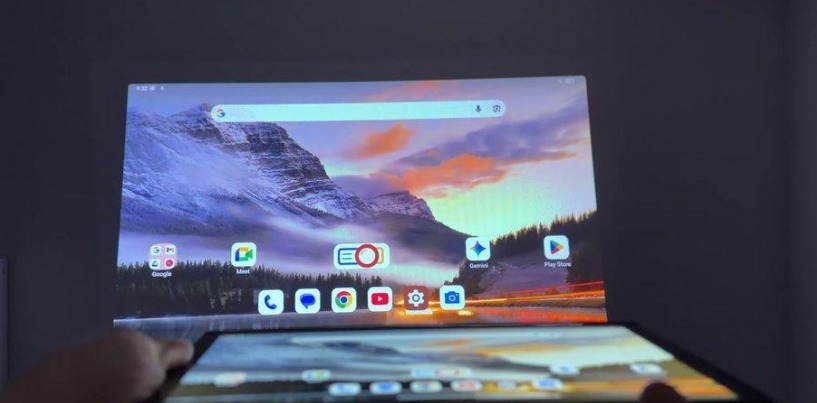
One example built for this kind of work is the 8849 Tank Pad Ultra. It pairs a rugged tablet body with a built-in projector and night vision camera, so crews can brief teams or check dark spaces without extra gear.
When a Rugged Laptop Wins in the Field
A rugged laptop suits crews that write long reports or run demanding software. It works well for engineering work, CAD files, and detailed data logging. It also tends to have more ports for cables, external drives, and diagnostic tools.
Keyboard Comfort
A permanent keyboard speeds up typing compared to an attached or virtual keyboard. This matters for anyone filling out long field reports every day of the week.
A larger screen also helps when reviewing detailed drawings or spreadsheets. Reading small text on a tablet screen can slow that kind of work down considerably.
Typing on a flat desk or a vehicle mount also feels more natural. Crews who sit for part of their shift often prefer this setup.
Processing Power
Laptops generally support stronger processors and more memory than tablets of similar price. This helps with software that needs to render graphics or handle large data sets.
Field engineers running specialized programs often need this extra headroom to stay productive. A tablet can struggle to keep up with the same workload under heavy use.
Battery life can also shift in favor of a laptop during long sessions. Larger internal batteries sometimes outlast smaller tablet cells under constant load.
Here is a quick comparison between rugged tablet vs laptop:
| Feature | Rugged Tablet | Rugged Laptop |
|---|---|---|
| Weight | Lighter, easier to carry all day | Heavier, better for vehicle mounts |
| Keyboard | Attachable or virtual | Built-in and permanent |
| Best Task Fit | Inspections, scanning, quick entry | Reports, CAD, heavy software |
| Screen Size | Smaller, more compact | Larger, easier for detailed review |
| Typical Setup | Handheld, one-hand friendly | Desk style or vehicle mounted |
How to Choose the Right Device for Your Team
Start by listing your most common daily tasks, then match them to the device built for that task. Skip the spec sheet race and focus on real habits instead.
Use this short process to narrow your decision:
- List the top three tasks your crew handles each day outdoors
- Note whether typing or one-hand operation matters more
- Check if the work needs heavy software or just data entry
- Decide if the device rides in a vehicle or stays in hand
- Set a budget range for the whole team, not just one unit
Walk through each step with your team lead, not alone at a desk. Field input often changes the answer more than spec sheets do. Ask a few workers what slows them down right now, and listen closely.
Once you match tasks to strengths, the choice usually becomes obvious pretty fast. Most teams find one device that covers most of their daily work. The rest can be handled with a small number of shared units for special cases.
Can One Device Replace the Other
Neither device fully replaces the other for every crew. Some teams genuinely need both tools on hand for different parts of the shift.
Hybrid rugged tablets with attachable keyboards try to close this gap between the two formats. They give a tablet body with laptop-style typing whenever it is needed, then let workers detach the keyboard for handheld tasks.
These hybrids work best for crews that split time between typing and handheld work fairly evenly. A pure specialist device still wins for teams with one dominant task type, since it avoids extra weight and cost. Extra field features can also tip the balance in favor of a tablet. A built-in projector, for example, lets a crew run a briefing on site without carrying separate equipment. Test both formats with your actual daily workflow before you commit a budget to a full fleet.
Conclusion
There is no single winner in the rugged tablet vs laptop debate. The right pick depends on how your crew actually works outdoors, not on a spec sheet. Choose a tablet for mobility, one-hand use, and quick field tasks like inspections. Choose a laptop for typing heavy reports, CAD work, and demanding software. Some crews benefit from a hybrid device that covers both needs at once.
Others find that added features, like a built-in projector for site briefings, remove the need for extra gear entirely. Walk through your daily task list before you buy anything new. Match the device to the actual work, not the other way around. Test a unit in real field conditions whenever you can before a full rollout. A short trial period will save your team money and frustration later. Make the decision based on daily habits, not on brand names or trends.