If you’re producing music, podcasts, or branded content that needs to survive mixing, mastering, and distribution, the file format you export matters as much as the creative process itself. Many creators default to MP3 because it’s familiar, only to discover during final mastering that compression artifacts have already damaged their audio. AISong addresses this gap with its WAV Download feature, giving users access to uncompressed, studio-grade files instead of settling for compressed output. This guide breaks down how AI Song handles the MP3 vs WAV decision so you can choose the right format for your specific production stage.
What Is WAV Download?
WAV Download is a feature inside the AISong platform that lets users export their generated tracks as uncompressed, lossless audio files instead of the standard compressed MP3. Where MP3 sacrifices some audio data to reduce file size, WAV preserves the full waveform, which matters for anyone doing further editing, mixing, or mastering. For content strategists, producers, and marketers who repurpose AI-generated tracks across multiple projects, this means one generation can serve both casual and professional use cases without regenerating the song.
Traditional Challenges of WAV Download
Creators working with compressed audio commonly run into a handful of recurring problems:
- Compression artifacts becoming audible after multiple rounds of editing or EQ adjustments
- Limited dynamic range that flattens detail during mastering passes
- Compatibility gaps with professional DAWs that expect uncompressed formats
- Re-recording or re-licensing costs when a compressed track proves unusable for a client’s broadcast standards
- Wasted time regenerating tracks from scratch just to get a cleaner export
These pain points push producers toward AI-based workflows precisely because manual re-recording or outsourcing to a studio is expensive and slow. An AI music generator that offers a direct path from creative brief to lossless file removes a major bottleneck in content pipelines, especially for teams handling multiple projects at once.
How AISong Handles WAV Download
MP3 to WAV Converter – High-Quality Audio Processing
This is the core mechanism behind the feature: AISong’s built-in converter maintains lossless audio quality when moving a track from MP3 to WAV, so the file is ready for studio-level work without a separate conversion tool. It matters because it removes the extra software step that many creators would otherwise need to complete manually before mastering or distribution.
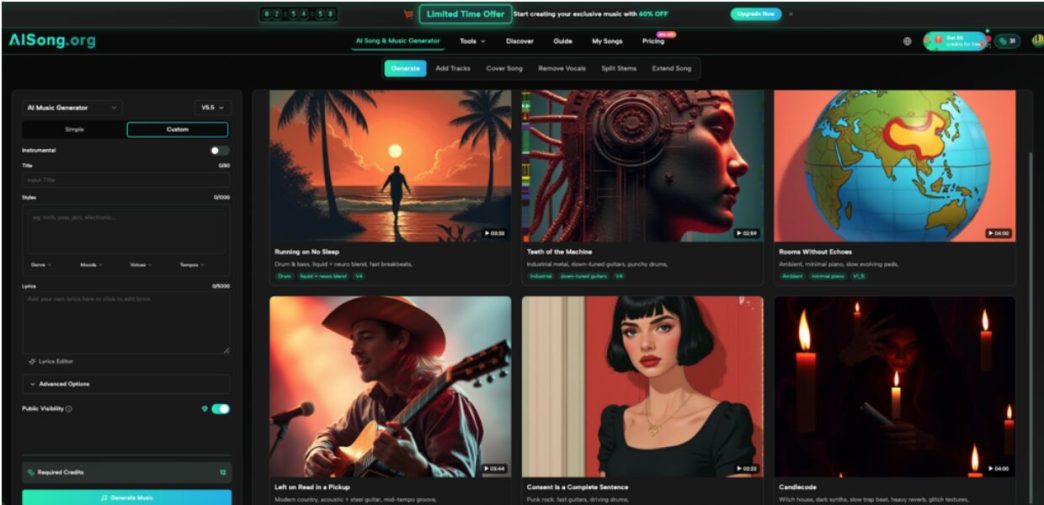
AI Music Generator – Create Original Songs with AI Song
Every WAV export starts with a track generated through AISong’s core AI Music Generator, which produces studio-quality compositions across more than 30 genres. Because the source material is already high-fidelity, the WAV export preserves that quality rather than compensating for a weak original recording.
Vocal Remover
For projects needing isolated vocals or clean instrumentals, the Vocal Remover tool uses precision separation to extract stems with minimal artifacts. When paired with WAV export, this supports tasks like karaoke production or sampling where lossless detail in the isolated tracks actually matters.
Output & Usage – Ready for Real Content
AISong exports tracks in high-quality WAV format alongside standard MP3, typically at 44.1kHz, which aligns with common professional and broadcast standards. This makes the output suitable for video soundtracks, ad campaigns, podcast intros, and further mixing in a DAW, while AISong’s royalty-free licensing lets creators use generated tracks across commercial projects without ongoing fees.
How to Use WAV Download (Step-by-Step)
Step 1 – Open Your Music Library
Every track you generate on AISong is automatically saved to your Music Library, so there’s nothing extra to prepare before downloading. Simply navigate to the library, where all your AI-generated songs are stored and organized in one place for easy access.
Step 2 – Select Your Track
Click on any track for an instant single download, or select multiple tracks at once to run a batch export. This works with any AI Music Generator track already saved in your library, so you don’t need to regenerate anything to get a WAV version.
Step 3 – Download & Reuse
Choose the WAV format and confirm the download; the platform preserves the original audio quality, so every export maintains studio-grade fidelity. Downloads are unlimited, and all Music Library exports are royalty-free for commercial use, so you can drop the file straight into your video, ad, or podcast project.
Use Cases for Content Teams
- Short-Form Video Creators — Producers making TikTok or Reels content use WAV exports when a track needs re-editing for pacing, keeping audio clean through multiple cuts.
- Brand and Campaign Marketers — Marketing teams building ad campaigns rely on WAV files during final mixing to meet broadcast-quality standards before a spot airs.
- YouTube and Podcast Hosts — Podcast producers use lossless downloads for intro and outro music that gets layered with voice tracks, avoiding compounded compression loss.
- Indie Game and App Teams — Developers pull WAV stems into game engines where audio needs to withstand real-time processing without additional quality loss.
FAQ
How does the WAV export workflow actually work?
Users open their Music Library, select the track they want, and choose the WAV format for download—no regeneration is needed since the export happens directly from stored tracks. Batch downloads are also supported for exporting several tracks at once.
What are the usage rights for downloaded tracks?
AISong applies royalty-free licensing to generated tracks, giving users commercial usage rights for projects like ads, videos, and podcasts without additional licensing fees. As with any platform, it’s worth reviewing the current terms before using tracks in large-scale commercial distribution.
Does WAV Download support the same genres as MP3 export?
Yes, WAV Download works across the same range of styles supported by the AI Music Generator, including pop, jazz, electronic, and other genres, since the format change happens after generation rather than limiting creative options.
Conclusion
Choosing between MP3 and WAV comes down to where a track sits in your production pipeline, and having both options accessible directly from one music library removes the friction of juggling separate conversion tools. AISong’s WAV Download feature gives professionals a direct path from a stored track to a mastering-ready file without extra software.
It’s worth testing AISong’s WAV Download on your next project to see how a lossless export holds up through your own mixing and mastering process.