Securing a barn, a remote gate, or a seasonal cabin is a different problem than securing a suburban backyard. There is no reliable Wi-Fi to connect to, no easy way to run cable, and often no one nearby to check on things when something goes wrong. Cellular security cameras solve the connectivity piece by running on LTE instead of a home network,but choosing the right one takes more than picking the highest resolution on the shelf.
This guide covers what actually matters for remote property installations: how to verify coverage before you buy, which camera features hold up under real outdoor conditions, how to keep ongoing data costs in check, and where eufy fits if you want local storage without a monthly fee.
Table of Contents
- Do You Actually Need Cellular?
- Start with an Honest Site Survey
- 9 Things That Separate Great Cellular Cameras from the Rest
- Quick Comparison: Key Factors at a Glance
- Installation Decisions That Cost Nothing on the Spec Sheet
- Security Habits That Still Apply to Cellular
- How eufy Fits This Shopping Path
- Conclusion
Do You Actually Need Cellular?
The best cellular security cameras for remote properties are not the ones with the longest battery life or the sharpest resolution. They are the ones you can actually keep running after you factor in patchy signal, monthly data costs, and the reality that a maintenance visit might be a two-hour drive.
Before comparing models, it is worth asking whether cellular is even the right call. If there is a reasonable path to bringing stable internet to the gate or outbuilding through a mesh node or point-to-point wireless link, that route may cost less over time with fewer moving parts.
Cellular earns its place when that option is not realistic. It makes sense when:
- Running cable or getting dependable internet to the structure you need to watch is not happening this season
- The setup needs to be temporary or movable, like a work site, a seasonal property, or a remote gate
- Power is available but trenching for a network run is not
Know the actual bottleneck before committing to cellular hardware.
Start with an Honest Site Survey
Most buying guides skip straight to the product list. The smarter first move is to walk the property with your phone and test signal at each planned mount location.
Official carrier coverage maps are a starting point, not a guarantee. Several common factors can blunt LTE performance in ways that maps do not capture:
- Metal roofs and siding reflect and absorb signal
- Dense tree cover, especially when wet, can significantly reduce range
- Low mounting angles and nearby terrain interrupt line of sight to towers
- Seasonal changes shift coverage patterns too, from heavy foliage in summer to snowpack in winter
If your phone barely holds a data connection at the spot where the camera is going, the camera will struggle too. Also consider who is servicing the equipment. Remote properties mean longer drives when a camera drops offline. The best spec sheet in the world does not help if you cannot reach the site within a reasonable window.
9 Things That Separate Great Cellular Cameras from the Rest
Not all cellular cameras are designed for the same conditions. For a remote property installation, these are the factors that actually determine whether a camera is worth the investment.
- Carrier network compatibility
Confirm the camera supports the carrier with the best signal at your install spot. Some cameras lock to one network; others accept third-party SIMs. That flexibility matters when coverage is marginal. - Power model matched to traffic volume
Solar-plus-battery works well in low-traffic areas with good sun. A busy gate that triggers dozens of alerts a day is a different load entirely. Match the power setup to how the camera will actually be used. - Where footage actually lives
A camera that pushes everything to cloud storage loses your clips if connectivity drops or the subscription lapses. Local storage on the device or a hub keeps evidence accessible during outages. - Data usage in real conditions
Longer clips, higher resolution, and frequent live viewing all add up on LTE. Look for manufacturer-provided usage estimates on the product page and treat those as product-specific guidance, not a universal monthly budget. - Motion detection accuracy
A camera that fires on every branch movement drains battery and burns through data. Person and vehicle detection, rather than generic motion alerts, is the difference between useful notifications and alert fatigue. - Night vision approach
Color night vision backed by a spotlight gives you footage you can actually act on. IR-only cameras produce black-and-white clips that make identifying faces or plates difficult at real-world distances. - Weather rating
IP66 is the minimum for exposed outdoor installations; IP67 is worth seeking out near water or in regions with heavy rain. “Weatherproof” in marketing copy is not a substitute for an actual rating. - Remote management
Sensitivity adjustments, firmware updates, and live view should all be manageable from your phone. A camera with a poor remote management experience becomes a liability on a property you rarely visit. - Tamper resistance and mount stability
Height reduces casual tampering and widens sight lines, but wind, ice, and wildlife pressure also affect mounts. If heavy winter ice is common at the property, plan for lens cleaning and physical access before finalizing the location.
Quick Comparison: Key Factors at a Glance
The 9 factors above can feel like a lot to track when flipping between product pages. This table distills them into a quick reference: what each factor decides and the one thing worth confirming before you commit.
| Factor | Why It Matters for Remote Properties | What to Confirm Before Buying |
| Carrier compatibility | Signal at your exact location determines everything | Field-test with your phone at the planned mount spot |
| Power model | Drives maintenance frequency and reliability | Match solar/battery capacity to expected daily trigger count |
| Local vs. cloud storage | Protects footage during outages and limits recurring costs | Confirm whether clips store on-device, on a hub, or cloud-only |
| Data usage | Monthly LTE costs compound quickly | Find product-specific usage estimates, not category averages |
| Motion detection | Reduces false alerts, saves battery and data | Confirm person and vehicle detection is built in at no extra cost |
| Night vision type | Determines footage usability for identification | Look for color spotlight capability, not IR-only |
| Weather rating | Real outdoor conditions are unforgiving | IP66 minimum; IP67 for exposed or high-humidity locations |
| App and remote management | Reduces need for physical site visits | Test live view, alert settings, and firmware update flow |
No single factor is a dealbreaker in isolation; they intersect. A camera with excellent local storage but poor solar performance is still a liability if you cannot drive out to recharge it. Run through this list against your current site before shortlisting models.
Installation Decisions That Cost Nothing on the Spec Sheet
Aim at the lens where you need evidence, not just where mounting is convenient. Those two things rarely overlap, and realizing it after the install is an avoidable frustration.
Think about framing before drilling. Capture what happens on your property, not a neighbor’s yard or public sidewalk, since what a camera records can matter legally. A camera does not replace physical barriers, good lighting, or a local contact with a key. It is one layer of a broader approach.
For seasonal-use properties, sort out the logistics before you leave:
- Is there a neighbor or caretaker who can physically check if a camera goes dark?
- Can you reboot or reconfigure the device remotely without an on-site visit?
- Is the mounting hardware secure enough for a full winter of wind and ice load?
Those answers are much easier to work out before the property sits unattended for months.
Security Habits That Still Apply to Cellular
Switching to cellular removes Wi-Fi from the path, but your phone app, account credentials, and the vendor’s cloud infrastructure are still online. The Federal Trade Commission’s guide How To Secure Your Home Security Cameras covers the practical baseline:
- Research encryption and account protections before depending on remote live view
- Use strong, unique passwords for each device and account
- Keep firmware updated, since most vulnerabilities are patched through routine updates
- Understand where footage is stored and for how long before assuming it will be there when you need it
These are not advanced steps. They are the floor for any setup where the footage actually matters.
How eufy Fits This Shopping Path
Once the decision is made to go cellular, the practical question shifts to which hardware suits the site. For a remote property where driving out to troubleshoot is not realistic, solar power and local storage stop being nice-to-have features and start being baseline requirements.
The eufy SoloCam E30 is built around exactly that kind of scenario. Paired with an on-site cellular gateway or LTE router, it joins the local Wi-Fi while LTE carries the uplink, and the setup still avoids piling a separate storage subscription on top of the data plan when clips live on a microSD card you add yourself. A few things that make this use case well:
eufy SoloCam E30 pan-and-tilt camera with removable solar panel covering a remote property
- Solar-powered with battery backup: keeps the camera in service through normal sun and longer overcast stretches without a site visit every time the battery quietly quits
- Local storage with no subscription: clips stay on removable storage instead of a forced cloud plan, so they remain reachable in the app whether or not LTE is having a good night
- Pan, tilt, and smart tracking: one mount covers more of the gate or yard and follows people and vehicles when motion matters, instead of multiplying fixed cameras down the same fence line
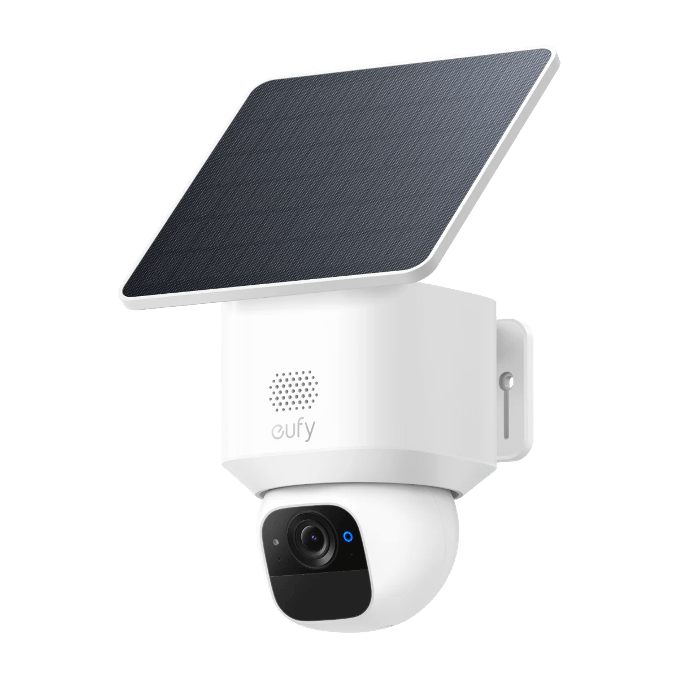
For a remote property, that combination matters more than a spec sheet suggests. Solar keeps the camera running without scheduled visits. Local storage means your footage is there when you need it, regardless of what the data connection was doing at 2 a.m. And tracking that behaves when deer and branches are doing their thing means you are not wading through dozens of false alerts every week just to find out nothing happened.
Conclusion
The best cellular security cameras for remote properties are defined by whether they stay powered, connected, and accessible in the actual conditions of the land: uneven LTE coverage, infrequent maintenance visits, and real weather.
Start with a field test at the install location. Match the power model to how that spot actually triggers. Know where footage lives before it matters. Get that framework right, and the shortlist almost builds itself. If you are ready to compare options built for exactly this kind of setup, browse eufy’s security cameras to see how solar power, local storage, and no-subscription access stack up across the lineup.