For years, many photographers treated image upscaling as a last resort. If a photo was too small, too heavily cropped, or not sharp enough for publishing, the usual answer was simple: go back to the original file, export a larger version, or accept that the image could not be saved. That advice still makes sense when a high-resolution source exists. But in everyday work, people often have to deal with imperfect images.
A travel photo may look fine on a phone but fall apart after cropping. A product image may be sharp enough for a listing thumbnail but too soft for a website banner. A social media image may have been compressed so many times that small details start to disappear. These are common problems for creators, online sellers, marketers, and even casual photographers.
Upscaling Is Not the Same as Sharpening
One of the biggest mistakes people make is thinking that image upscaling and sharpening are basically the same thing. They are not. Sharpening increases local contrast around edges, which can make a photo look crisper at first glance. But it does not add real usable detail. Push it too far and the result often looks harsh, noisy, or unnatural.
Traditional upscaling works differently. Older resizing methods stretch the image and estimate new pixels based on nearby pixels. This can be useful for simple graphics, screenshots, or clean illustrations, but it often struggles with natural textures such as hair, skin, water, fabric, buildings, and foliage. The image becomes bigger, but not always better.
Why AI Changed the Workflow
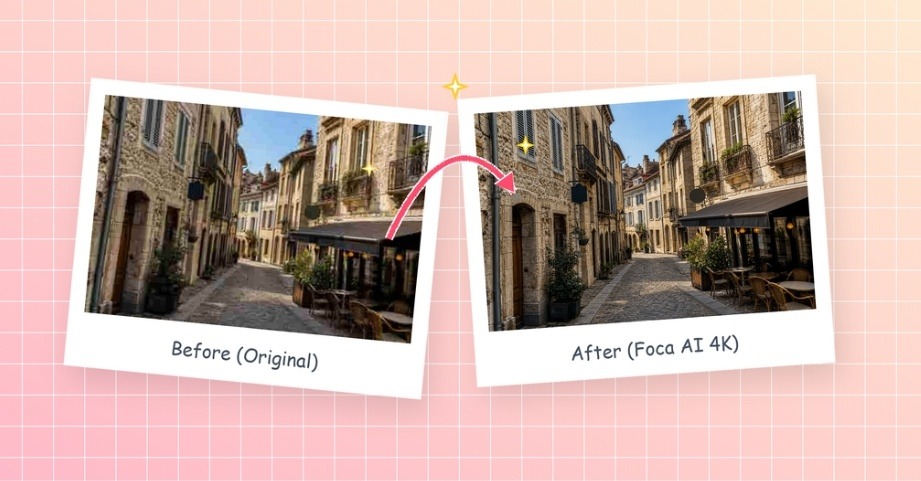
AI upscaling has changed the conversation because it can analyze patterns in an image and rebuild missing detail in a more context-aware way. Instead of only stretching pixels, modern tools can make a low-resolution image look more suitable for web publishing, social posts, e-commerce pages, or portfolio previews.
This does not mean AI can magically recover every lost detail. A badly blurred photo is still a badly blurred photo. But AI can often make a practical difference when the source image is usable but limited. For example, a cropped portrait can keep more facial definition, a product photo can retain cleaner edges, and a landscape image can hold more texture in water, trees, or buildings.
For users who need a simple option, a web-based AI image upscaler can help enlarge cropped or low-resolution images while keeping textures more natural. This type of tool is especially useful when the goal is not to create a completely new image, but to make an existing image more publishable.
Where Upscaling Helps Most
The best use cases are usually practical ones. A blogger may need a sharper header image. A small business may want cleaner product visuals without reshooting everything. A designer may need to prepare a client-supplied image for a mockup. A photographer may want to rescue a detail from a wider shot for social media.
AI upscaling also helps when working across different platforms. A photo that looks acceptable in an Instagram feed may not hold up on a high-resolution website layout. A marketplace image that works in a small grid may look weak on a product detail page. Better image quality can make content feel more professional without changing the original subject.
When You Should Avoid It
There are still cases where upscaling is the wrong solution. If the original photo has motion blur, poor focus, or bad lighting, upscaling may only make those flaws more visible. If the image is meant for strict documentary or editorial use, any AI-enhanced detail should be handled carefully. The goal should be visual improvement, not misleading reconstruction.
It is also important not to overprocess. Some AI tools make photos look too smooth or too painterly. Skin can become waxy, water can look artificial, and buildings can develop strange edges. The best result is usually the one that still feels like the original photo, only cleaner and more usable.
The Bottom Line
Image upscaling is no longer just a technical workaround. It has become part of a normal publishing workflow for many people who work with digital visuals. The key is knowing what it can and cannot do. It will not replace good photography, proper lighting, or high-quality source files. But when a useful image is slightly too small, too cropped, or too compressed, AI upscaling can give it a second chance.
For photographers, creators, and businesses publishing online, that can be the difference between discarding an image and using it confidently.