
Choosing a course platform can feel harder than mapping the lessons themselves. AI builders promise “done-for-you” modules, while older LMSs tout security—yet many creators still watch students bail halfway.
Interactive lessons drive 2.7× more student activity than passive video, and AI-native authoring can cut production time by up to 12-fold. With the right tool, you can capture both gains without touching code or paying for bloated extras. In this guide, we rank nine platforms that balance speed, stickiness, and business sense so you can teach, not tinker.
How we selected and scored every tool
We didn’t start from scratch. We checked more than 25 platforms, scanned hundreds of creator reviews, and looked for the traits that keep a course moving.
Our first, non-negotiable goal was learner engagement. If a platform can’t help students finish and apply what they learn, it never made the long list.
Next, we graded every candidate against four equally weighted pillars:
Engagement depth. Does the platform offer more than video hosting? We rewarded built-in quizzes, interactive video, gamification, and active communities because these features lift completion rates and spark conversation.
Ease of use. Tech headaches derail momentum, so clean, no-code builders earned top marks. Drag-and-drop editors, templated outlines, and clear onboarding flows added points.
AI advantage. AI counts when it speeds production. AI-native authoring can trim build time by up to 12× compared with legacy tools. Platforms that automate outlines, translations, or quiz creation scored higher because they let you focus on teaching, not formatting.
Value for money. A generous free tier or sensible entry price matters, especially for solo creators. We weighed sticker price against feature depth to spotlight genuine ROI, not just the lowest bill.
Each pillar carried ten possible points, so every tool could earn up to 40. If scores tied, we looked at two extras: support for SCORM or xAPI (still needed for 56 percent of enterprise imports) and the ability to scale to larger cohorts.
This rubric surfaced a decisive top nine. The next table shows the results at a glance; after that, we unpack each platform so you can match the right tool to your style.
The top nine tools at a glance
Before we dive into the details of each platform, it helps to see how they line up against the four pillars you just read. Use this snapshot to spot quick front runners, then jump to the deeper reviews that follow.
| Tool | Ease of use | Engagement features | AI boost | Value for money | Standout perk | Best for |
| GoSkills Course Builder | 5 | 4 | 5 | 5 | AI “Genie” writes lessons in minutes | Team training and cost-savvy creators |
| Thinkific | 5 | 4 | 4 | 5 | Built-in communities with no sales fees | First-time course entrepreneurs |
| Kajabi | 4 | 4 | 5 | 3 | All-in-one marketing and course hub | Established knowledge businesses |
| Teachable | 4 | 3 | 3 | 4 | Simple setup with automatic tax handling | Launching a first paid course |
| LearnWorlds | 4 | 5 | 4 | 4 | Interactive video quizzes and gamification | Designers chasing maximum engagement |
| Podia | 5 | 3 | 3 | 5 | Affordable entry plan plus memberships in one place | Budget creators bundling products |
| Articulate 360 | 3 | 5 | 2 | 3 | Deep scenario-based interactivity | Corporate L&D and pro IDs |
| EdApp | 4 | 5 | 4 | 5 | Gamified micro lessons and leaderboards | Mobile microlearning for teams |
| Synthesia | 5 | 3 | 5 | 4 | AI avatars in 120+ languages | Fast, multilingual video creation |
Scores use a 1–5 scale based on 2026 market benchmarks. A 5 signals category-leading performance, while a 3 indicates solid but routine execution.
Keep this cheat sheet handy. In the next section we start our ranked deep dives, beginning with the platform that earned the highest composite score.
1. GoSkills Course Builder: best for team-based online courses
Open the editor, pick a template, and drop in video, slides, or text, then invite unlimited learners on the free tier through the best online course builder for teams.
GoSkills Course Builder editor interface for team-based online courses
Once your content is ready, you can easily share it with your audience. The platform offers a variety of sharing options, ensuring that your course reaches the right people. Whether you’re targeting a small group or a large audience, the tools provided will help you achieve your goals efficiently.
Why it leads the pack
GoSkills is built for people who need polished training live in days, not weeks. Open the editor, pick a template, and drop in video, slides, or text. The platform handles the heavy lifting: it formats lessons, tracks progress, and issues certificates, so you can stay focused on content.
The headline feature is Genie, an AI assistant that turns source documents into lesson outlines, quiz questions, and micro summaries in just a few clicks. In practice, an afternoon of copy-and-paste work shrinks to coffee-break length. Industry research shows AI-native authoring can cut production time by roughly twelvefold.
Speed sits inside a full LMS. Invite subject-matter experts to co-author modules, assign courses to departments, and monitor completion without extra add-ons. The free tier allows unlimited learners, giving small companies and solo creators a risk-free way to test an idea before paying.
Most importantly, learners stay active. Built-in quizzes, bite-sized videos, and gentle progress nudges keep courses moving, so managers see skills stick instead of fade.
2. Thinkific: best all-purpose platform for beginners
Where Thinkific shines
Thinkific feels like the team remembers the stress of launching a first course. The dashboard is clean, the setup wizard guides you step by step, and the default theme looks polished without endless tweaks.
Drag a video or PDF into the lesson pane and Thinkific converts, compresses, and positions it automatically. Want to drip-release modules or add a community? Toggle two settings and you’re done. There is no code and no surprise paywall message.
Growth stays painless. Once sales pick up, you can add unlimited courses and students while paying zero transaction fees. That single detail saves creators thousands over time, especially compared with platforms that skim five percent from every sale.
Thinkific raised engagement in 2025 by adding native Communities. Students meet in topic threads, swap wins, and hold each other accountable. Completion rates rise when learners feel seen, and you no longer need a separate Facebook group to make it happen.
Pros and cons in plain English
- Free tier lets you launch one full course with video hosting
- No transaction fees on paid plans, so revenue scales cleanly
- Built-in communities and live lessons add stickiness without plugins
- Design freedom stays within preset themes unless you edit Liquid files
- Advanced gamification (badges, leaderboards) needs third-party tools
- Email marketing is basic; most creators connect ConvertKit or Mailchimp as they grow
Ideal fit
Choose Thinkific when you want to move from idea to first sale in days and avoid payment penalties as your student base grows. Coaches, consultants, and niche experts often start here and never feel a ceiling.
3. Kajabi: best all-in-one platform for serious scaling
What sets Kajabi apart
Kajabi works as the control room for a growing creator business. Courses, coaching, podcasts, email marketing, checkout pages, and communities sit under one login. When revenue rises and single-purpose tools begin to clash, that unified approach keeps operations simple.
The 2023 release of AI Creator Studio extended the advantage. Type a course idea and the assistant drafts an outline, sample lessons, and sales copy in minutes, pairing AI speed with built-in funnels to shorten the path from concept to cash.
Engagement beyond transactions
Learners never feel trapped in a content silo. Each course can sit inside a branded community where students share progress, post projects, and join live sessions. The mobile app continues discussions during commutes, nudging completion rates higher without extra software.
Assessments and certificates complete the learning loop. Set a pass mark, and Kajabi tracks progress while issuing share-ready certificates that turn graduates into promoters.
Costs and trade-offs
Capability comes at a price. Plans begin around 149 dollars per month and scale with products and contact list size. If you only need a simple video course, that figure hurts. Yet once you add email automation, funnels, and zero transaction fees, many six-figure creators find the numbers fair.
Customization has limits. Themes are polished but opinionated, so designers who want pixel-level control may prefer a WordPress blend instead.
Ideal fit
Pick Kajabi when you want to run an entire knowledge brand from one dashboard and you value time over tinkering. Coaches with multiple revenue streams such as courses, memberships, and live cohorts often move here once piecemeal stacks start draining focus.
4. Teachable: best platform for quick, no-frills launches
Simplicity first
Teachable works on one principle: launch now and polish later. The onboarding path guides you from idea to published sales page in under an hour. Upload videos, drag lessons into order, set a price, and you’re live—no design degree or plugin scavenger hunt required.
The course player matches that minimalism. Students see a clean sidebar, progress bar, and inline comment thread. Nothing draws them away from finishing the lesson you built.
How it keeps learners active
Engagement tools are basic yet effective. Add a quiz after a video, issue a completion certificate, and let students leave timestamped comments. It is not elaborate gamification, yet many instructors report higher completion because learners always know what comes next.
Teachable also collects EU VAT and other sales taxes automatically. That administrative win frees you to improve content instead of decoding tax tables.
Costs to expect
Paid plans begin with a 7.5 percent transaction fee on every sale. Step up to the Builder plan and the fee disappears, but the monthly rate rises. For many new instructors, a per-sale fee feels fair while they validate demand.
Design freedom stays limited to theme tweaks unless you add custom code. If brand aesthetics drive your business, budget extra time.
Ideal fit
Pick Teachable when you need proof of concept fast and would rather sell a course this week than assemble a tech stack this quarter. Think of it as opening a lemonade stand on a sunny Saturday: simple, accessible, and profitable when executed well.
5. LearnWorlds: best for interactive, white-label online schools
LearnWorlds interactive video editor for white-label online schools
Engagement superpowers
If your teaching style thrives on learn-by-doing, LearnWorlds feels like home. Its interactive video editor lets you embed quizzes, branching paths, and clickable hotspots directly inside a lesson. That feature matters because interactive video can lift learner activity 2.7 times over passive formats. Students answer questions in the moment, not in a separate quiz block, so knowledge sticks.
Gamification builds on that base. Badges, points, and leaderboards spark friendly competition, while branded certificates celebrate finishers. Add a built-in social feed and you have a campus where learners cheer each other on instead of drifting to outside forums.
Designer-level control without code
Most platforms lock you into cookie-cutter players. LearnWorlds hands you the toolbox. Tweak fonts, layouts, and navigation to match your brand, and remove platform logos on higher plans. Agencies value this white-label freedom when they sell courses under client banners.
Upload SCORM packages from Articulate or Captivate, mix them with interactive videos, and present everything through a portal that looks bespoke without hiring a developer.
Pricing perspective
Plans start at 29 dollars per month, but interactive video and full white-labeling appear on higher tiers. If your strategy leans on deep customization, budget for the Learning Center plan. The plus side: no transaction fees, and the platform’s engagement toolkit can replace third-party apps you would otherwise pay for.
Ideal fit
Choose LearnWorlds when learner experience is your competitive edge, such as certification programs, compliance training, or premium academies that justify higher prices through rich, hands-on content.
6. Podia: best value for creators selling more than courses
One dashboard, many products
Podia feels like a local market stall where you can offer a flagship course, a bundle of templates, a Tuesday-night webinar, and a monthly membership from one checkout. That flexibility matters when your audience wants different ways to learn and you refuse to juggle multiple payment processors.
The interface speaks plain English. Create a “Product,” pick its type, and drag in files or schedule live sessions. No jargon, just the essentials laid out clearly.
Keeping learners in the loop
Engagement tools sit quietly under the hood. A built-in community lets members share wins and questions without leaving your site. Drip schedules release content on autopilot, while creator-to-student messages act like a lightweight coaching inbox. Students can send a direct note, and you can nudge lurkers back into lessons.
For cohort launches, Podia’s “opens and closes” option locks enrollment after kickoff, building urgency and focus. Connect a webinar, and you have a tidy live-teaching pipeline.
The pricing sweet spot
The Mover plan costs 39 dollars per month with a five-percent transaction fee. Upgrade to the Shaker plan at 89 dollars per month and the fee disappears. Because higher tiers include email broadcasts and affiliate management, the cost-to-feature ratio stays attractive.
Design options are limited to theme blocks, so brand purists may crave deeper control. The trade-off is speed: most creators publish a clean storefront in an afternoon.
Ideal fit
Choose Podia if you sell mixed-format products—courses today, paid newsletters tomorrow—and you prefer a predictable monthly bill over granular design tweaks.
7. Articulate 360: best for building interactive, SCORM-ready content
Power under the hood
Articulate 360 is not a sales platform; it is a studio for crafting courses. Storyline 360 lets you build software simulations, branching scenarios, and drag-and-drop challenges that feel closer to a lightweight game than a slide deck. Rise 360 handles the rapid side with responsive, scroll-friendly modules you can publish before lunch.
Because output arrives as SCORM or xAPI packages, you can upload the same course to almost any LMS and still track every click, score, and slide view. That standards compliance matters when 56 percent of corporate content still enters systems through SCORM 1.2.
Collaboration and assets
A built-in media library offers thousands of characters, icons, and images. Need a nurse avatar or factory backdrop? Search, click, done. Teams share reusable slide templates through Review 360, collecting feedback in context so revisions stop clogging inboxes.
The trade-offs
Creative range comes with a learning curve. Storyline’s timeline and trigger panels can feel complex on day one. Individual seats cost about 1,099 dollars per year, so the spend makes sense only when interactivity drives real outcomes such as compliance simulations or certification exams.
Also remember that Articulate does not host or market your course. You still need an LMS such as GoSkills or a sales platform such as Kajabi to reach learners.
Ideal fit
Choose Articulate 360 when you are an instructional designer, or willing to think like one, and your success metric is behavioral change rather than video views. Organizations rely on it when “click next” courses simply will not meet the goal.
8. EdApp: best for mobile, gamified microlearning
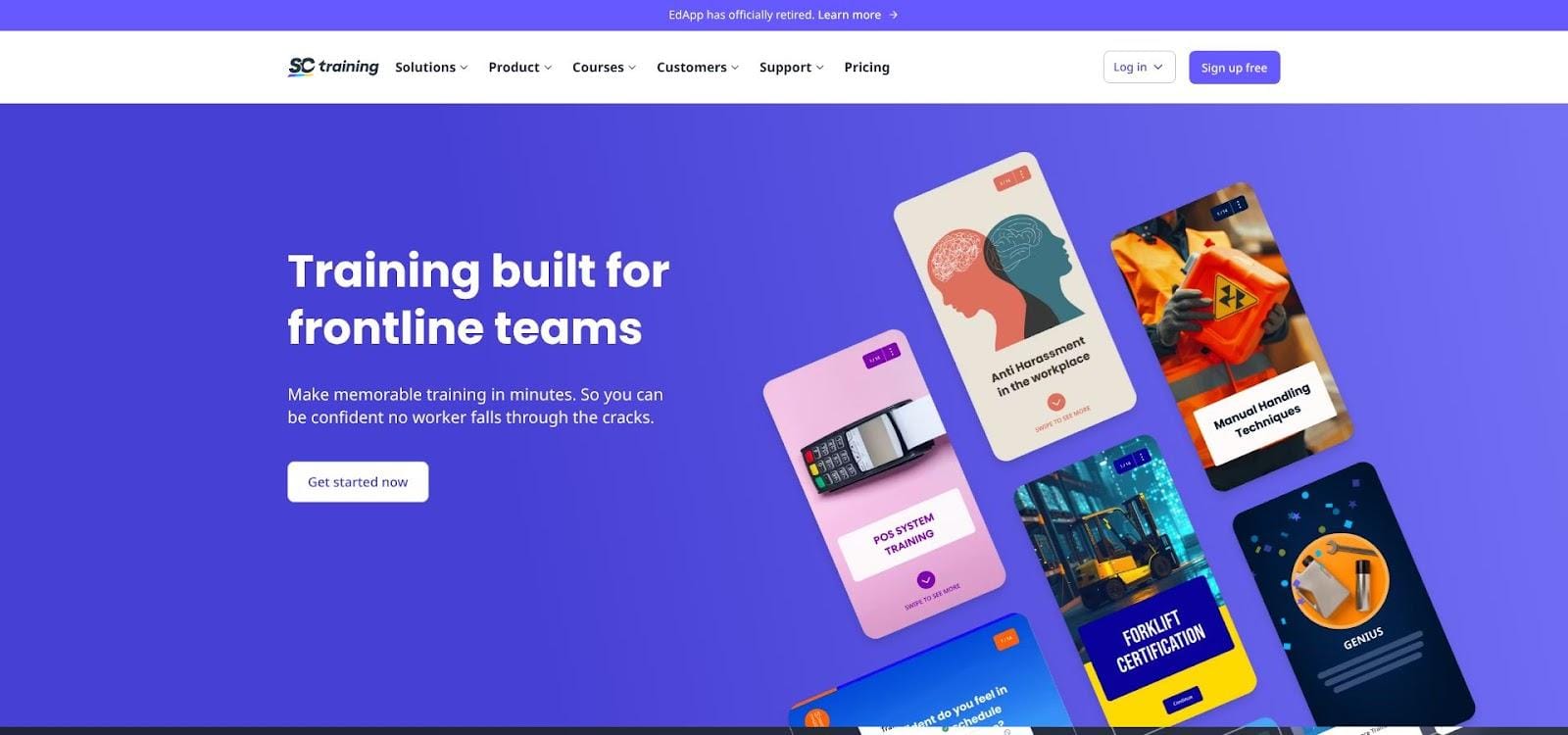
EdApp mobile microlearning and gamified lesson interface
Bite-sized by design
EdApp flips the traditional course model. Instead of 30-minute videos, you build microlessons that learners finish in three to five minutes on their phones. Research suggests microlearning can raise knowledge retention by about 20 percent.
The template gallery feels like Canva for training: swipe cards, image hotspots, matching games, and even elevator-style pitch timers. You focus on content while EdApp handles animation and responsive layouts.
Built-in motivation
Gamification is not an add-on; it is the core loop. Each correct answer awards stars, leaderboards highlight top performers, and a daily “Brain Boost” quiz uses spaced repetition to reinforce memory. Push notifications nudge learners when a new lesson drops, keeping momentum alive without inbox overload.
Teams can redeem earned stars in a prize draw, turning compliance modules into a mini rewards program that resonates with frontline staff who juggle busy shifts.
AI and integrations
EdApp’s AI assistant converts slide decks or SOP documents into mobile lessons. A Canva plug-in pulls brand assets directly into templates, so everything stays on-brand without extra exports.
For oversight, admins drill into per-question analytics or sync completions back to corporate LMSs through SCORM or xAPI exports, proving that microlearning does not mean micro data.
Ideal fit
EdApp shines when your audience is short on time and glued to phones—think retail associates, gig workers, or volunteers unlikely to sit through hour-long webinars. It also serves as a post-course reinforcement tool, dripping mobile refreshers after a flagship program ends.
9. Synthesia: best for fast, multilingual training videos
Synthesia AI text-to-video studio with training avatar
Studio-quality video without cameras
Video remains one of the most effective learning formats, yet filming days, editing suites, and reshoots drain budgets. Synthesia replaces that workflow with an AI text-to-video engine. Write a script, choose an avatar, pick a voice, and generate. In minutes you download a presenter-led lesson that resembles professional studio work.
Need a quick update? Edit the text and regenerate; no lighting reset or makeup call required. That agility matters when product features or compliance rules shift weekly.
Language reach on autopilot
Synthesia speaks more than 120 languages and accents. Copy your English script, click translate, and the same avatar delivers Spanish, Mandarin, or Arabic narration with native lip sync. Many global teams report localization cycles dropping from six weeks to two days, allowing training to ship alongside product launches.
Adding interactivity
Video alone can feel passive. Synthesia’s interactive layer (now in beta) lets you add quizzes or clickable hotspots mid-clip, then export the package as SCORM for any LMS. Combined with analytics, you can see who watches, clicks, and passes, not just who presses play.
Limitations to note
You still need a platform to host or sell the videos. And while avatars look increasingly realistic, some learners prefer seeing the real instructor. Personal-brand courses often mix Synthesia clips with on-camera introductions to maintain authenticity.
Ideal fit
Choose Synthesia when speed, consistency, and multilingual reach matter more than face time. It excels for software walkthroughs, safety briefings, and evergreen FAQ modules that need frequent updates.
How to choose the right tool for your course
A side-by-side table helps, but choices get real when you picture your own learners.
Start by asking two blunt questions.
- Who am I teaching, and where will they learn?
- What level of interactivity will move them from “video watcher” to “skill owner”?
If your audience is an internal team that values quick rollouts and analytics, GoSkills stands out with its free tier and AI Genie. For a solo creator validating a first idea, Thinkific or Teachable remove friction and transaction fees. Need an all-in-one business cockpit? Kajabi’s unified stack pays for itself once you juggle products and funnels.
When content must dazzle, such as compliance simulations or branching debates, pair Articulate 360’s creative power with any SCORM-friendly LMS. For mobile, moment-of-need learning, EdApp’s micro lessons reach phones, not desktops.
Remember, learner activity is the outcome, not a menu item. The best software builds momentum, tracks progress, and updates fast when knowledge changes. Every platform here offers a free plan or trial. Try two, load a sample lesson, and see which one lets you forget the tech and focus on teaching.
Quick-fire FAQ
What is the easiest software to create an online course?
Thinkific and Teachable tie for the simplest launch. Both guide you through setup in minutes and offer free trials so you can test before paying.
Which platform has the best marketing tools built in?
Kajabi leads here. Email automation, funnels, webinars, and a branded mobile app live under one roof, so you rarely need extra subscriptions.
Can I host SCORM or xAPI content on these platforms?
Yes, but only certain ones. GoSkills, LearnWorlds, and most corporate LMSs accept SCORM packages. Articulate 360 creates the packages; it does not host them. Consumer-focused tools like Teachable ignore SCORM.
Is there a truly free way to start?
GoSkills offers a permanent free tier. You trade some advanced branding controls, but you can enroll unlimited students without a credit card.
How do I make my course more sticky regardless of platform?
Keep lessons short, add quizzes every few minutes, and include a community hub for peer support. Interactive video can lift participation more than two-and-a-half times, so use it whenever the platform allows.
Conclusion
Still deciding? Open a free account on two platforms, load one lesson into each, and see which experience feels natural for you and your learners. The right choice often becomes clear after an afternoon of hands-on testing.