If you are looking for ways to spoof your location in Pokémon GO, you have likely heard of PGSharp. While it is one of the most famous tools for virtual movement, recent updates to Niantic’s anti-cheat systems have fundamentally changed how safe it is to use.
What is PGSharp for Pokémon GO? (And Is It Safe?)
Quick Answer:
- What is it: PGSharp is a popular, modified third-party game client for Pokémon GO that includes built-in location spoofing tools like a joystick, teleportation, and auto-walk.
- Is it safe: No. Because it alters the official game code, using PGSharp carries a highly elevated risk of detection, strikes, and permanent account bans under Niantic’s Terms of Service.
- Platform support: PGSharp is designed exclusively for Android devices. There is no official iOS version available.
How PGSharp Works: Core Features and Setup
PGSharp attracts players because it bundles powerful location-spoofing tools directly into the game interface. Once installed, users gain access to a built-in GPS joystick for on-screen movement, a map for teleporting to coordinates worldwide, auto-walk functionality to hatch eggs automatically, and an IV checker to evaluate Pokémon stats before catching them.
To install the app, Android users must bypass the Google Play Store and sideload an APK file downloaded from the developer’s website. While a detailed PGSharp Pokémon GO guide might appeal to those who do not want to root their Android device, it does force you to completely uninstall the official Pokémon GO app first. Furthermore, sideloading unverified applications outside of official app stores always carries general device security cautions, as the software is not vetted by Google Protect.
The Reality of PGSharp Ban Risks and Error 12
The biggest drawback of PGSharp lies in its technical architecture. Because PGSharp is a modified third-party application, it directly alters the official Pokémon GO game code. Niantic’s anti-cheat systems are specifically designed to scan for and detect these unauthorized clients.
Recently, this anti-cheat detection has manifested as the infamous “”Failed to detect location (12)”” message—commonly known as Error 12. This error is currently the biggest friction point for active PGSharp users, effectively blocking them from catching Pokémon, spinning PokéStops, or interacting with the map.
Even if you manage to evade Error 12 temporarily, relying on a modded app frequently triggers cooldown violations, soft bans, and ultimately, permanent account suspension. When Niantic flags a modified client, it does not matter how realistically you play; your account is automatically at risk. For players trying to protect their main accounts, learning about safe GPS spoofing on Android requires moving away from hacked clients entirely.
Warning: There Is No Official PGSharp for iOS
If you are an iPhone user searching for a way to install PGSharp, you need to be extremely careful. The official PGSharp developers have never released an iOS version, and they have explicitly stated that the tool is Android-only.
Any website, YouTube video, or forum claiming to offer a PGSharp for iPhone download is a scam designed to distribute malware, steal credentials, or force you into phishing traps.
Red Flags to Avoid (Fake PGSharp iOS Downloads):
- Human Verification: Sites that require you to fill out surveys or download unrelated apps to “unlock” the PGSharp installer.
- Apple ID Requests: Any tool or configuration profile that asks for your Apple ID, iCloud password, or payment details.
- Fake App Store Profiles: Websites imitating the Apple App Store interface to trick you into downloading malicious Configuration Profiles or tampered IPA files.
Why OS-Level Spoofing is a Safer Alternative
If modified apps like PGSharp are highly risky and entirely unavailable on iOS, what is a safer way to spoof? The answer lies in OS-level tethered spoofing.
Instead of hacking the game client, OS-level tools change the GPS location of your entire smartphone. This crucial technical distinction allows you to play using the official, un-modded Pokémon GO app downloaded directly from the App Store or Google Play. Because the game files remain untouched, it fundamentally lowers the detection risk associated with third-party clients.
For users looking to bypass the iOS restriction or protect their main accounts from modded-app bans, Fonelora Location Changer serves as a definitive, cross-platform alternative to change location in Pokémon GO. While it is important to remember that no location spoofing method is 100% ban-proof, pairing the official game app with an OS-level GPS changer like Fonelora—alongside strict adherence to realistic movement and cooldown rules—offers a much safer architectural category for virtual movement.
PGSharp vs. Fonelora Location Changer
When evaluating your virtual location options, understanding the architectural differences between a modified app and a desktop GPS spoofer is key.
| Criteria | PGSharp | Fonelora Location Changer |
| Platform Support | Android Only | iOS & Android |
| App Architecture | Modified Third-Party Game Client | Desktop Spoofer + Official Game App |
| Ban Risk Level | High (Easily detected by anti-cheat) | Lower (OS-level modification) |
| Core Method | Hacked APK sideloaded on phone | Tethered via Windows / Mac desktop |
| Key Features | Built-in Joystick, Teleport, Auto-walk | Game Mode, GPS Joystick, Multi-Spot Routes, Cooldown Timer |
For players who prioritize account safety or require support for their iPhone, Fonelora Location Changer effectively replaces PGSharp’s most popular features—like joystick control and virtual routing—without forcing you to log into a high-risk modified app.
Fonelora Pokémon GO Spoof Guide: Change GPS Location Safely on iPhone and Android
Switching to a tethered OS-level spoofer is straightforward. Fonelora Location Changer provides a guided desktop workflow that replaces the need for risky sideloaded apps. Here is how you can set it up for your location-based games:
1.Connect Your Device: Launch Fonelora Location Changer on your Windows or Mac computer and connect your iOS or Android device via USB or Wi-Fi.
2.Select Game Mode: Choose “Game Mode” from the interface. This mode is specifically optimized to handle movement seamlessly for location-based games under supported conditions.
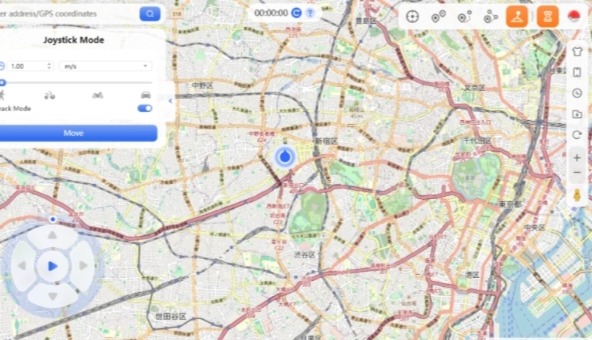
3.Use the GPS Joystick: Select Joystick Mode to gain real-time, 360-degree control over your virtual movement. This matches the beloved PGSharp on-screen joystick experience but runs safely at the OS level.
4.Monitor the Cooldown Timer: Before making any long-distance teleport jumps, check the built-in Cooldown Timer feature. This tool reminds you of the realistic Pokémon GO cooldown rules you must respect to avoid triggering soft bans in the official game app.
Frequently Asked Questions About PGSharp
Is PGSharp safe to use in 2026?
No. PGSharp remains highly risky due to Niantic’s strict, actively enforced policies against modified third-party clients. Using it heavily exposes your main account to detection and bans.
How do I fix Error 12 on PGSharp?
Error 12 (“Failed to detect location”) usually occurs when the game’s anti-cheat blocks the modified client. Fixing it often requires uninstalling PGSharp, downloading the official un-modded Pokémon GO app, and switching to an OS-level desktop location changer.
Do I need to root my Android to use PGSharp?
No, PGSharp does not require a rooted Android device. However, you do have to uninstall the official game and sideload the PGSharp APK, which carries other device security risks.
How does the cooldown timer work when spoofing?
The cooldown timer enforces realistic travel times to prevent soft bans. For example, if you catch a Pokémon in New York and immediately teleport to Tokyo, you must wait a specific number of hours based on the distance before interacting with the game again.
What is the best PGSharp alternative for iOS?
Because PGSharp does not exist for iPhone, the best alternatives are desktop-based iOS GPS spoofer tools like Fonelora Location Changer. They alter your device’s GPS signal while letting you play on the official app, keeping your account much safer.
Final Verdict: Which Location Spoofer Should You Choose?
While PGSharp remains a recognizable name for virtual movement, its Android-only restriction and modified-app architecture make it increasingly dangerous for players who care about their main accounts. The constant threat of Error 12 and permanent account bans significantly outweighs the convenience of a sideloaded app.
If you are playing on an iPhone, or if you simply want to protect your hard-earned progress on Android, opting for an OS-level GPS changer is a much smarter choice. By tethering your device and altering your location at the system level, you can continue using the official game client while enjoying features like GPS joysticks and virtual routes safely.
Ready to take control of your virtual location without the high risks of modded apps? Try Fonelora Location Changer for a guided, feature-rich experience that prioritizes your account’s safety on both iOS and Android.