

Location-based games like Pokémon GO continue to attract millions of active players worldwide. However, gameplay is often limited by real-world location constraints, which has led many users to explore how to spoof location in Pokémon GO.
In the past, most methods required advanced system changes such as jailbreaking or rooting devices. In 2026, however, safer Pokémon GO spoofer have become more widely adopted, offering Pokémon GO spoofing without jailbreak or root.
Understanding Pokémon GO Spoofing
In simple terms, Pokémon GO spoofing refers to changing a device’s GPS location to simulate being in a different place within the game. This allows players to access region-exclusive Pokémon, join remote raids, and explore different in-game locations without physically traveling.
Most players achieve this through a GPS spoofing app, which modifies location data temporarily or continuously depending on the tool used.
Why Jailbreak and Root Methods Are No Longer Ideal
Traditional spoofing techniques relied on deep system access through jailbreak (iOS) or root (Android). While powerful, these methods introduce several drawbacks:
- Reduced device security
- System instability and update issues
- Higher detection probability in games
- Compatibility limitations with newer OS versions
As a result, most players prefer no-modification solutions that operate externally rather than altering system files.
Best Safe Method for Pokémon GO Spoofing in 2026
One of the best Pokémon GO spoofer that is commonly used is PoKeep Location Changer, a PC-based location simulation tool designed to work without jailbreak or root access. Instead of modifying system files, it operates through controlled GPS simulation, allowing users to adjust their location while maintaining device integrity.
Key Features of PoKeep Location Changer
PoKeep Location Changer includes several features designed for stable and controlled location simulation:
- GPS Location Simulation Without System Modification
Allows users to change location without jailbreaking or rooting their device, maintaining system stability.
- Multi-Point Route Movement
Enables users to create custom movement paths that simulate realistic walking or traveling behavior.
- Adjustable Movement Speed
Users can simulate walking, cycling, or driving speeds depending on gameplay needs.
- Location Search and Instant Selection
Players can quickly select and search any global location for exploration or gameplay purposes.
- Compatibility with Location-Based Apps
Designed to support multiple location-based applications, including gaming like Pokémon GO and other social, dating, and GPS tracking apps.
How to Spoof Pokémon GO with PoKeep Location Changer
Using PoKeep Location Changer is straightforward and designed for general users. The typical process includes the following steps:
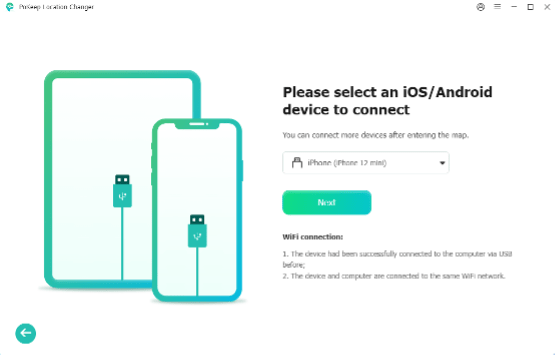
Step 1: Install PoKeep on Your Computer and Connect Your Device
Download and install the software on a compatible Windows or macOS system. Use a USB cable to connect your iPhone or Android device to the computer and allow necessary permissions.
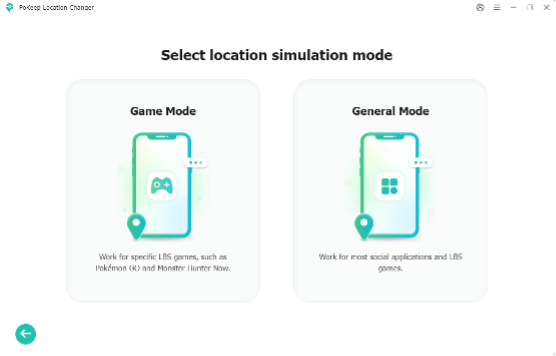
Step 2: Choose a Mode
Enable developer mode and complete the setup according to the on-screen guide. Then select Game Mode.
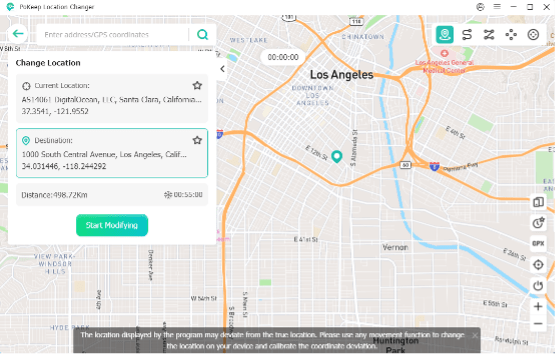
Step 3: Select a Location
After entering the map, search for a desired location or click directly on the built-in map. Then click Start Modifying to change your GPS location.
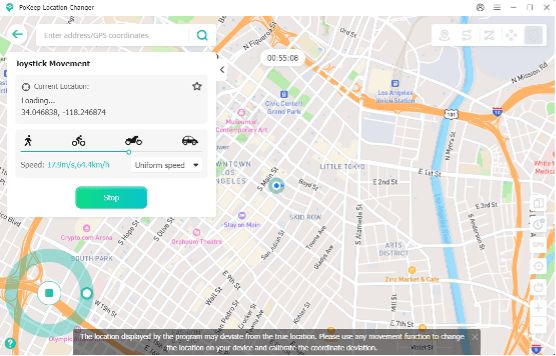
Step 4: Start Pokémon GO Spoofing
Launch Pokémon GO to verify the updated in-game location. Then switch to movement mode to custom routes and speeds. Or use joystick mode for free control.
In addition to location-based gameplay, many Pokémon GO players also use a Pokémon GO IV calculator to evaluate the potential strength of caught Pokémon. This can help players make more informed decisions about which Pokémon are worth keeping or powering up.
Keeping Safe Gameplay Behavior When Spoofing in Pokémon Go
Even when using advanced tools, user behavior plays a critical role in maintaining account safety. The game’s detection systems are heavily influenced by movement consistency.
Recommended practices include:
- Avoid instant long-distance jumps: Sudden location changes across countries can trigger detection.
- Use realistic movement speeds: Stick to normal walking or bicycling speeds.
- Respect cooldown times: Wait before catching Pokémon or spinning PokéStops after moving.
- Stay in one area longer: Frequent location switching increases risk.
- Play naturally: Mimic real player behavior with consistent actions.
- Use a stable tool only: Avoid combining multiple spoofing methods; tools like PoKeep Location Changer are designed for controlled simulation.
These habits help reduce detection risk more effectively than tool selection alone.
FAQ
- Is Pokémon GO spoofing still working in 2026?
Yes, location simulation methods still exist in 2026, but their effectiveness depends on how they are used.
- Can I spoof Pokémon GO without jailbreak or root?
Yes. Modern solutions like PoKeep run on a computer and connect to your mobile device to simulate GPS movement in a controlled way.
- What is the best way to avoid getting banned while spoofing?
The most important factor is behavior consistency. Even when using a stable tool like PoKeep Location Changer, users should avoid frequent teleporting, maintain realistic movement speeds, and keep gameplay patterns natural to reduce detection risks.
Conclusion: How to Spoof Pokémon GO Safely
Pokémon GO location spoofing has evolved significantly over the years. How to spoof Pokémon GO safely is attracting increasing attention. Tools like PoKeep Location Changer allow users to explore location-based gameplay in a safer and more beginner-friendly way. Although no method is completely risk-free, understanding movement behavior, using stable tools, and avoiding unnatural gameplay patterns can greatly improve safety.