If you’re serious about going viral on social media, you already know that the best AI video generator can make all the difference in producing standout short‑form videos for platforms like TikTok and Instagram Reels. Whether you want a free AI TikTok video generator or a tool that delivers professional quality clips with minimal effort, today’s AI options can drastically cut down your production time while boosting engagement.
In this article, we’ll explore what creators need to consider when choosing an AI video tool, break down the top 5 AI video generators I’ve used personally, and help you decide which is the best fit for your content goals.
What Are the Top 5 AI Video Generators for TikTok and Instagram?
After personally testing multiple options, I’ve put together a hands-on comparison of AI video generator tools, based on real usage, output quality, and ease of creating short-form content.
1. Pollo AI
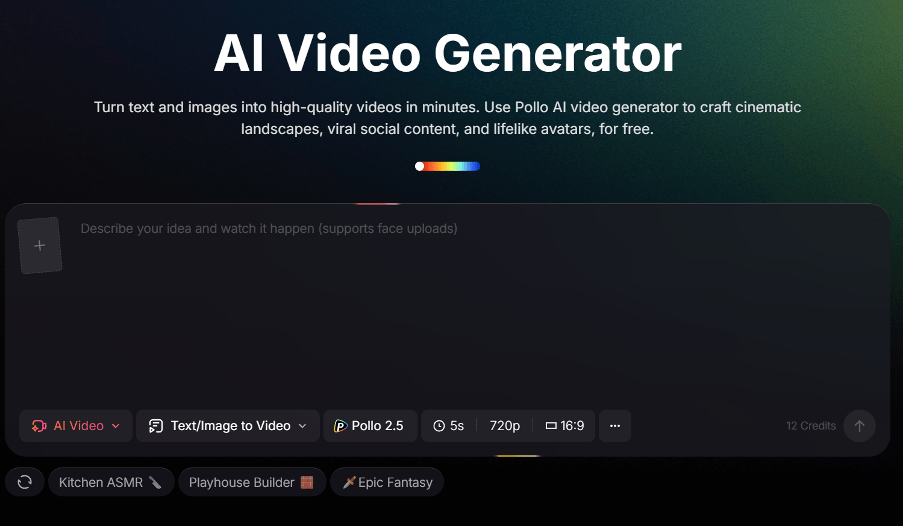
I’ve been relying on Pollo AI consistently for my social media content, and it quickly became my go-to Sora alternative. What makes it stand out is how seamless the workflow feels: I type a description of the scene, upload images, or even start from an existing video, and within moments, I have a vertical clip ready to post. Every transition feels smooth, and the motion—even small gestures like breathing—feels natural. I especially love testing different AI models in one session to find the perfect style, whether cinematic, stylized, or playful.
Why it wins for me: Multi-model flexibility, trend-aware templates, and cross-platform parity let me create polished videos anywhere—on web, iOS, or Android.
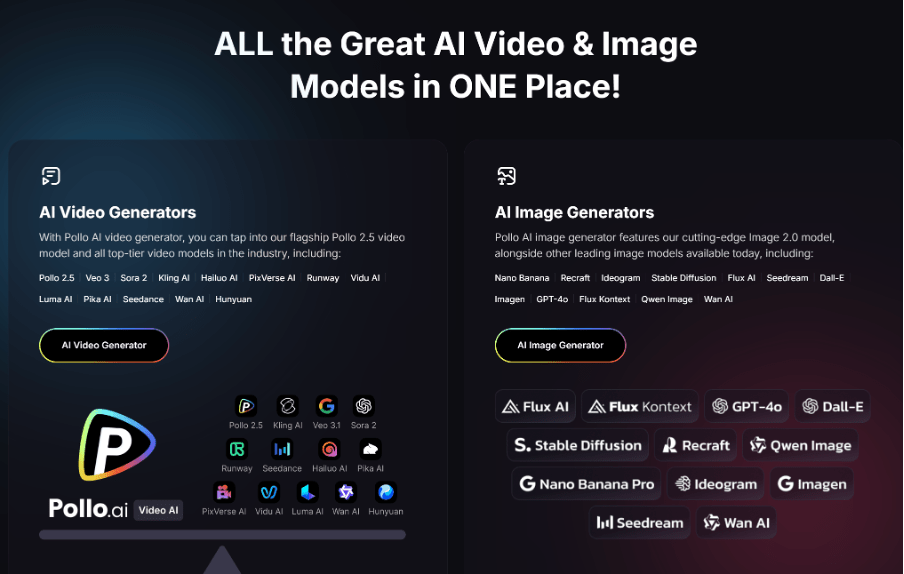
Pros: Fast results (often under a minute), no timeline editing required, handles text-to-video, image-to-video, and character animation, built-in music and effects.
Cons: Advanced cinematic scenes have less customization than dedicated pro tools.
Ease of Use: ⭐⭐⭐⭐⭐
Best For: Beginners to professionals
2. CapCut
For me, CapCut is the ultimate mobile companion, especially when I’m posting directly from my phone. Vertical templates, trending effects, and auto-captioning make it effortless to produce clips that feel native to TikTok and Instagram Reels. While it’s more of an AI-assisted editor than a full text-to-video generator, I found its speed and intuitiveness perfect for rapid posting and viral content experiments.
Why it works: Being mobile-first and tied to TikTok’s ecosystem ensures my videos are optimized for engagement and discoverability.
Pros: Completely free, frequent updates, auto captions, trend-aware effects, quick publishing.
Cons: Limited as a full text-to-video generator.
Ease of Use: ⭐⭐⭐⭐⭐
Best For: Quick mobile editing
Platforms: iOS & Android
3. Kling AI
Kling AI impressed me with its level of detail in motion and scene consistency. When I generated a long walking sequence, the character’s coordination felt remarkably real—the hands, body, and even small gestures matched naturally from frame to frame. Unlike simpler tools, Kling lets me craft multi-shot sequences with precise scene transitions, making it ideal for storytelling or cinematic narratives.
Why it wins: Deep creative freedom and natural motion make it feel like a professional studio in my browser.
Pros: Powerful prompt responsiveness, better motion coherence for long-form content.
Cons: Slightly steeper learning curve, free access can be limited.
Ease of Use: ⭐⭐⭐
Best For: Experienced creators
Platforms: Web
4. Runway Gen‑3 Alpha
When I needed cinematic control, Runway Gen‑3 Alpha was my choice. Its camera angle manipulation, frame-level edits, and layered visuals made me feel like a director, with AI handling the heavy lifting. It’s more complex than Pollo AI, but the output is precise and professional. For narrative clips, ads, or multi-shot storytelling, it delivered visuals I couldn’t achieve elsewhere.
Why it stands out: The combination of AI-assisted generation and granular manual control lets me push creative boundaries without compromising quality.
Pros: Excellent for sophisticated visuals, layered narratives, professional-grade output.
Cons: Requires time to learn, not beginner-friendly.
Ease of Use: ⭐⭐⭐⭐
Best For: Pros & advanced users
Platforms: Web
5. Pika Art
I found Pika Art perfect for bold, eye-catching clips. Its stylized approach makes videos pop in feeds, especially when I want something visually playful or trend-driven. The generation is fast, and tweaking individual segments is surprisingly easy, letting me experiment without regenerating entire videos. It’s not as cinematic as Runway or Pollo AI, but for creative niches, it shines.
Why I like it: Rapid iteration, physics-aware effects, and visually striking output make it ideal for fun, shareable content.
Pros: Fast generation, trend-styled visuals, flexible editing of segments.
Cons: Less control over fine cinematic details.
Ease of Use: ⭐⭐⭐⭐
Best For: Creative niches, stylized content
Platforms: Web
What Should We Consider When Choosing an AI Video Generator?
Choosing the right AI generator isn’t just about raw output quality — it’s about matching the tool to your workflow and content goals.
Here are the key factors you should weigh:
1. Ease of Use
If you want speed over complexity, tools like CapCut and Pollo AI are ideal. If you enjoy creative control, Runway or Kling AI may serve you better.
2. Free vs Paid Features
Many platforms offer a free tier, but they may limit export quality, duration, or trends. Always test the free version first (especially for free AI TikTok video generator options) to see if it fits your needs.
3. Output Quality & Style
Some tools prioritize hyper‑real visuals, others focus on fun stylistic output, and some lean towards professional edits. Consider what fits your brand aesthetic.
4. Platform Support
Mobile‑first tools like CapCut are great for on‑the‑go editing. Web‑based generations like Pollo AI offer more power.
FAQs
Q: What is an AI video generator for TikTok and Instagram?
A: It’s a tool that uses artificial intelligence to turn text prompts, images, or scripts into short‑form videos ready for social platforms. Many include automatic captions, music choice, and vertical formatting.
Q: Can I find a free AI TikTok video generator?
A: Yes — some tools like CapCut and other online generators offer free plans, though they may have limits on duration and quality.
Q: Do these tools require technical skills?
A: Most beginner‑oriented tools (like Pollo AI) are very intuitive. Some advanced platforms may need time to master for fine‑tuned control.
Q: How long can AI videos be?
A: Duration varies across platforms. Many generators focus on short clips (~15–60 seconds) that fit TikTok/Reels formats.
Q: Will AI‑generated content get flagged on TikTok/Instagram?
A: Social platforms increasingly label AI‑generated content. Make sure to follow guidelines and tag your content appropriately.
The Bottom Line
Choosing the best AI video generator for TikTok and Instagram comes down to your specific goals: ease of use, output style, mobile workflows, and the tools’ creative power. Tools like Pollo AI and CapCut are excellent starting points if you want to create high‑quality content fast, while Kling AI and Runway Gen‑3 Alpha are better for advanced creative projects.
No matter what you choose, integrating AI into your short‑form video production will help you stay ahead of trends, save time, and grow your presence faster — and the tools we covered are some of the best ones available today.