
AI image tools are often discussed as generators, but many real content teams need something more specific: revision. They already have a product photo, blog image, profile picture, event shot, or campaign concept. The job is to change the background, explore a style, improve consistency, or create a variation without starting over.
That is where image-to-image workflows become useful. They are also easy to misuse. If the source image is weak, the prompt is vague, or the output is not reviewed carefully, the result can look polished while still failing the brief.
For creators, marketers, and small businesses, the practical approach is to treat image-to-image AI as an editing workflow, not a magic shortcut.
Check The Source Image First
The uploaded image sets the limits of the revision. A blurry product shot, awkward crop, mixed lighting, or cluttered background may lead to a weak result even with a strong prompt. Before using any AI editing tool, teams should inspect the source image like an editor would.
Ask these questions:
- Is the subject clear?
- Is the crop usable for the final format?
- Are there logos, private details, or people who should not be included?
- Is the lighting consistent enough to support a realistic edit?
- Does the image have permission for the intended use?
If the answer is no, fix the source image or choose another one. AI can help with variation, but it should not become a cover for poor input discipline.
Match The Model To The Task
Model names can be useful, but they are not a substitute for workflow testing. A team should ask what kind of task it is running: text-to-image concepting, background replacement, product-image variation, portrait refresh, or image expansion. Each task has different failure modes.
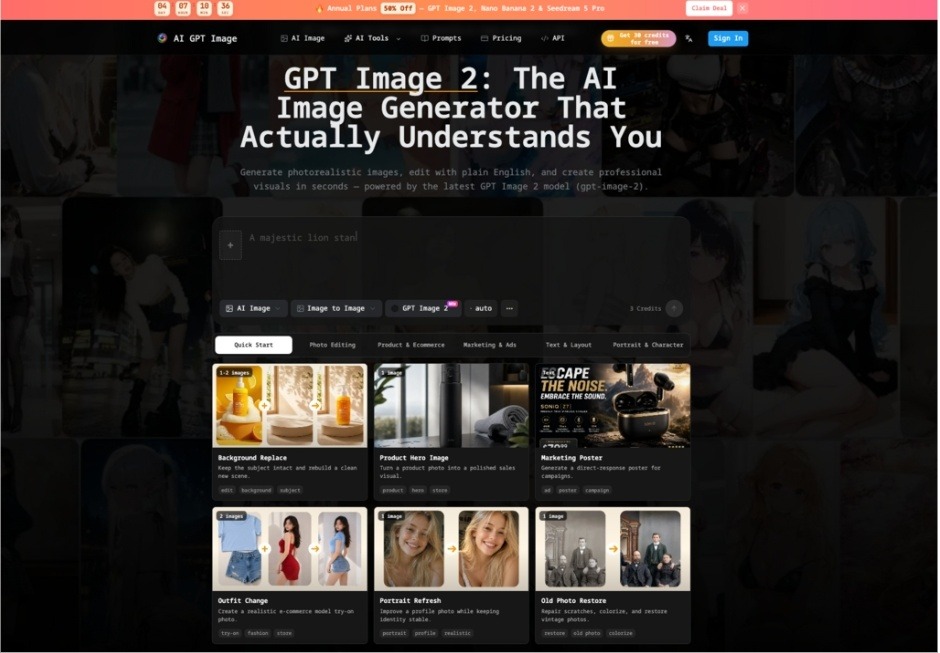
A workspace presenting GPT image 2 can be evaluated by looking at visible controls such as prompt fields, image modes, aspect ratios, resolution settings, and credit labels. The practical question is whether the interface gives the team enough control to define the job and enough context to review the result.
Avoid judging a tool only by gallery samples. A sample image may be impressive, but the real test is whether the workflow handles the team’s actual source images and publishing formats.
Write The Edit As A Specific Instruction
A weak prompt says “make this better.” A useful prompt explains what should change and what must stay the same.
For example:
Replace the background with a clean modern office setting. Keep the product shape, label position, color, and lighting direction unchanged. Do not add text, logos, hands, or extra products. Preserve a natural shadow under the product.
That prompt creates review criteria. The editor can check whether the product stayed consistent, whether the background changed correctly, and whether unwanted elements appeared.
Use Upload-Driven Editing For Controlled Variations
The strongest use cases for image to image AI usually begin with a clear source image and a narrow transformation request. A content team might use it to test a seasonal background, clean up a product scene, create a blog-header variation, or adapt a campaign concept for a different aspect ratio.
The key is to keep the transformation bounded. If the goal is a product hero image, the product should remain recognizable. If the goal is a portrait refresh, identity-sensitive edits need special care. If the goal is a social graphic, the team should check how the output crops on mobile.
The workflow should produce candidates, not automatic final assets.
Track Credits And Iterations
AI editing is iterative. One generation may reveal that the prompt is too broad. Another may fix the background but introduce fake text. A third may improve composition but change the subject too much.
That means cost and time should be tracked. Even when a platform offers welcome credits or visible credit labels, teams should still record how many attempts it takes to reach an acceptable draft. A tool that looks cheap for one image may become less efficient if it requires repeated cleanup.
Track simple metrics:
- number of generations per accepted asset;
- common reasons for rejection;
- average review time;
- types of edits that work reliably;
- types of edits that should go back to a human designer.
This helps teams decide where AI editing belongs in the content pipeline.
Review For Publishing Risks
AI-generated edits can introduce details that are easy to miss. Before publishing, inspect the output for:
- fake or misspelled text;
- invented labels;
- distorted product shapes;
- changed logos or packaging;
- unrealistic shadows;
- faces or hands that look wrong;
- background details that imply a location or claim;
- visual changes that misrepresent the product or service.
For marketing assets, the review should include brand, legal, and content stakeholders when necessary. For editorial assets, the question is whether the image helps the reader understand the topic without misleading them.
Keep A Human Finish Step
The most reliable image-to-image process ends with human judgment. That may mean cropping, compressing, adjusting contrast, removing a flawed candidate, or sending the asset to a designer for final polish. The AI step should make the workflow faster, not remove accountability.
A simple production checklist can keep the process grounded:
- Choose a source image with permission.
- Define one edit at a time.
- Preserve the subject when required.
- Avoid private data, logos, and sensitive claims.
- Track credits and rejected outputs.
- Review the final image in the actual publishing layout.
- Keep a record of the prompt, date, and reviewer.
Image-to-image AI is useful when it helps teams make controlled, reviewable revisions. It is risky when it turns into vague visual experimentation with no source-image rules and no approval step. The difference is not the tool alone. It is the workflow around it.