
AI creative workflow platforms are changing campaign production by helping teams move from idea to publish-ready assets in a shorter, more connected process. Instead of treating image generation, video creation, audio, mockups and design review as separate jobs, teams can now bring more of that work into one coordinated production environment.
For marketing teams, agencies and growing companies, that matters because campaign speed has become a business requirement. Audiences move quickly, product updates happen often and every channel needs fresh creative in different sizes, formats and tones. The old model of waiting on disconnected tools, file exports and manual version tracking is becoming harder to defend.
The real value of AI is not only that it creates assets faster. It is that it can reduce the friction between briefing, creation, editing, review and delivery.
Why campaign production is becoming harder to manage
Campaign production used to be more linear. A team planned the message, requested visuals, reviewed the first draft, made revisions and prepared final files for publishing. That process still exists, but the number of required assets has grown.
A single product launch may now need ad creatives, social posts, landing page visuals, product mockups, short video clips, email banners, thumbnails, audio snippets and localized variations. Each format has its own rules. A square social post does not behave like a mobile video. A product mockup needs different quality checks than a blog header. A paid ad creative needs stricter review than an internal concept board.
This creates operational pressure. Teams are not only making more content; they are also managing more versions, more approvals and more asset dependencies. When tools are scattered, the production workflow becomes harder to track.
That is why many teams are looking at AI not as a novelty, but as a practical way to organize creative work around campaign outcomes.
What an AI creative workflow platform does
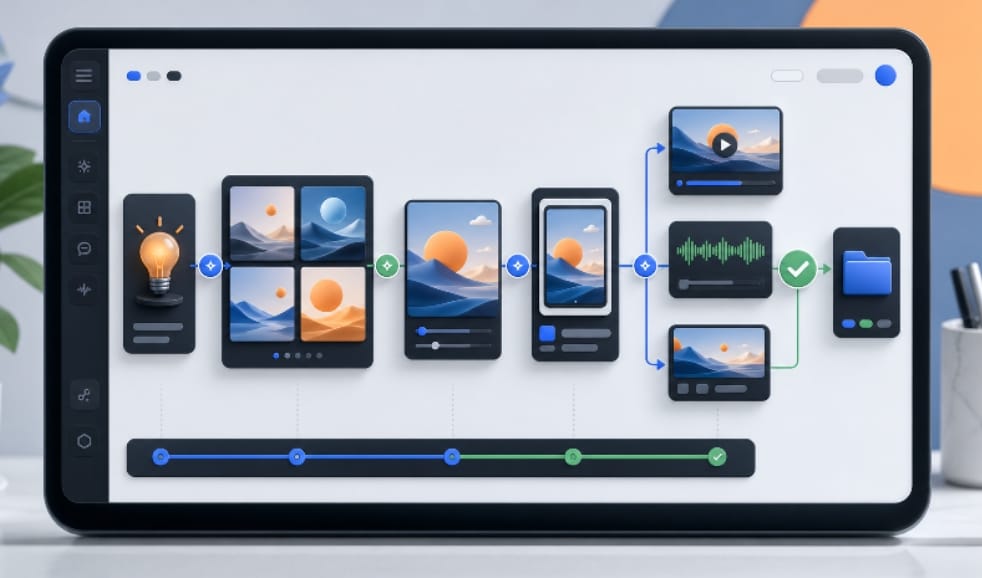
An AI creative workflow platform brings multiple creative tasks into a shared workspace. It can help teams generate campaign visuals, edit images, upscale assets, create mockups, test video concepts, manage audio ideas and prepare files for review.
The difference between a platform and a single-purpose tool is coordination. A standalone generator may create one image. A workflow platform helps the team understand where that image belongs, what needs to happen next and whether the asset is ready for campaign use.
For example, a team might start with an idea for a product launch. It can generate several visual directions, refine one concept, remove or replace a background, create a mockup, adapt the design for social formats and then send the strongest version into review. The work stays connected to the campaign instead of becoming a folder full of unrelated files.
This is where an AI creative workflow platform can support teams that need both speed and control. The goal is not just to produce more creative output. The goal is to make the production process easier to manage.
How AI changes the creative production cycle
AI changes campaign production by shortening the distance between a brief and a usable draft. That does not remove strategy or human judgment. It changes where people spend their time.
Instead of waiting for one concept before giving feedback, teams can compare several visual directions earlier. Instead of asking a designer to manually create every version from scratch, they can use AI to prepare starting points and then refine the strongest options. Instead of rebuilding assets for each channel, teams can adapt approved ideas into multiple formats faster.
This creates a more iterative production cycle. Teams can test, review and improve creative assets while the campaign is still being shaped. That is especially useful for startups, ecommerce teams and agencies that need to respond to market changes quickly.
The result is not automatic creativity. The result is faster decision-making. AI produces options, but people still decide which option fits the audience, offer and brand.
Why connected workflows are better than scattered tools
Using separate tools for every creative task can work at a small scale, but it becomes inefficient as the campaign grows. A team might generate images in one app, edit them in another, make mockups somewhere else, track feedback in a chat thread and store final files in a shared drive.
That system is familiar, but it creates hidden costs. Files get duplicated. Version names become confusing. Review comments are separated from the asset itself. A small change in one format may not be reflected in the rest of the campaign.
Connected workflows reduce that friction. When creative tasks sit closer together, a team can keep the campaign structure visible. It becomes easier to see what has been generated, what has been approved and what still needs refinement.
For teams exploring broader production capabilities, an AI tools suite for creative production can help connect image, video, audio, mockup and editing workflows in one place rather than forcing every task into a different app.
Where AI fits into image, video and audio asset creation
 Images are often the first place teams notice the benefit of AI. A product idea, campaign mood or visual concept can be explored quickly before a final design direction is chosen. This helps teams avoid committing too early to one concept.
Video is another important area. Many campaigns now need motion assets for short-form platforms, paid social, product explainers and launch teasers. AI can help teams test the movement, pacing and visual direction before investing in a fully produced video.
Audio also matters more than many teams expect. Background music, voice direction, sound cues and short audio concepts can influence how a campaign feels. When audio is managed alongside image and video ideas, the creative direction becomes more complete.
The strongest workflow is not one where AI handles every decision. It is one where AI helps teams build a fuller campaign system faster, then human reviewers decide what is accurate, brand-safe and ready to publish.
Review and brand control still matter
Fast production can create problems if review is weak. AI-generated assets still need to be checked for accuracy, consistency, rights, quality and brand fit.
Product images should not misrepresent the product. Text in visuals should be reviewed carefully. People, objects and backgrounds should make sense for the target market. Campaign claims should match what the business can actually deliver. Brand colors, tone and design standards should be checked before publishing.
This is why human-led AI matters. The team should treat AI as a production accelerator, not an approval authority. The platform can help produce and organize assets, but final responsibility still belongs to the people managing the campaign.
Strong review also helps teams learn. When reviewers approve one direction and reject another, that feedback can shape future prompts, templates and production standards.
How growing teams can adopt AI creative workflows
Teams do not need to rebuild their entire creative operation at once. A practical starting point is to choose one campaign workflow that already causes delays.
For example, a team might begin with social ad variations, product mockups, landing page images or campaign thumbnails. Once that workflow is smoother, it can expand AI support into additional formats such as video concepts, audio ideas or brand template variations.
The adoption process should include clear rules. Teams should define who can generate assets, who can approve them, where final files are stored and what quality checks are required before publishing. Without those rules, AI can increase output while making the workflow messier.
Good implementation combines speed with governance. The point is not to create as many assets as possible. The point is to create the right assets faster, with enough control to use them confidently.
What this means for the future of campaign production
Campaign production is moving toward connected, AI-assisted systems. The teams that benefit most will not be the ones that replace creative judgment with automation. They will be the ones that use AI to remove repetitive work, explore more options and keep the campaign process better organized.
For publishers, startups, agencies and technology companies, the shift is already visible. Creative production is becoming closer to software workflow management: faster iterations, clearer asset states, structured review and reusable systems.
That does not make creativity less human. It makes the operational side of creativity more manageable.
As AI creative workflow platforms mature, the winning teams will be those that combine automation with taste, strategy and review. Speed will matter, but control will matter just as much.
FAQs
What is an AI creative workflow platform?
An AI creative workflow platform is software that helps teams generate, edit, review and manage creative assets such as images, video, audio, mockups and design variations in one connected workspace.
How does AI help campaign production?
AI helps campaign production by creating faster first drafts, generating asset variations, supporting edits and reducing repetitive production work. Human teams still guide the message, quality and final approval.
Are AI creative tools only for large companies?
No. Startups, agencies, ecommerce brands and small marketing teams can also use AI creative tools to produce campaign assets faster, especially when they have limited design or production capacity.
Can AI replace creative teams?
AI should not replace creative teams. It works best as a production assistant that helps people explore options, refine assets and manage workflows while humans make strategic and brand decisions.
What should teams check before publishing AI-generated assets?
Teams should check accuracy, brand consistency, usage rights, visual quality, mobile readability and whether the asset matches the campaign goal. Fast output still needs careful review.