Erase Tool, which helps simplify the process of removing passcodes on supported devices. Whether you’re working on modern iPhones or managing a professional repair business, understanding DFU-based tools can enhance your efficiency and save time.
What Is a DFU Passcode Erase Tool?
A DFU PASSCODE erase tool is a solution, either hardware- or software-based, used for compatible iPhone models that require passcode removal during authorized repairs. It works by putting the device into Device Firmware Update (DFU) mode, allowing technicians to interact with the device at a lower system level. Unlike regular recovery mode, DFU mode offers more access for firmware-related operations.
Repair professionals commonly use these tools when restoring supported devices or preparing them for legitimate service procedures. Many technicians pair these tools with a Pwned DFU Mode Adapter to make entering specialized DFU states faster and more reliable during repairs.
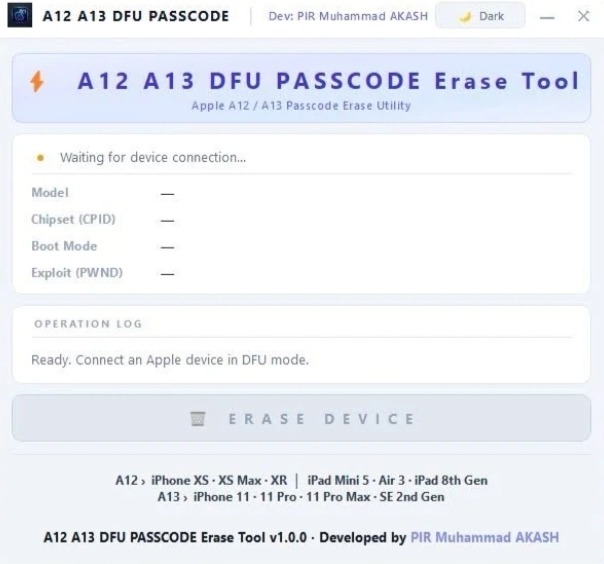
The A12 and A13 DFU PASSCODE erase tool
is specifically developed for devices equipped with Apple’s A12 and A13 chipsets.
Common supported devices may include:
- iPhone XR
- iPhone XS and XS Max
- iPhone 11 series
- iPhone SE (2nd Generation)
Compatibility depends on the specific tool version and firmware support, so technicians should always verify supported models before use.
Why Technicians Use a PwnDfu Mode Tool
A PwnDfu mode tool helps put supported devices into a modified DFU state required for certain repair processes. For repair professionals, this process reduces manual effort and increases consistency during service.
Some key advantages include the following:
- Faster repair preparation
- Improved workflow efficiency
- Stable communication with supported devices
- Reduced chances of manual DFU timing errors
Many repair shops also combine the tool with an auto-DFU cable for iPhone, which automatically assists devices in entering DFU mode without requiring complicated button combinations.
The Importance of a DFU Adapter for Passcode Erase
A DFU adapter for PASSCODE Erase acts as a hardware bridge between the repair computer and the iPhone. It simplifies the DFU process and improves reliability during maintenance procedures.
Benefits include:
- Stable USB communication
- Faster device detection
- Simplified repair workflow
- Reduced risk of failed DFU entry
Professional technicians often prefer using dedicated adapters because they save time when servicing multiple devices throughout the day.
Choosing the Right Accessories
The effectiveness of any DFU repair solution depends not only on the software but also on the quality of the supporting accessories.
When selecting repair equipment, consider:
- Device compatibility
- Build quality
- Firmware update support
- Reliable USB connection
Ease of use in busy repair environments
Using quality accessories such as a Pwned DFU Mode Adapter and an Auto DFU Cable for an iPhone can significantly improve repair efficiency and reduce repeated setup attempts.
Best Practices for Safe Operation
Before using any DFU-related repair equipment, technicians should follow professional repair standards.
Recommended practices include:
- Confirm device compatibility
- Back up customer data whenever possible
- Use updated repair software
- Inspect cables and adapters before each repair.
- Follow manufacturer instructions carefully.
- Perform repairs only on devices you are authorized to service
Proper handling reduces errors and helps maintain consistent repair results.
FAQs
- What is a DFU passcode erase tool?
It is a repair tool that helps technicians perform DFU-based service procedures on supported iPhones.
- What does the A12, A13 DFU PASSCODE Erase Tool support?
It is designed for compatible iPhones with A12 and A13 chips, depending on the tool version.
- What is a PwnDfu mode tool used for?
It helps place supported iPhones into PwnDFU mode for advanced repair tasks.
- Why use a DFU adapter for PASSCODE erase?
It provides a more stable connection and makes entering DFU mode easier.
Conclusion
A reliable DFU PASSCODE erase tool, along with an A12/A13 DFU PASSCODE erase tool, a dependable PwnDfu mode tool, and a professional DFU adapter for PASSCODE erase, can streamline authorized repair workflows and improve technician efficiency.
Equipping your workspace with trusted accessories like a Pwned DFU Mode Adapter and an Auto DFU Cable for iPhone further enhances the repair process by making DFU entry faster, more stable, and more convenient.