AI tools are becoming part of everyday ecommerce operations, but the best results come from using them inside a clear workflow. Product pages need images that explain the product, reduce uncertainty, and fit the buyer journey. For jewelry sellers, that can be difficult because each item is small, reflective, and strongly affected by scale and styling context.
A practical AI image workflow helps ecommerce teams move from one source product photo to a complete set of product-page assets. The result is not just more images. It is a more structured way to create visuals for product pages, marketplace listings, ads, and email campaigns.
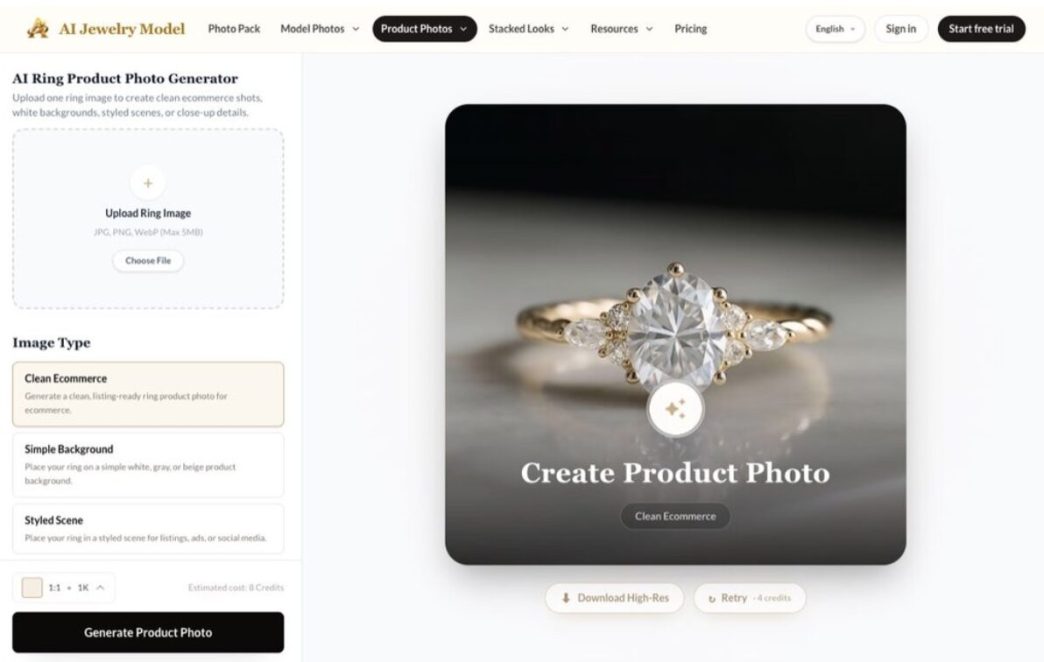
Desktop view of a ring product photo workflow for creating ecommerce-ready product images.
Why generic image generation is not enough
A generic image generator can create attractive visuals, but ecommerce product pages need a stronger operational standard. The image must match the item being sold. It must support the page layout. It must avoid adding details that are not part of the real product. It also needs to work across different placements, from product thumbnails to close-up detail sections.
This is why AI image production should be treated as a system. The system starts with inputs, defines output roles, runs generation, applies review, and then publishes only the assets that pass quality control.
The four-part AI product image system
A small ecommerce team can build a useful system around four stages.
1. Input preparation
The product photo should clearly show the jewelry item. Before using AI, remove unnecessary confusion from the source image. Make sure the main product shape, stones, chain, clasp, and material are visible enough to compare with the generated output.
2. Output planning
Each image should have a purpose. A clean product image is different from a model try-on. A close-up image is different from a lifestyle image. Planning these roles before generation helps the team avoid random outputs.
3. Category-specific generation
Jewelry categories need different visual logic. Rings need hand context. Necklaces need neckline placement. Earrings need ear scale and face framing. Bracelets need wrist context. Tools built around jewelry workflows can support these category needs more directly than broad prompt-based generation.
4. Review and publishing
After generation, the team should review each image against the product record. The goal is to approve only images that are useful, accurate, and suitable for the channel where they will appear.
How vertical AI tools fit ecommerce operations
Vertical AI tools are designed around a narrower use case. For jewelry ecommerce, that can mean workflows for product photos, model photos, listing packs, and styled looks. A focused tool can reduce the amount of manual prompt engineering because the product category is already part of the workflow.
One example is AI Jewelry Model, which is built for jewelry sellers who need listing-ready model photos and product images. The value of this type of tool is not only image generation. It is the ability to structure product imagery around real ecommerce needs, such as scale, detail, catalog consistency, and campaign variation.
A product-page image map for jewelry sellers
The following map can help sellers decide which visual to create for each page section.
| Page section | Recommended image type | Main purpose |
| Product grid | Clean product or model hero | Earn the click and show the item clearly |
| Product detail hero | High-quality product or model image | Set the first impression |
| Gallery slot 2 | Model try-on | Show scale and wearability |
| Gallery slot 3 | Close-up detail | Support inspection and trust |
| Campaign section | Lifestyle or styled image | Connect the product with a mood or occasion |
Implementation checklist
- Create a repeatable visual brief for each jewelry category.
- Keep the original product photo as the accuracy reference.
- Use model images to answer scale questions, not just for decoration.
- Review generated images before publishing them to a live product page.
- Track which image roles are missing for each product launch.
Frequently asked questions
Should ecommerce teams use AI for every product image?
No. AI is most useful for expanding a product gallery, creating model context, and testing visual variations. The original product image and product data should remain the source of truth for accuracy.
What makes jewelry a strong use case for AI product imagery?
Jewelry needs multiple visual angles because shoppers care about scale, detail, shine, fit, and styling context. AI can help create those support visuals faster, as long as each output is reviewed before publication.
Conclusion
AI tools for ecommerce product pages work best when they are connected to a defined production system. For jewelry sellers, that means planning image roles, using category-aware generation, checking product accuracy, and publishing a consistent gallery that helps shoppers make a confident decision.