
Many iPhone players face the same challenge when playing Pokémon GO:
They want to participate in exclusive events from around the world, discover Pokémon in different regions, access popular Pokémon GO coordinates, or experience location-based content from other areas. However, changing GPS location on iOS has traditionally required complicated setups and technical steps.
Previously, many Pokémon GO spoofer iOS solutions required jailbreak, modified Pokémon GO apps, complex setups, and faced compatibility issues.
Now, with the launch of iToolab AnyGo iOS Native Mode, iPhone users can change their GPS location in a simpler way while continuing to use the official Pokémon GO App.
What Is iToolab AnyGo Native Mode?
iToolab AnyGo is a GPS location changer that supports both iOS and Android. The new Native Mode is designed specifically for iPhone users, allowing players to change their device GPS location without installing a Modified version of Pokémon GO, greatly reducing the risk of getting banned.
With Native Mode, you can:
✅ No Jailbreak required
✅ No need to install a modified Pokémon GO
✅ Use the official Pokémon GO App
✅ Support GPS location changes and movement simulation
✅ Quickly change your iPhone GPS location
✅ Support various location-based applications
How to Use iToolab AnyGo iOS Native Mode
Step 1: Install iToolab AnyGo and Select Native Mode
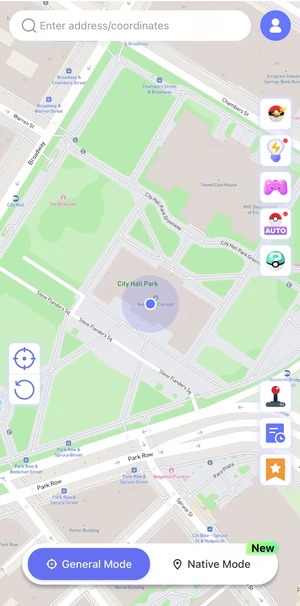
Install iToolab AnyGo location changer iOS APP and choose:Native Mode
After entering Native Mode, follow the instructions in the App to complete the initial setup.
Step 2: Select the Target Location
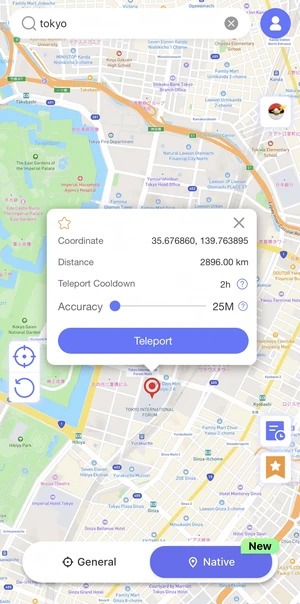
Search City name/Address/GPS coordinates or directly click the target location on the map, then click:Teleport.
Step 3: Complete iPhone Configuration
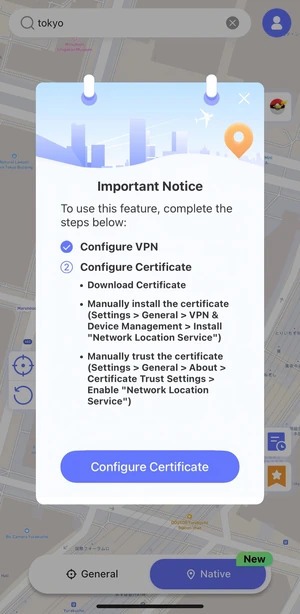
When using Native Mode for the first time, you need to complete the related configuration according to the instructions:
- Download the required configuration according to the App guide
- Complete the necessary permissions in iPhone Settings
- Start using the virtual location feature after completing the setup
After the first setup is completed, changing locations will become more convenient in the future.
General Mode (Classic Mode): More Advanced Pokémon GO Features
In addition to the new Native Mode, iToolab AnyGo also provides the classic General Mode.
General Mode not only allows users to change locations but also provides more Pokémon GO assistance features, giving players a more complete exploration experience.
✅ One-click teleport to anywhere in the world
✅ Joystick control for realistic movement
✅ Create custom routes and simulate walking
✅ Adjust movement speed
✅ Import GPX routes
✅ Save route history
✅ Auto Catch to improve exploration efficiency
✅ Pokémon GO Assistant Features:
Auto Hatch, Enhanced Throw, Auto Raid, Auto Team Battle, Fast Spin, Skip Animation, IV Checker, and Enhanced Radius.
FAQ
Q1: Does Native Mode require jailbreak?
No. AnyGo Native Mode allows you to change GPS location on iPhone without Jailbreak.
Q2: Do I need to download a modified Pokémon GO?
No. You can continue using the official Pokémon GO App.
Q3: Is the setup complicated?
The first time you use it, you only need to follow the instructions inside the AnyGo App to complete the configuration. After that, you can change locations more conveniently.
Q4: What is the difference between Native Mode and General Mode?
Native Mode mainly provides a simple and fast location-changing experience.
General Mode provides more advanced features, such as joystick control, route simulation, and Pokémon GO Assistant.
Conclusion
Whether you prefer the simple location-changing experience of Native Mode or the advanced Pokémon GO features of General Mode, iToolab AnyGo provides a more flexible way to explore the Pokémon GO world.
As a reliable Pokémon GO spoofer solution, AnyGo makes it easier for players to enjoy a more flexible gaming experience and explore new possibilities in Pokémon GO.