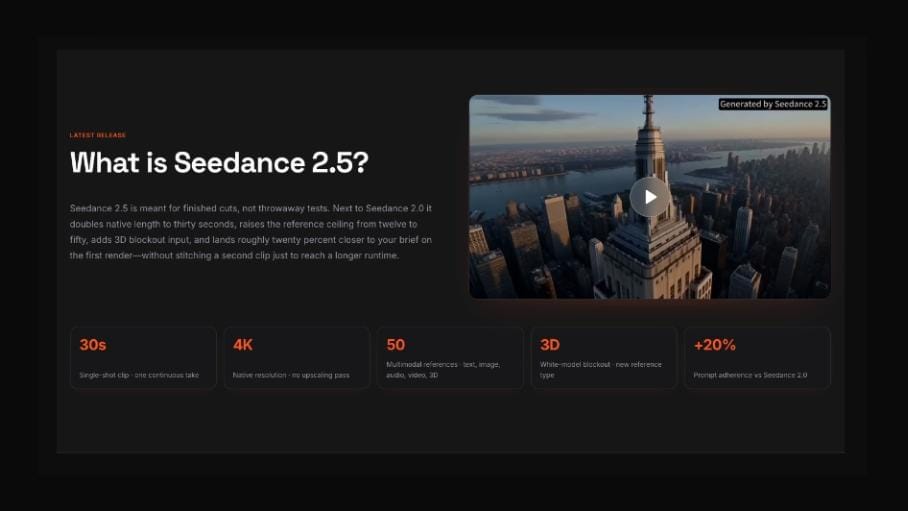
Seedance 2.5 is drawing attention before wider availability because creators are looking for AI video tools that can move beyond short experiments. The useful question now is not only what the model may offer, but how teams should prepare to evaluate it.
AI video has moved quickly from novelty clips to practical creative work. A year ago, many people were testing whether a prompt could produce a few seconds of motion. Now the conversation is different. Creators want clips that can support campaign drafts, product videos, social edits, music visuals, explainers and early storyboards.
That is why interest around Seedance 2.5 is building ahead of wider availability. The model is being watched as part of a broader shift toward longer, more controllable and more reference-aware AI video workflows. For creators, marketers and small production teams, the smartest move is to prepare a clear testing plan before launch excitement makes everything feel urgent.
Why Seedance 2.5 Is Getting Attention Before Launch
The early interest is easy to understand. Most AI video tools can now produce clips that look impressive at first glance. The harder challenge is making those clips useful in normal creative work. A video draft needs to hold a visual idea, follow a direction, respect reference materials and leave room for editing.
Creators are watching Seedance 2.5 because it appears to sit in that practical part of the market. Instead of focusing only on one-off prompt results, the discussion around the model has centered on stronger creative control, image-to-video workflows, better scene direction and outputs that may be easier to review inside a real production process.
Until official details are fully confirmed, creators should treat specific performance claims as areas to watch rather than guaranteed outcomes. That still leaves plenty to prepare. A good pre-launch plan can make the first round of testing more useful.
What Creators Should Watch for First
The first thing to review is not the most cinematic sample. It is consistency. If a character, product or environment changes too much during a clip, the result becomes difficult to use. This is especially important for brand content, product explainers and any video that needs to be revised later.
The second area is motion. A generated clip can feel dynamic but still be hard to edit if the camera moves too quickly, the subject drifts, or the final seconds do not land cleanly. Useful motion should support the story, not distract from it.
The third area is reference control. Many creators will want to guide AI video with images, screenshots, style frames or existing assets. A model becomes more useful when those references help shape the final clip without being ignored or distorted.
Availability: What to Prepare Before Access Expands
Pre-launch content can easily become too speculative, so it is better to focus on preparation. Creators do not need final access details to organize a useful test kit. They can prepare real assets now: a product image, a short script, a style reference, a vertical video concept and one longer scene idea.
Those materials will make early evaluation more honest. If the first tests use random prompts, the results may look fun but say little about whether the tool fits a workflow. If the first tests use real creative tasks, teams can judge the model against actual needs.
A creator preparing for Seedance 2.5 availability should also decide what success means. Is the goal to create faster social drafts? Build better product visuals? Turn still images into motion? Explore storyboards? The clearer the goal, the easier it is to evaluate the tool when broader access is available.
What Could Be New for Everyday Workflows
The most important change in AI video is not simply higher visual quality. It is workflow fit. Creators want to move from idea to draft without losing control over the scene. They also want outputs that can be edited, reviewed and improved.
If Seedance 2.5 strengthens longer generation, image-to-video control and reference-guided creation, the benefit would be practical. A marketer could test multiple versions of a product clip before sending anything to production. A creator could turn a visual concept into a draft for social content. A small team could explore campaign ideas without waiting for a full video shoot.
That does not remove the creative process. It changes where the work happens. Instead of spending all the early time building a first draft manually, teams may spend more time directing, comparing and refining generated drafts.
A Pre-Launch Checklist for Creators
Before using Seedance 2.5 for serious work, creators can prepare a simple checklist:
- Choose one real use case, such as a product teaser, explainer, creator clip or campaign draft.
- Prepare reference images or style frames that clearly define the desired look.
- Write prompts that describe motion, camera behavior and scene purpose, not only mood.
- Decide how the output will be edited, cropped or published.
- Review each result for consistency, motion, clarity and usable ending frames.
- Save prompts and notes so successful results can be repeated or improved.
Why the First Tests Should Be Practical
It is tempting to start with broad prompts because they are quick. But practical prompts reveal more. A product video, a short educational clip or a brand scene will show whether the model can follow direction, preserve important details and produce something that can be used beyond a demo.
Creators should also compare outputs across formats. A clip that works on a desktop preview may not work in a vertical social post. A scene that looks good without captions may become crowded once text is added. These small checks matter because most AI video eventually has to live on a real platform.
Final Thoughts
Seedance 2.5 is arriving at a moment when creators want AI video tools to become more useful, not just more impressive. The strongest pre-launch approach is to prepare real assets, define real use cases and review early results with a practical eye.
For teams watching the AI video space, the question is not whether a new model can generate motion. The better question is whether it can help creators build drafts that are clear, controllable and ready to move into a real editing workflow.