Missing out on losing JPEG or JPG photos is one of those things that can definitely make you panic at once, especially if it happened because you deleted them by mistake, changed the SD card, or the system crash made them disappear. It’s often about memories so it might seem that by losing them, you are closing that chapter.
In fact, most of the time, the files are not gone for good. Deleted files still “live” on a storage device until new data is written over them. Simply put, the original JPEGs still exist on a physical level and, in general, are able to be recovered if the right kind of software is used.
Here we reveal our picks for the top 5 best JPEG recovery software of 2026 based on hands-on testing, which would help you recover your photos safely and effectively.
Quick Comparison Table
| Software Name | Best For | Ease of Use | Free Trial Allowance | Supported OS |
| EaseUS Data Recovery Wizard | Best overall / all-rounder JPEG recovery | Very easy | Up to 2 GB free recovery (Windows only, with trial) | Windows, macOS |
| Recuva | Budget Windows users | Easy | Unlimited recovery (free version available) | Windows |
| PhotoRec | Tech-savvy users / 100% free recovery | Difficult | 100% free, no limits | Windows, macOS, Linux |
| Stellar Photo Recovery | Corrupted or broken JPEGs | Easy | Free scan + preview, no free full recovery (paid required) | Windows, macOS |
| Disk Drill | Best modern UI / beginners | Very easy | Up to 500 MB free recovery (Windows) / 100 MB (Mac) | Windows, macOS |
Top 5 Best JPEG Recovery Software (Core Reviews)
1. EaseUS Data Recovery Wizard (Best Overall Choice)
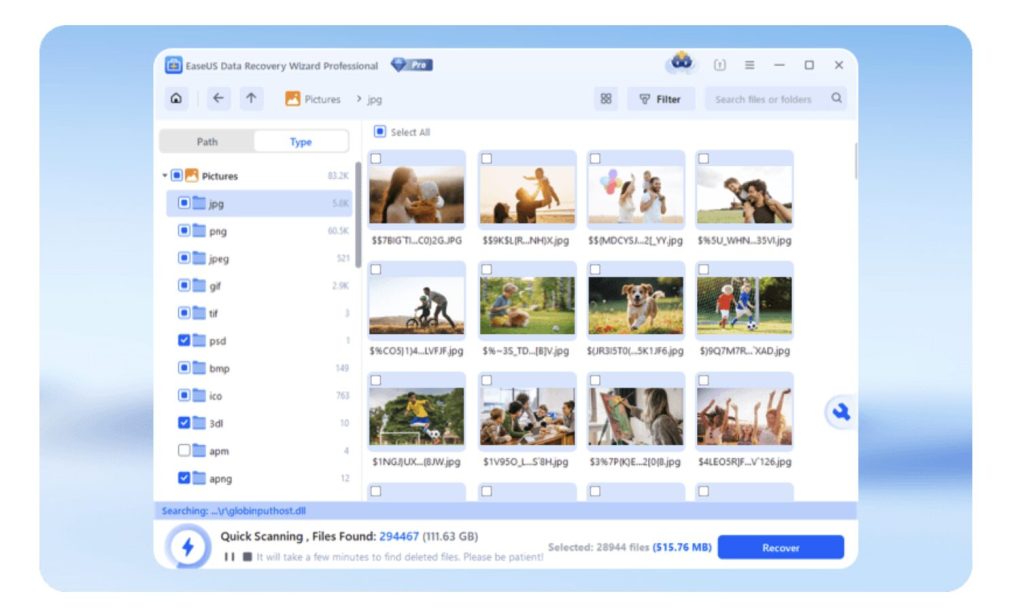
EaseUS Data Recovery Wizard is an excellent program in terms of effectiveness and simplicity that helps you recover deleted, formatted, or simply lost JPEG photos just through several steps.
Key Features
- It can be used to recover files that were deleted, formatted, lost in a system crash, or when a virus attack happened.
- A very thorough scan will show even the most difficult to recover and hidden image files.
- It is possible to check the image before it is recovered.
- Recover JPG and JPEG images from memory cards, USB sticks, HDDs, and SSDs.
- Supports more than 1,000 file formats, such as images, videos, and documents.
- Compatible with Windows and macOS.
Pros
- Very easy to use with a simple 3-step recovery process
- High success rate for photo recovery
- Supports a wide range of storage devices and file formats
- Free trial available to scan and preview files
Cons
- Full recovery requires paid version
- Deep scan can take time for large drives
2. Recuva (Best Budget / Free Option for Windows)
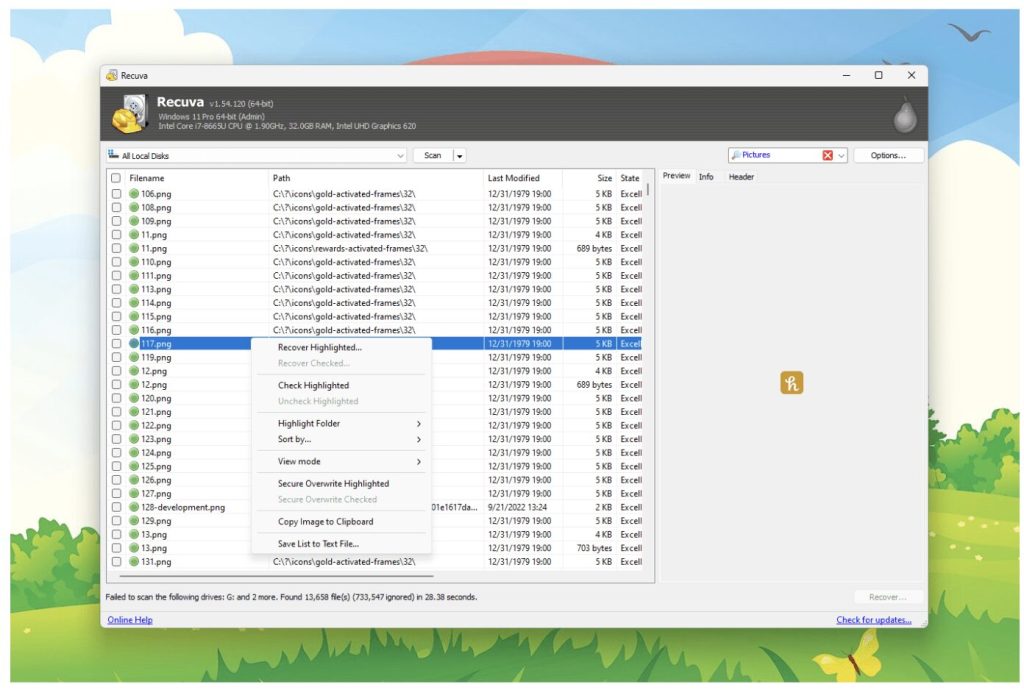
Recuva is a very compact, simple, and easy-to-use file recovery tool for Windows users. It was built to recover deleted JPEG/JPG images with utmost speed and simplicity. In fact, it is a device that most users will consider because of its no-cost option without a series of complicated setup steps.
Key Features
- Recovers deleted JPEG/JPG photos from your computer, Recycle Bin, SD cards, USB drives, and external drives.
- Deep scan mode to find even the toughest or permanently deleted photos
- Recover files from formatted or damaged storage devices
- Able to recover photos, videos, documents, music, and emails
- “Wizard mode” for an easy step-by-step recovery process
- Secure overwrite function to permanently delete sensitive files
- Compatible with all major Windows versions
Pros
- Completely free version available
- Very easy to use, even for beginners
- Fast scanning for recently deleted files
- Good recovery results for basic file loss cases
Cons
- Limited advanced features compared to premium tools
- Lower success rate for heavily corrupted or deeply overwritten data
3. PhotoRec (Best Open-Source & 100% Free Tool)
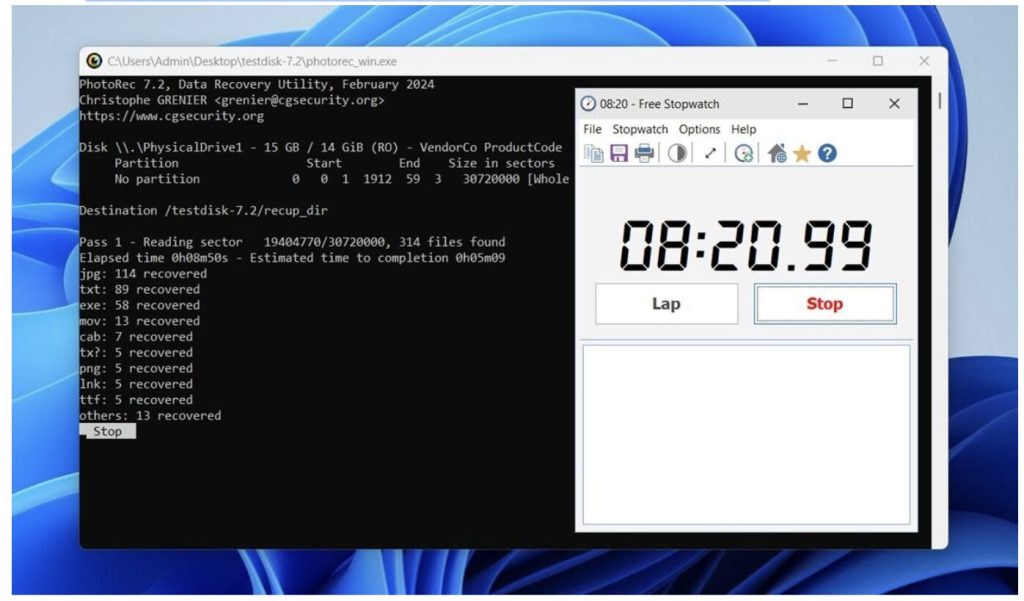
PhotoRec is a recovery software that is 100% free and open-source and that mainly focuses on getting back lost photos and other files from the storage devices that are damaged, formatted, or corrupted. Although the software looks quite technical compared to most of its competitors, it unlocks serious file recovery potential without you paying a dime.
Key Features
- Free and open source with no limitation on the number of recoveries
- Photo recovery of JPEG/JPG, video, document, archive and above 480 types of files
- Inclusive operation in case of file system damaged, corrupted or reformatted
- Recovery is supported by various devices such as HDDs, SSDs, SD cards, USB drives, CDs and camera memory cards
- File signature scanning method is used to recover lost JPEG photos by accessing storage sectors directly
- Non-destructive recovery process that minimizes the risk of data overwriting
- Multi-platform compatibility with several major operating systems
- File system compatibility includes FAT, NTFS, exFAT, ext2/ext3/ext4, and HFS+
Pros
- 100% free with no hidden restrictions
- Excellent recovery performance on formatted and damaged drives
- Supports a wide range of operating systems and storage devices
- Safe read-only recovery process
Cons
- Interface is not beginner-friendly
- Recovered files may lose original file names and folder structure
4. Stellar Photo Recovery (Best for Corrupted Image Repair)
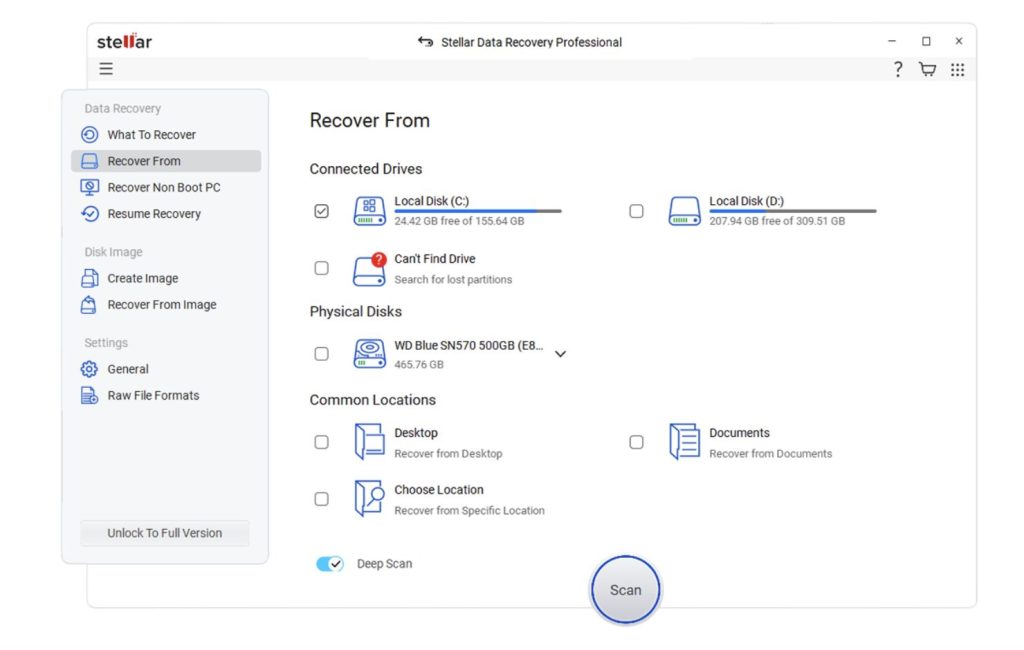
Stellar Photo Recovery is a perfect fit for professional photographers as well as regular users. What sets it apart is the 2-in-1 Recover + Repair feature that allows you not only to recover but also repair your images which have been damaged or corrupted.
Key Features
- Restore deleted photos in JPEG, JPG, PNG, RAW, TIFF, and other formats
- Recover photos from SD cards, microSD cards, USB drives, HDDs, SSDs, and digital cameras
- Repair corrupted or damaged JPEG files using the built-in photo repair feature
- Restore photos deleted due to accidental deletion, formatting, corruption, or system error
- Work with RAW image formats from DSLR and mirrorless cameras
- Check photos prior to recovery to ensure recovery suitability
- Recover photos, videos, and audio files from a single scan
- Compatible with both Windows and macOS
- Simple interface that even beginners can use, but also suits professionals
- The list of camera brands supported includes, among others, Canon, Nikon, Sony, GoPro, and Fujifilm
Pros
- Excellent JPEG and photo recovery performance
- Can repair corrupted photos during or after recovery
- Strong support for professional camera RAW formats
- Easy-to-use interface with preview functionality
Cons
- More expensive than some competitors
5. Disk Drill (Best for Modern User Experience)
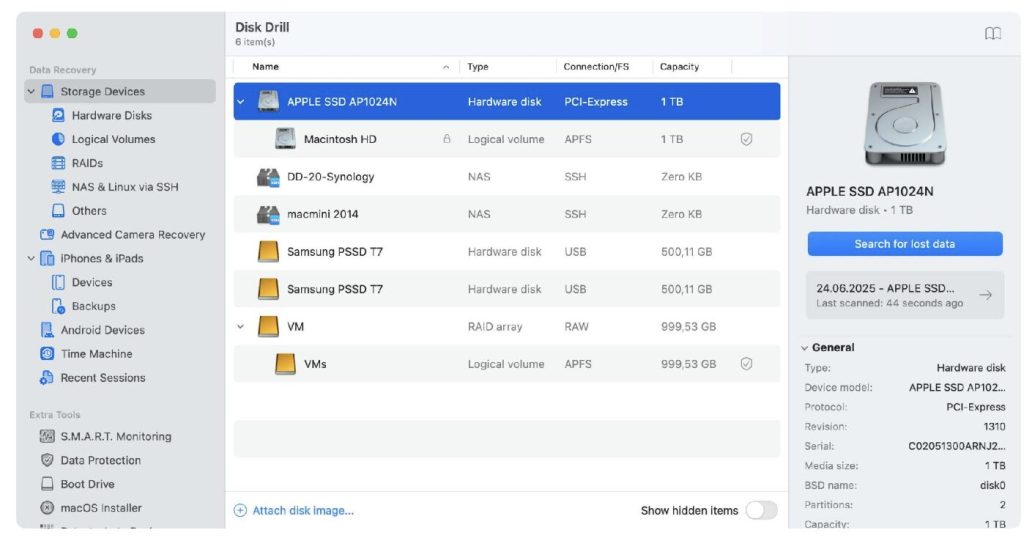
Besides having excellent photo recovery capabilities, Disk Drill is also very pretty and easy-to-use software at the same time. The program walks the inexperienced user through the photo recovery process, which is pretty straightforward for JPEG, on the other hand, it also features advanced tools that an experienced user will probably be pleased to find.
Key Features
- Deleted JPEG/JPG photo recovery from PCs, SSDs, HDDs, SD cards, USB drives, cameras, and RAID arrays
- Besides photo files, the software supports more than 400 file formats for recovery, including videos, documents, and archives.
- Recovered images can be previewed prior to restoration
- The Recovery chance indicator is a handy tool to locate the files with the highest probability of successful recovery
- The deep scan feature can handle formatted, corrupted, RAW, and even inaccessible drives
- Recovery Vault is a safety net against accidental file deletion
- Byte-level backup makes it possible to generate entire disk images before recovery
Pros
- Modern and intuitive interface
- Excellent photo preview and file filtering tools
- Strong recovery performance on memory cards and external drives
- Includes useful data protection features not found in many competitors
Cons
- The free version has a 100 MB recovery limit on Windows
How to Choose the Right JPEG Recovery Software
It is a fact that not all JPEG recovery tools are the same. To achieve the best results, it is important that you review the features of a tool first before you decide on one.
Recovery rate and scanning technology
The best recovery tools provide scanning options that are quick and deep. The deep scan feature is required as it can look through the storage sectors at a more detailed level and retrieve JPEG files that were eliminated a long time ago, lost after the formatting of the disk, or hidden due to damage to the file system.
Preview capabilities
Be sure the software you pick comes with the option to preview JPEG photos before recovery. With this feature, you can verify that the image is restorable.
Cost vs. value
Tools that are free, such as PhotoRec and Recuva, are suitable for the most basic recovery operations and last-time photo loss. On the other hand, premium programs like EaseUS Data Recovery Wizard and Disk Drill generally have better recovery rates.
Repair vs. recovery
Another factor to consider is whether your photos are missing or damaged. The main function of recovery software is to locate and bring back JPEG files that have been lost. On the other hand, if the recovered images are corrupted, only partially visible, or will not open, you might have to use a tool that has photo repair functions. This is the area in which EaseUS Data Recovery Wizard excels, as it can recover and repair damaged JPEG/JPG photos during recovery.
3 Golden Rules to Increase JPEG Recovery Success Rates (Pro Tips)
Unfortunately, even the best photo recovery programs will fail in recovering images that have been overwritten. That said, simply adhering to some of these easy steps could drastically increase your successful image recovery rates.
Rule #1: Immediately stop using the device
When you discover your JPEG files have disappeared, you must immediately cease using the storage device. File transfers can overwrite the storage.
Rule #2: Don’t ever install the recovery program on the same drive
Don’t download or install a recovery program onto the same drive that needs scanning. Fresh installations of software result in additional data being written on the disk, which might surface changes to previously deleted JPEG files.
Rule #3: Always store restored files somewhere else
During your photo recovery operation, do not save the restored photos to the same disk from where they were recovered. You must always select a different external drive, a USB stick, or any other storage location.
FAQs
Is it possible to recover permanently deleted JPEG files?
It really depends. Usually, if the area where the file was saved has not been used to store new data, then using recovery software, you can still restore permanently deleted JPEG files.
What causes my recovered JPEG files to be corrupted or half-grey?
Such a situation may arise if the file’s segments have been overwritten or data was saved in a fragmented manner from the start. Hence, only fragments of the picture can be restored.
Are there any completely free JPEG recovery programs that really work?
Yes, there are. Among the free tools, EaseUS offers a free trial that lets you scan and preview recoverable JPEG files. For full recovery, EaseUS Data Recovery Wizard provides a more reliable and higher success rate compared to basic free tools.
Conclusion
Losing JPEG photos is quite annoying. But usually, these photos can still be recovered if you don’t delay and pick the right software. Which software you choose will largely decide how many files you will really be able to recover.
After reviewing many different alternatives, EaseUS Data Recovery Wizard stands out as the most reliable one. It gives great recovery performance, supports a wide range of devices, and can even help when JPEG files are corrupted or damaged to some extent. It’s simple-to-use interface will make the process of recovering photos very straightforward, even for those new to the software.