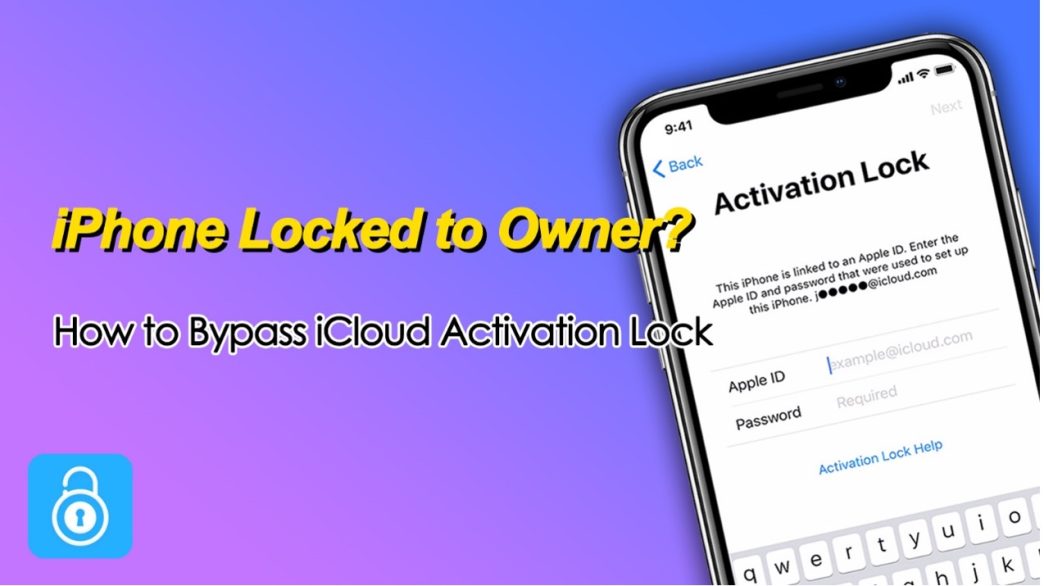
An iPhone showing “Locked to Owner” usually means the device is protected by iCloud Activation Lock, a security feature that links it to the original Apple ID. While this protection is designed to keep devices secure, it can also leave legitimate users stuck when the original account isn’t available.
In this guide, I’ll walk through several practical ways about how to bypass iCloud Activation Lock, from official options to professional iPhone Unlocker tools, so you can regain access to your iPhone and get it working again.
Why Does the iCloud Activation Lock Appear?
iCloud Activation Lock is part of Find My iPhone, automatically enabled when a device is linked to an Apple ID. Its main purpose is to ensure that only the rightful owner can access or reset the device.
Here are the most common scenarios where Activation Lock appears:
- iPhone locked to owner after factory reset without signing out of iCloud
- The device is lost or stolen and still linked to the original owner
- You purchased a second-hand iPhone that wasn’t properly removed from the previous owner’s account
- The Apple ID or password has been forgotten
Once activated, the iPhone requires the original Apple ID credentials before it can be used again.
Method 1: How to Bypass iCloud Activation Lock If Forgot Apple ID Password
If you forgot Apple ID password, you can still regain access by resetting it and then using the updated credentials to remove the Activation Lock. This is the safest and most official approach when dealing with a locked iPhone.
Steps using another Apple device:
- On another device, visit the Apple ID account page
- Click “Forgot Apple ID or password” and enter your Apple ID account
- Follow the prompts to reset your password via email, security questions, or two-factor authentication
- Once the password is reset, return to your iPhone. Enter the updated Apple ID and new password to unlock the device
Steps using iforgot.apple.com:
- Open a browser and go to the Apple password recovery page
- Enter your Apple ID email address and the characters shown on the screen
- Click Continue and choose a verification method: receive a code on your trusted phone number or answer security questions (if set up). Enter the verification code or complete the required verification
- Create a new Apple ID password
- Go back to your locked iPhone and enter the updated Apple ID and password on the Activation Lock screen. Finish setting up your device
This method keeps your device fully functional and avoids any restrictions, making it the most recommended solution if you still have access to your Apple ID account.
Method 2: Remove iCloud Activation Lock with a Professional iPhone Unlocking Tool (Most Effective)
When the Apple ID credentials are unavailable, a dedicated unlocking tool like TunesKit iPhone Unlocker can be a practical alternative. TunesKit iPhone Unlocker is designed to help users remove various iOS locks, including Activation Lock, screen passcodes, and MDM restrictions.
Why choose TunesKit iPhone Unlocker?
- Remove iCloud Activation Lock without the original Apple ID
- Allows users to unlock iPhone is disabled, iPhone passcode not working, iPhone unresponsive easily
- Fast unlocking process with a high success rate
- Supports the latest iOS versions and compatible with a wide range of iPhone/iPad models
- Simple, user-friendly interface with guided on-screen instructions
- Bypass screen lock, Screen Time passcode, and remove MDM from iPhone
- Ensures data security during the unlocking process
Steps to bypass iCloud Activation Lock with TunesKit iPhone Unlocker:
- Launch the program and connect your device
Download and install TunesKit iPhone Unlocker on your computer. Open the program and connect your iPhone using a USB cable.
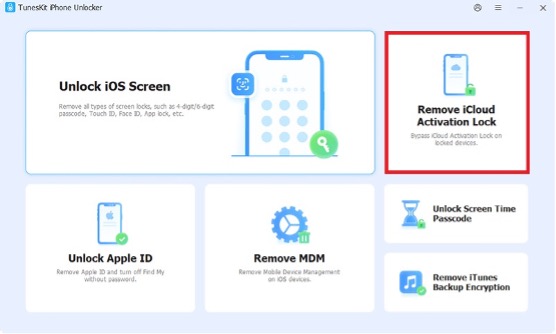
- Select “Remove iCloud Activation Lock”
From the main interface, choose the Remove iCloud Activation Lock option to proceed.
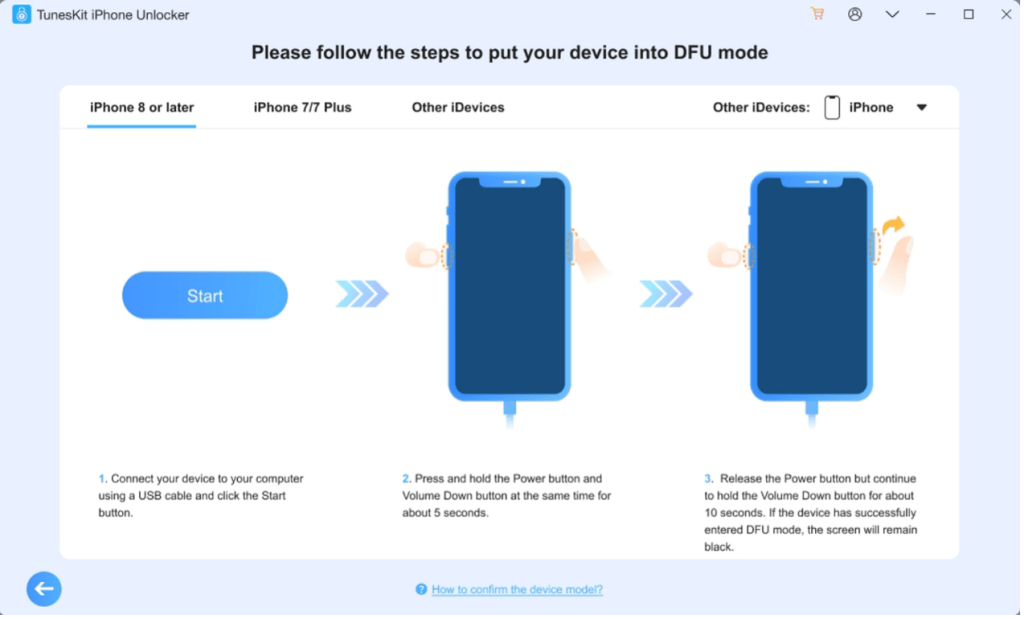
- Enter DFU mode
Click the Start button. Your device will first enter Recovery Mode. Follow the on-screen instructions to manually put your iPhone into DFU mode. Once done, the jailbreak process will begin.
- Begin removing the iCloud lock
Click Start Remove and repeat the DFU mode steps if prompted. TunesKit will automatically start removing the Activation Lock from your device. Keep your iPhone connected throughout the process.
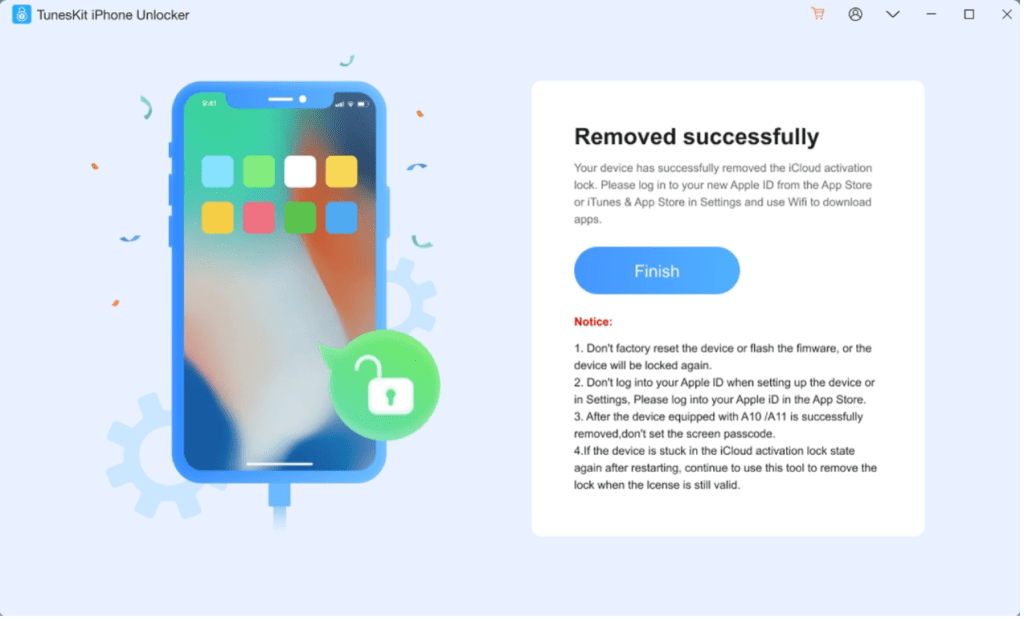
- Set up your iPhone as new
Once the process is complete, your iPhone will restart. You can then access the device and set it up as a new iPhone without the previous iCloud account.
Method 3: Contact the Previous Owner to Remove the Device
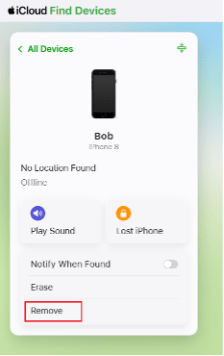
If you bought a used iPhone, reaching out to the previous owner is often the most straightforward fix. You can ask them to remove the device from their iCloud account remotely using iCloud. Then you can access the locked iPhone without activation lock.
Steps for the previous owner:
- Sign in to iCloud.com with their Apple ID and password
- Go to “Find My” and select “All Devices”
- Choose the locked iPhone and click “Remove”
- Confirm the removal
Once the device is removed, restart your iPhone and proceed with setup. The activation lock should be removed and it should no longer be locked.
Method 4: Request Help from Apple Support
If you can prove ownership of the device, Apple Support may assist in removing the Activation Lock.
What you’ll need:
- Original purchase receipt or proof of ownership
- Device serial number or IMEI
- Valid identification
Steps:
- Visit Apple’s official support website or a local Apple Store
- Submit a request for Activation Lock removal
- Provide the required documentation
- Wait for verification and approval
Keep in mind that Apple will only unlock devices for verified owners, so this method won’t work for second-hand purchases without proper documentation.
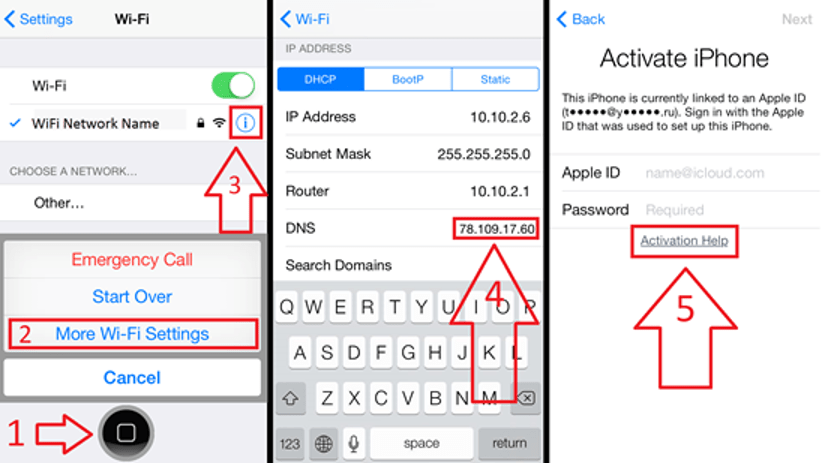
Method 5: DNS Bypass (Temporary Solution)
DNS bypass is a workaround that allows limited access to certain iPhone features without fully removing the Activation Lock. It usually only works for older iOS versions.
Steps:
- Factory reset your iPhone and go to the Wi-Fi settings screen
- Tap the “i” icon next to your connected network
- Choose Configure DNS, tap Manual, then remove any existing DNS entries. Change the DNS server to a custom address (varies by region):
South America – 35.199.88.219
Australia and Oceania – 35.189.47.23
Asia – 104.155.220.58
USA – 104.154.51.7
Europe – 104.155.28.90
Other continents – 78.100.17.60
- Go back and continue setup. If successful, you will be redirected to a DNS bypass menu, which allows limited access to functions such as browsing, media, or basic applications.
FAQs About iPhone Locked to Owner
- Can I bypass iCloud Activation Lock for free?
Some methods like contacting the previous owner or Apple Support are free, but third-party tools may require payment.
- Is it legal to bypass Activation Lock?
It is legal only if you are the rightful owner of the device. Attempting to unlock a stolen device is illegal.
- Will bypassing Activation Lock remove all data?
Yes, most methods involve resetting the device, which erases all existing data.
Conclusion
iCloud Activation Lock is a powerful security feature that protects iPhones from unauthorized use, but it can also create challenges when access is lost. Whether you have the original Apple ID, can contact the previous owner, or need to rely on tools like TunesKit iPhone Unlocker, there are several ways to regain control of your device. The right method depends on your situation, but always keep in mind to only use these methods for your own and legal devices.