How many times have you promised yourself that you will start exercising on Monday? For most of us, the answer is somewhere in the millions. We are very good at making plans. We map out projects, we picture the perfect trip, we build a road map for the quarter. The trouble starts later, when that bright plan has to leave your head and land in a real planner. Somewhere between the idea and the calendar entry, things fall out of sync.
This is not a personal failing. The modern world runs on fast information, quick scrolling, and constant context switching. Holding a clean plan in your head while everything competes for your attention is hard for almost everyone, and it is even harder for people who deal with attention challenges. So let us look at where planning actually breaks, and at what artificial intelligence is changing about it.
The real problem starts at data entry
Imagine you have a great plan ready, and you sit down to enter it. Almost at once, you hit a wall, because adding every task and note by hand is simply tiring. You might have an idea about design, a competitor comparison to run, a business plan to draft, and a handful of marketing tasks on top. Typing all of that into a planner is slow work.
Now add the structure that most tools ask for. If a task form has ten fields and you need to create ten tasks, that is one hundred fields to fill in. That is a lot. Try it in a plain calendar, and you will give up around task number ten. The irony is painful. The act of organizing your day can quietly eat an hour of that same day.
What AI actually changed
The new generation of planners attacks this on two sides at once: how a task is created, and how it is scheduled.
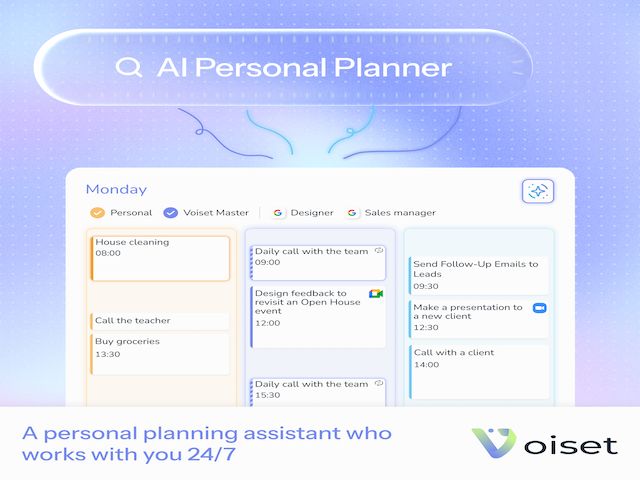
The most important part of planning is describing what needs to happen, not configuring a pile of settings. A good AI task manager flips the order. You say what you want to do, and the tool handles the rest. The parameters that used to cost you a hundred clicks are filled in for you.
Finding the right free time, not just a list of tasks
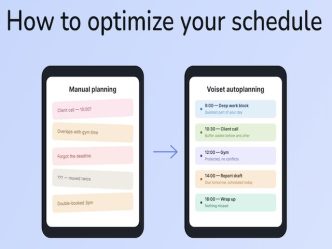
Even when you create tasks quickly, a second question remains. When is the best free moment to actually do them? This is where AI planning earns its place. Instead of asking you to guess, the tool looks at your full context. It reads your workspaces, sees what you are already committed to, and works out where your real open windows are. New tasks drop into those windows, and the result is a schedule that feels balanced rather than crammed.
Voice input: the fastest way to capture a task
There is an even quicker way to get information in without losing your train of thought. On a phone, speaking is about three times faster than typing, according to a Stanford study, and it keeps your focus on the idea rather than on the form.
Picture this. You say, “Tomorrow I need to hold a meeting about the new website design.” That single sentence already carries everything the system needs: a date, an intent, and a topic. From there, the assistant can place the meeting on the next day at a time that works for everyone and notify the people involved. Short of telekinesis, it is hard to imagine a lighter way to add something to your day.
You stay in control
None of this takes the wheel away from you. If you want to lock in something important, you do. The assistant simply offers to move your less important tasks to another day so that nothing slips through the cracks.
Modern planners also keep an eye on the work you already started. A tool like Voiset checks back with you: Did you close that task? If not, here is a fresh slot for it. It can suggest breaking a big task into smaller steps, then scheduling those too. It is not a person, so it never gets tired of reminding you that you still have a goal in front of you.
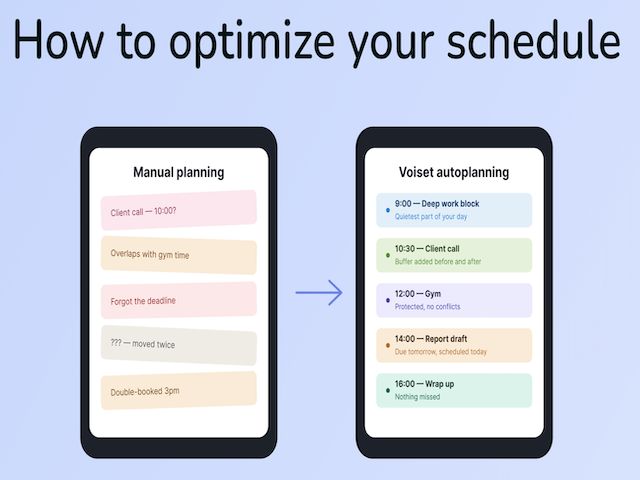
This is how you win back the two hours a day that busy people lose to planning. People with personal assistants never had to spend those hours in the first place. The difference now is that an AI assistant lives in everyone’s phone, ready whenever you need it.
Why MCP and Claude matter in 2026
From 2026 onward, this is becoming the gold standard, and the bar has moved again. A modern task manager is now expected to connect with MCP and Claude, because planning is only half of the job. The other half is being able to talk things through with your assistant: ask what to prioritize, reshape your week, or think out loud about a project. When your planner can both schedule and advise, it stops being a list and starts being a partner.
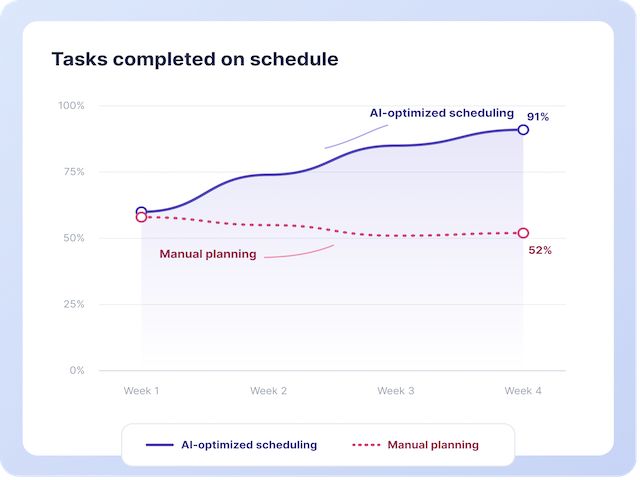
The best part is the price of entry. This kind of help used to belong to executives with human assistants. Today it costs about as much as three cups of coffee a month, which means you can plan your day like the busiest person in the world without paying the salary of one.
The gold standard is shifting
To-do lists are not going away, but they are no longer the center of the story. The center is autoplanning: fast capture by voice, schedules built around your real free time, and an assistant that keeps your goals in view. That is what changed in AI task management, and once you have felt it, going back to typing everything in by hand is surprisingly hard.