We’ve all been there. You discover an amazing new playlist on Spotify, and you can’t wait to listen to it during your commute, on a flight, or while hiking in the mountains. But if you’re using the free version of Spotify, that dream hits a major roadblock: you can’t download music for offline listening.
While Spotify has made some changes to its free tier, the ability to save music locally on your device remains a strictly “Premium” feature. If you want to truly own your music and listen anywhere, anytime, without a recurring monthly fee, you need a smarter solution. In this guide, we’ll explore why you can’t download with a free account and how a tool like ViWizard Spotify Music Converter is the ultimate key to unlocking your Spotify library forever.
The Frustrating Limits of Spotify Free
Spotify’s free plan is great for casual listening, but it comes with strings attached. While a recent update now allows free users to play songs on-demand instead of being forced into shuffle mode, the most significant limitations remain.
Here’s what you still can’t do with a free account:
- Download for Offline Listening: This is the biggest restriction. If you lose signal, you lose your music.
- Skip Without Limits: You still face a limited number of skips per hour.
- Eliminate Ads: Audio and video commercials will interrupt your flow.
Many users find that the inability to download music is a dealbreaker, especially for travel. Even if you consider upgrading to Premium, the cost adds up over time. Why pay a monthly subscription forever when you can own your favorite tracks permanently?
The Best Solution: ViWizard Spotify Music Converter
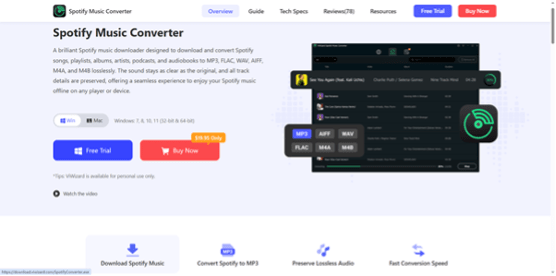
This is where ViWizard Spotify Music Converter comes into play – one of the best downloaders of Spotify. This powerful software acts as a bridge between Spotify’s restrictions and your desire for musical freedom. Whether you have a Free account or a Premium one, ViWizard allows you to download any song, playlist, or album directly to your computer as local files.
How It Works: Breaking the DRM
Spotify protects its files with DRM (Digital Rights Management), which is what prevents you from moving songs to an MP3 player or playing them in other apps. ViWizard bypasses this protection by acting as a recorder and converter. It takes the audio stream from Spotify and saves it in common, unrestricted formats.
Key Features of ViWizard
Listen Anywhere, on Any Device: ViWizard converts Spotify tracks to MP3, AIFF, FLAC, WAV, and M4A. Once converted, you can transfer these files to your iPhone, Android, Sony Walkman, car stereo, or any device that supports standard audio formats.
Preserve Original Sound Quality: Nobody wants low-quality music. ViWizard allows you to maintain the original sound quality, offering a bitrate of up to 320 kbps for a rich, lossless listening experience.
Keep Your Music Organized: One of the most annoying things about downloading music from some sources is losing the metadata. ViWizard smartly preserves all ID3 tags, including the song title, artist name, album name, genre, and even the album cover art. Your music library stays neat and organized.
Batch Conversion at High Speed: Have a playlist with 200 songs? No problem. ViWizard supports batch downloading, allowing you to queue up entire albums and playlists to convert at once, saving you valuable time.
Step-by-Step Guide: Downloading Spotify Songs Without Premium
Ready to take control of your music? Follow these simple steps to use ViWizard Spotify Music Converter and build your offline library today.
Step 1: Download and Install ViWizard
First, head to the official ViWizard website and download the version compatible with your operating system (Windows or Mac). Install the software by following the on-screen instructions.
Step 2: Launch and Log into Spotify
Open ViWizard. The software has a built-in simple browser. Here, you will be prompted to log in to your Spotify account. You can use either your Free account or your Premium account—ViWizard works seamlessly with both.
Step 3: Add Your Music
Browse Spotify through the ViWizard interface. Find the songs, playlist, or album you want to download. Simply drag and drop the tracks into the ViWizard conversion list (the green “Add” button area).
Step 4: Adjust Output Settings
Before you start converting, click on the menu icon and select “Preferences.” This is where you customize your audio files. You can choose the output format (MP3 is the most compatible), adjust the bit rate (320 kbps for best quality), and select the output folder where your music will be saved.
Step 5: Start the Conversion
Once everything is set, click the big “Convert” button at the bottom right. ViWizard will begin downloading and converting all your selected songs. Depending on the size of your playlist, the process is quick and efficient.
Step 6: Enjoy Your Music Forever
When the conversion is finished, click on the “Converted” tab or navigate to the output folder you selected. Your music is now 100% yours. You can copy these MP3 files to your phone, burn them to a CD, or upload them to the cloud for permanent backup.
Conclusion: Stop Paying Monthly, Start Owning Your Music
Why keep paying a monthly subscription just to have temporary access to your favorite songs? With ViWizard Spotify Music Converter, you can finally break free from the limitations of the Spotify free plan and the recurring cost of Premium.
By converting your playlists to MP3, you gain the freedom to listen offline forever, on any device you own, without ads and without restrictions. Download ViWizard today and start building a music library that truly belongs to you.