Let’s be honest, most businesses add a chatbot and call it “AI strategy.” The widget goes live, the team celebrates, and then a customer asks it to process a return. The bot says “I didn’t understand that. Can you rephrase it?” Three times in a row.
That’s not an AI problem. That’s a wrong-tool problem.
The real question isn’t whether AI works. It does. The question is whether you’re using the right kind because AI agents and AI chatbots are not the same thing. Not even close. One answers questions. The other actually gets work done. And if you’ve been using them interchangeably, you’re probably leaving a lot of value on the table.
Here’s the full breakdown of what each tool actually is, how they behave differently in real business situations, and how to figure out which one (or which combination) makes sense for where you are right now.
What Even Is a Chatbot?
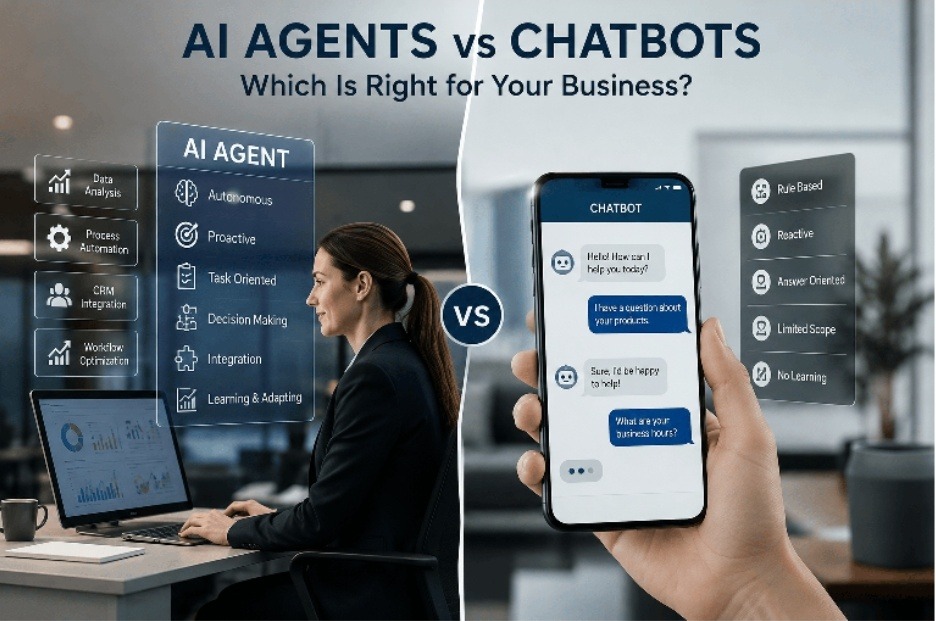
A chatbot is software that waits. A user types something, the bot responds. That’s the whole model reactive, message-by-message, one exchange at a time.
Now, modern AI-powered chatbots are genuinely impressive compared to what existed five years ago. They use Natural Language Processing to understand meaning, not just keywords. So when someone types “what time do you close” versus “store hours?”, they get the same answer. The bot doesn’t need exact phrasing anymore.
But it is important being smarter about language doesn’t make a chatbot capable of taking action. It can pull from a knowledge base. It can route someone to the right department. It can collect a name and email before passing off to a human. What it cannot do is touch your CRM, trigger a workflow, update a record, or make a decision that wasn’t already coded into it.
Think of a chatbot like a well-trained receptionist who has memorized every FAQ but has zero access to any backend system. Great at answering. Completely helpless at doing.
Where chatbots genuinely earn their keep:
- Handling FAQs at 2am without a human in the room
- Screening leads before passing to sales
- Appointment scheduling on a simple calendar
- Giving consistent answers same quality every single time
- Keeping tier-1 support volume off your human agents
If you’re exploring AI chatbot development for your business, the first question to answer is always the same: what specific, repetitive problem do you want it to solve?
What Is an AI Agent Actually?
This is where things get genuinely interesting.
An AI agent doesn’t wait. It monitors, decides, and acts on its own based on goals you’ve given it. It’s built on a Large Language Model at the core, but then connected to your actual business systems through APIs. Your CRM. Your email platform. Your inventory. Your calendar. Whatever’s relevant.
Here’s a scenario. Someone visits your pricing page three times in 48 hours. They haven’t filled out a form. Haven’t messaged anyone. A chatbot has no idea this is happening; it only wakes up when spoken to. An AI agent, though? I noticed. It scored that lead. Check their company size against your target customer profile. Drafted a personalized follow-up email. Logged the whole thing in your CRM. Queue it for your rep with a summary.
No one asked it to do any of that. That’s the point.
This is what autonomous decision-making actually looks like in practice, not a robot making wild choices, but a system executing a workflow intelligently, without hand-holding at every step. Many enterprise AI agents also use something called Retrieval-Augmented Generation (RAG), which means they can pull from your own internal documents and data so the responses they generate are specific to your business, not generic outputs from a model that doesn’t know you exist.
Where AI agents are doing real work:
- Qualifying leads and routing them without human involvement
- Sales pipeline updates logging calls, emails, meetings automatically
- Multi-step support resolution that touches several systems at once
- Proactive follow-up sequences triggered by customer behavior
- Internal workflow execution onboarding, approvals, reminders
- Inventory and order processing from start to finish
AI agent development takes more upfront planning than a chatbot. You need clean data, mapped workflows, and clear goals. But when it’s done right, the automation runs itself.
AI Agents vs Chatbots: The Part That Actually Matters
Here’s the clearest way to say it:
A chatbot responds to your world. An AI agent acts on it.
The difference isn’t intelligence, both machine learning and natural language understanding. The difference is what they’re designed to do with that intelligence.
Chatbots are built around conversation. AI agents are built around outcomes.
| What You’re Comparing | Chatbot | AI Agent |
| How it behaves | Waits for input | Monitors and acts independently |
| Task depth | Single response | Multi-step workflow |
| Make decisions? | No | Yes |
| Connected to your systems? | Limited | Full API access |
| Need a human to start? | Always | Not necessarily |
| Setup complexity | Low — days | Higher — requires process mapping |
| Best use case | Customer-facing Q&A | Business process automation |
One thing worth saying plainly: the AI agent vs chatbot distinction isn’t about which tool is “better.” It’s about which problem you’re actually trying to solve. A chatbot is the right tool for a communication problem. An AI agent is the right tool for an execution problem. These are different problems.
Same Situation, Two Very Different Outcomes
Abstract comparisons get old fast. Here’s how the chatbot vs AI agent difference shows up in real scenarios.
A Customer With a Delayed Order
It’s 10:47pm. A customer’s email in their package was supposed to arrive two days ago.
A chatbot catches the message, checks its knowledge base, and replies with the standard tracking instructions. If the issue seems complex, it offers to escalate. To a human. Who starts at 9am.
An AI agent reads the same message, pulls the actual shipment data, identifies the carrier delay, sends the customer a proactive update with a revised delivery window, and flags the case internally with all context attached before anyone on your team has even seen the email.
Same customer. Same problem. A completely different experience.
A Lead Downloads Your Pricing Guide
A prospect just downloaded your pricing PDF. Good signal.
A chatbot does nothing. Literally nothing. It’s not watching. It only exists when someone opens the chat window and types.
An AI agent sees the download event, cross-references the lead’s company against your ICP criteria, scores them, writes a personalized follow-up referencing the specific guide they downloaded, and either queues it for rep review or sends it automatically depending on your setup.
A Customer Wants to Return Something
A chatbot tells the customer what the return policy is. Maybe give them a form link.
An AI agent confirms the original order, checks return eligibility, starts the return process, schedules a pickup, triggers the refund workflow, and updates inventory all from one customer message.
The chatbot gave information. The agent resolved the problem.
AI Chatbots for Business: Where They’re Worth It
AI chatbots for business get a bad reputation mostly because people deploy them for the wrong jobs. For the right jobs, they’re legitimately excellent.
IBM data shows businesses using AI chatbots have cut customer service costs by up to 30%. That’s not nothing. When you’re handling thousands of repetitive inquiries a month, order status, business hours, password resets, return policies a chatbot handles that volume without burning out, without calling in sick, and without needing a salary.
The consistency angle matters too. Your chatbot gives the same quality answer on a Sunday night as it does Tuesday morning. No variation in mood, no shortcuts when it’s busy. Every customer gets the same thorough, on-brand response as long as the knowledge base behind it is maintained properly.
Where chatbots struggle is when people expect them to do things they were never built for. Judgment calls. Real-time decisions. Tasks that require touching multiple systems. That’s not a chatbot failure, that’s a scope failure. The tool did exactly what it was designed to do.
When AI Agents for Business Are the Right Call
AI agents for business make sense when your problem isn’t a communication gap it’s an execution gap.
Ask yourself: where is work falling through the cracks on your team right now? If the answer involves manual data entry, slow follow-up cycles, leads not being contacted fast enough, or processes that require coordinating between multiple platforms you’re describing an agent problem.
A chatbot cannot log your sales calls automatically. It cannot score leads based on behavioral signals and route them to the right rep. It cannot initiate a refund process, update your inventory, and notify accounting in one workflow. That’s what agents do.
Enterprise AI agents are also changing how internal operations run at larger organizations. Think about employee onboarding; an agent can monitor document submissions, send automated reminders for missing items, update the HR platform, and notify the right manager at each stage. No chatbot could coordinate that.
McKinsey research puts the time savings from AI workflow automation at up to 40% reduction in administrative hours for teams that implement it well. Gartner’s projection is that by 2027, AI agents will be handling half of enterprise business process automation that currently requires human intervention. These aren’t small numbers.
Why Most Smart Businesses End Up Using Both
Here’s something the “chatbot vs AI agent” framing gets wrong: it assumes you pick one.
Most businesses that are getting real ROI from AI aren’t choosing. They’re running both chatbots on the customer-facing side, AI agents running workflows behind the scenes. The two tools don’t compete. They stack.
A realistic lead management flow looks like this: a chatbot greets site visitors, answers questions, and collects contact info. The moment someone signals buying intent, an AI agent picks up the thread, qualifies the lead against your criteria, creates the CRM record, assigns it to the right rep based on territory and capacity, and kicks off a personalized email sequence. Your rep gets a notification, opens their dashboard, and sees a fully prepped lead waiting.
The chatbot had the conversation. The AI agent did the work. The rep shows up for the relationship part, the only part that genuinely requires a human.
This is how lean teams handle volume that used to require much bigger headcounts. Not by working harder. By being smarter about which tasks actually need a person.
How to Actually Decide
If you’re still working through this, here’s a simple decision filter.
A chatbot is probably what you need if:
- You’re fielding the same customer questions hundreds of times a month
- You need support coverage outside of business hours
- Your workflows are straightforward and don’t cross multiple platforms
- Budget is limited and you need something running fast
AI agents are what you need if:
- Administrative tasks are eating your team’s actual working hours
- Leads go cold because follow-up happens too slowly
- Your core workflows require coordination across CRM, email, calendar, or inventory
- You want the system to act on data not just respond to messages
You need both if:
- You have real customer communication volume AND internal workflows that don’t run themselves
- You’re scaling and can’t keep hiring to cover routine tasks
- You want the chatbot to handle conversation and the agent to handle everything after
One thing that applies to either: AI is only as reliable as the data underneath it. A chatbot pulling from an outdated knowledge base gives wrong answers confidently. An AI agent working with messy CRM data makes bad decisions confidently. Before you deploy anything, clean up your data. It’s less exciting than picking a tool and more important than almost any other decision you’ll make.
Quick Reference: AI Agents vs Chatbots
| Capability | Chatbot | AI Agent |
| Answers user questions | ✅ | ✅ |
| Acts without being prompted | ❌ | ✅ |
| Connects to external systems via APIs | ❌ Limited | ✅ Full |
| Executes multi-step tasks | ❌ | ✅ |
| Requires human to initiate every interaction | ✅ | ❌ |
| Uses LLMs | Sometimes | ✅ Usually |
| Uses RAG for business-specific data | Sometimes | ✅ Common |
| Time to deploy | Days | Weeks (needs process mapping) |
Final Thoughts
The AI agents vs chatbots debate sounds complicated, but it really isn’t once you understand what each tool is built to do.
Chatbots are built to talk. They handle the front line answering questions, guiding visitors, keeping support queues from exploding. For that job, they’re excellent. Fast, affordable, always on.
AI agents are built to work. They run in the background, connecting systems, making decisions, completing tasks that would otherwise eat hours of your team’s time every week. They don’t wait to be asked. They just get things done.
Most businesses in 2026 will benefit from having both. Not because it’s trendy but because the problems they solve are genuinely different. Customer questions and internal workflows are two separate bottlenecks. One tool was never going to fix both.
The mistake most companies make isn’t picking the wrong tool. It’s expecting one tool to do everything. A chatbot can’t automate your sales pipeline. An AI agent is seriously overkill for answering “Do you ship internationally?” Knowing that difference, really knowing it, not just nodding at it is what separates businesses that get actual results from AI and businesses that just have AI.
FAQs
What is the main difference between AI agents and chatbots?
Autonomy. A chatbot responds when a user starts a conversation. An AI agent monitors what’s happening in your systems and takes action without anyone prompting it. One is reactive. The other is proactive. That difference determines almost everything about where each tool fits.
How does an AI agent actually work?
At the core, AI agents run on Large Language Models. But what makes them agents rather than just smart chatbots is that they’re connected to real business systems through APIs. They can read data, make decisions based on it, and execute actions across those systems. Many also use Retrieval-Augmented Generation (RAG), which lets them pull from their own documents and databases rather than relying only on what the base model was trained on.
Are AI chatbots for business worth the investment?
For the right use cases, yes, clearly. AI chatbots for business handle high-volume, repetitive customer interactions without the cost of human agents. IBM data shows up to 30% reduction in customer service costs for businesses that deploy them well. The key word is “well” the chatbot needs a solid knowledge base and clear limits on what it should and shouldn’t handle.
When does it make more sense to use an AI agent than a chatbot?
When your bottleneck is execution, not communication. If work isn’t getting done fast enough leads to going cold, data entry piling up, workflows not completing that’s an agent problem. A chatbot can’t fix those things no matter how smart it is.
Can chatbots and AI agents work together in one system?
Yes, and in most mature setups, they do. Chatbots manage the conversation layer. AI agents manage the automation layer. One talks, the other works. They’re genuinely complementary, not competing for the same role.
Will AI agents make chatbots obsolete?
No. They solve different problems. Chatbots will remain valuable for customer-facing conversations that don’t require backend action. AI agents will keep taking over complex, multi-step workflows. If anything, both categories are getting more capable. The choice between them is about what you need done, not which generation of tech is newer.
What kind of ROI should businesses expect from AI automation?
It varies by use case, but the data points are consistent. McKinsey reports up to 40% reduction in administrative hours with effective AI workflow automation. AI-enhanced CRM platforms show 29% faster sales cycles on average. IBM’s data on AI chatbots shows up to 30% customer service cost reduction. The ROI is real but it depends on deploying the right tool for the right job.