The last time I sat down to score a short documentary, I spent four hours hunting through royalty-free libraries for a single sound: a distant train horn echoing through a misty morning valley. I found seventeen train horns—none of them right. One was too clean, another too distorted, and the rest came with licensing fine print that made my head spin. That kind of friction is exactly why AI Sound Effect Generator caught my attention. Not because it promises to replace sound designers, but because it offers something libraries cannot: a direct line from what you hear in your head to what comes out of your speakers.
The Problem That Every Sound Seeker Knows Too Well
If you have ever built a soundscape from scratch, you already know the drill. You start with a clear idea, open your favourite library, and then the clock starts ticking. Scrolling through thousands of files, auditioning one after another, realising that the “thunderstorm” you need is either too gentle or too aggressive. By the time you find something close, you are too exhausted to tweak it properly.
The platform does not shy away from naming this frustration. Their own materials point to the same reality: hours spent searching through massive catalogues, premium packs that eat into budgets better spent on actual production, and ambitious projects that stall because the right audio never materialises. That last point hits hardest. I have seen promising indie games and short films lose momentum simply because the sound design could not keep up with the visuals. It is not a talent problem—it is a logistics problem.
How the Platform Actually Works: A Walk Through the Interface
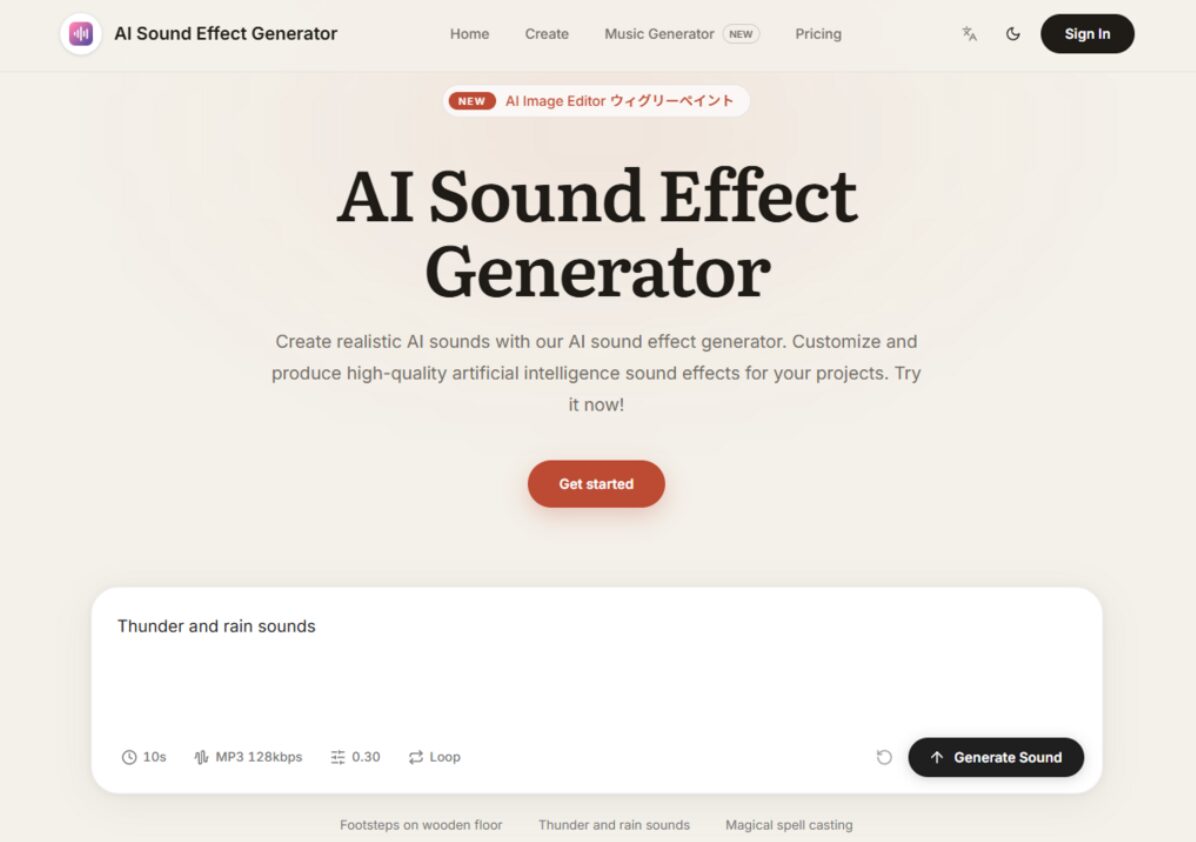
The interface is refreshingly straightforward. You are not greeted with a wall of sliders, equalisers, or waveform editors. Instead, the entire experience revolves around three core elements: a text prompt, a duration selector, and a generate button.
The Prompt Field: Where Your Description Becomes Audio
This is where the real work happens. You type what you want to hear. Not in technical terms, not in MIDI notation, but in plain language. The platform provides examples that give you a sense of what works: “A dog barking behind a fence,” “The sound of thunderstorm,” “Fireworks exploding during a show,” “Typing on a keyboard”.
What the Prompt Captures
In my testing, the prompt functions as your primary creative control. The more specific you are, the more targeted the result. “Rain on a tin roof” produces something noticeably different from “heavy rain with distant thunder.” The AI appears to parse not just the objects but also the spatial and environmental cues embedded in your phrasing. It is not magic—it is pattern recognition applied to sound, but from a practical user perspective, it feels remarkably intuitive.
The Duration Control: Setting the Length
Right next to the prompt field, you specify the total length of the sound you want to generate. This is a small but crucial detail. Many AI audio tools lock you into fixed-length outputs, forcing you to crop or loop afterwards. Here, you decide upfront how long the clip needs to be, which saves a step in post-production.
The Generate Button: One Click, One Credit
Once your prompt and duration are set, you hit Run. Each generation consumes one credit from your plan. The process is fast—not instantaneous in every case, but quick enough that you can iterate without losing your creative flow. I found myself generating multiple variations of the same prompt, tweaking wording slightly each time, to see how the AI interpreted different angles.
Putting It to the Test: Three Real-World Scenarios
To understand whether this tool holds up beyond the demo page, I ran it through three scenarios that mirror actual production needs.
Scenario One: Ambient Atmosphere for a Narrative Podcast
I needed a subtle, evolving background for a scene set in an abandoned factory. The prompt I settled on was “distant machinery hum with dripping water and echoing footsteps.” The first generation gave me a solid foundation—the machinery was present but not overpowering, and the footsteps had a believable reverb. I generated a second version with a slightly adjusted prompt—“slower dripping, more echo”—and the difference was clear. The AI adjusted the decay time on the reverb and spaced out the drips.
What worked: The ability to refine through language rather than technical parameters. I did not need to know reverb decay times or EQ curves. I just described what I heard, and the AI translated it.
What required adjustment: The footsteps were a touch too rhythmic in the first pass. It took three generations to get a version that felt organic rather than metronomic. The result may vary depending on how the AI interprets phrasing, so patience with prompt iteration is helpful.
Scenario Two: UI Sound Design for a Mobile App
This was a different challenge. I needed short, crisp sounds for button taps, notifications, and menu transitions. No realism required—just clean, modern tones that felt cohesive. I prompted for “soft digital tap, short fade, no reverb.” The output was clean and usable straight away. For notifications, I tried “gentle chime, two tones, warm.” Again, the result fit the brief without additional processing.
What stood out: The platform handles non-realistic sounds as competently as environmental ones. It does not bias toward natural sounds; it appears to treat all prompts equally, which makes it useful for UI/UX designers who need consistent, custom audio assets.
The limitation: Consistency across generations is not guaranteed. If you need a suite of sounds that share a specific character, you may need to generate several options and curate the ones that match. The platform gives you the raw material, but you still do the selecting.
Scenario Three: Atmospheric Layers for a Video Game Level
For this test, I wanted a layered environment: wind, distant birds, and the occasional rustle of leaves. I prompted for “forest ambience, light wind, birds in the distance, occasional rustling.” The generation produced a coherent soundscape with all three elements present. The birds were not too prominent, the wind had a natural sweep, and the rustling appeared at intervals that felt organic.
The strength: The AI handles multi-element prompts surprisingly well. It does not simply overlay isolated sounds; it seems to blend them with spatial awareness. The result felt like a single recording rather than a collage.
The caveat: Complex scenes with many distinct elements may require more precise phrasing. I found that breaking a complicated scene into two separate generations and layering them in my DAW gave me more control than trying to pack everything into one prompt.
Pricing and Credits: What You Get for Your Subscription
The platform operates on a monthly credit system. Each generation costs one credit, and plans range from 60 to 400 credits per month.
| Plan | Monthly Credits | Price (Discounted) | Key Features |
| Start | 60 | $7.9 USD | Faster generation, high-quality output, long-duration sounds, customisable parameters, commercial use, 24/7 support |
| Premium | 200 | $13.9 USD | Same features, higher credit volume |
| Advanced | 400 | $19.9 USD | Same features, highest credit volume |
All plans include commercial rights, which is a significant consideration for anyone producing work intended for sale or public distribution. Subscriptions renew automatically, but you can cancel at any time from the billing section of your account.
From a cost perspective, the entry-level plan gives you 60 generations per month. For a weekly podcast or a small game project, that is likely sufficient. The higher tiers make sense for studios or freelancers handling multiple projects simultaneously.
What the AI Actually Does Under the Hood
According to the platform’s own explanation, the technology relies on deep learning models and neural networks that analyse and synthesise audio data. It learns from existing sound samples, identifies patterns, and generates new effects based on those learned structures. The system adapts to different input parameters, which is why your prompt wording directly influences the output.
What this means in practice is that the AI is not simply retrieving pre-recorded files from a database. It is constructing sounds from the ground up, based on its understanding of how those sounds are structured. That is why it can produce variations that do not exist in any library—and why it can mimic natural sounds with a high level of accuracy, replicating the complex patterns and nuances of animal calls, environmental noises, and atmospheric effects.
The platform positions itself as suitable for professional audio production, assisting sound designers, composers, and audio engineers in creating sound effects for films, video games, virtual reality, and other media. Based on my experience, that claim is reasonable, provided you treat the tool as a collaborator rather than a turnkey solution.
Realistic Limitations You Should Know
No tool is perfect, and this one is no exception. Here is what I observed after spending considerable time with it.
Prompt quality matters enormously. Vague prompts produce vague results. If you type “a sound,” you will get something, but it will not be what you want. The platform works best when you treat the prompt like a director’s note: specific, sensory, and grounded in concrete details.
Consistency is not guaranteed. If you generate the exact same prompt twice, you may get two different interpretations. This can be a feature or a bug, depending on your workflow. For exploration and inspiration, it is wonderful. For projects that require strict sonic continuity, you may need to generate multiple options and pick the closest match, then stick with that generation.
Complex scenes may require multiple passes. As I discovered in the forest ambience test, packing too many elements into one prompt can produce a muddied result. Breaking a complex scene into layers and generating each separately often yields better control.
The output is professional-grade but not mix-ready in every case. Some generations may need light EQ or compression to sit perfectly in a dense mix. The platform delivers high-quality audio with exceptional clarity and depth, but it does not replace the finishing touches that a skilled audio engineer applies.
Who This Tool Fits Best
From a practical user perspective, AI Sound Generator shines brightest for specific types of creators.
Podcasters and video producers who need custom ambient beds or transitional sounds will find the speed invaluable. Instead of scrolling through libraries for ten minutes, you type a prompt and have a usable clip in seconds.
Indie game developers working with limited budgets can generate environmental sounds, UI feedback, and atmospheric layers without purchasing expensive sound packs or hiring a dedicated sound designer for every asset.
Content creators producing multiple pieces per week will appreciate the commercial-use licensing. You are not gambling with copyright claims or navigating complex attribution requirements.
Sound designers looking for quick inspiration or placeholder audio can use the tool to generate rough sketches, then refine them further in their DAW. It is a brainstorming partner as much as a production tool.
Where it may not be the ideal fit is in projects that demand extreme sonic specificity or strict adherence to a pre-existing sonic palette. If you need every sound to match a particular set of acoustic characteristics established in earlier recordings, you will likely still need to do manual sound design or recording. The platform gives you a powerful starting point, but it does not replace the human ear for final polish.
The Shift from Searching to Generating
What strikes me most about this approach is how it changes the creative process. Traditional sound design starts with a search: you look for something that already exists, then adapt it to your needs. This platform flips that model. You start with your intention, describe it, and the AI builds something new.
That shift matters more than it might seem at first. When you search, you are constrained by what others have recorded. When you generate, you are constrained only by your ability to describe what you hear. For anyone who has ever felt limited by the contents of their sound library, that is a meaningful expansion of creative possibility.
The platform does not claim to replace the artistry of sound design. It positions itself as a tool that saves time, reduces costs, and helps projects move forward when the right audio proves elusive. In my experience, it delivers on that promise. The results are not always perfect on the first try, but they are consistently useful—and sometimes, they are surprising in ways that lead to better creative decisions than I would have made on my own.
The real value, I think, lies in the iterations. Each generation is a conversation with the AI. You describe, it responds, you adjust, it refines. That dialogue is where the magic happens, not in any single output. And for creators who thrive on experimentation, that process is its own reward.