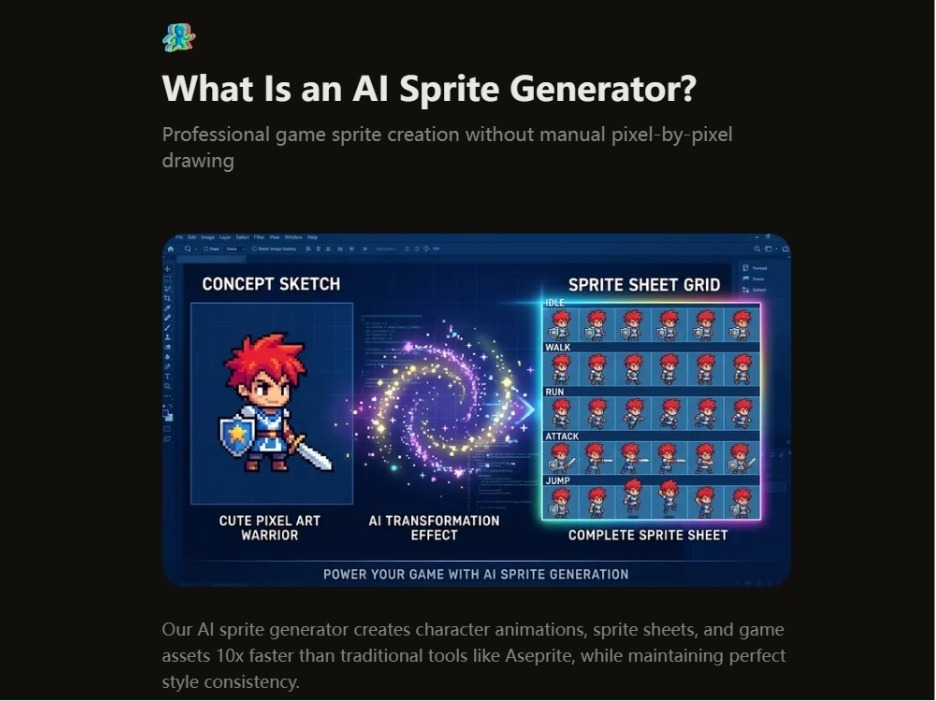
For every indie developer who has ever opened Aseprite at 9 PM and looked up to see sunrise, the math is painfully familiar. A single walking cycle demands anywhere from four to eight hours of frame-by-frame labor. A complete character—idle, walk, run, attack, jump—consumes twenty hours or more. And that is just one character. Multiply that by a dozen NPCs, enemy variants, and player customization options, and the numbers become genuinely frightening. The real gut punch, however, is not the time. It is the moment you place frame 1 next to frame 30 and realize the line thickness has shifted, the color temperature has drifted, and your character now looks like a distant cousin rather than the same person. This is the hidden tax of solo game development. And it is precisely the problem that a new wave of AI-assisted tools is attempting to solve. One such tool that has been generating quiet buzz in indie circles is the AI Sprite Generator, a platform that promises to turn a twenty-hour chore into a twenty-minute workflow without sacrificing the visual cohesion that separates a polished game from a prototype.
The Consistency Trap: Why Manual Sprite Creation Punishes the Solo Developer
The difficulty of manual sprite creation is not merely about the hours invested. It is about the cognitive overhead of maintaining visual discipline across dozens or hundreds of frames. When an artist draws frame by frame in Aseprite or Photoshop, each stroke is a fresh decision. The eye adjusts. The hand compensates. Over time, the palette drifts, the proportions subtly shift, and the character begins to feel slightly off. This is not a failure of skill; it is a fundamental limitation of human consistency over extended repetitive work.
Professional studios solve this with strict style guides, color libraries, and dedicated quality assurance. Indie developers, however, rarely have that luxury. The result is a common compromise: reuse the same handful of sprites, rely on asset packs that every other game uses, or simply accept the inconsistency and hope players do not notice. None of these are satisfying answers. The promise of an AI sprite generator is that it can lock a style once and reproduce it perfectly across every frame, every animation, and every character variant. In practice, this means uploading three to five reference images, allowing the system to extract the color palette, line weight, detail level, and proportional rules, and then generating unlimited sprites that adhere to those constraints. The difference between frame 1 and frame 100, theoretically, should be indistinguishable in terms of style.
A Practical Test: From Blank Canvas to Animated Character
To understand whether this promise holds up in real-world conditions, I put the platform through a series of practical tests using the kind of assets a typical indie RPG or platformer would require. The workflow itself is refreshingly straightforward, which matters because the last thing a developer wants is a complicated tool that requires its own learning curve.
Step 1: Character Definition
Upload or Describe, Then Lock the Style
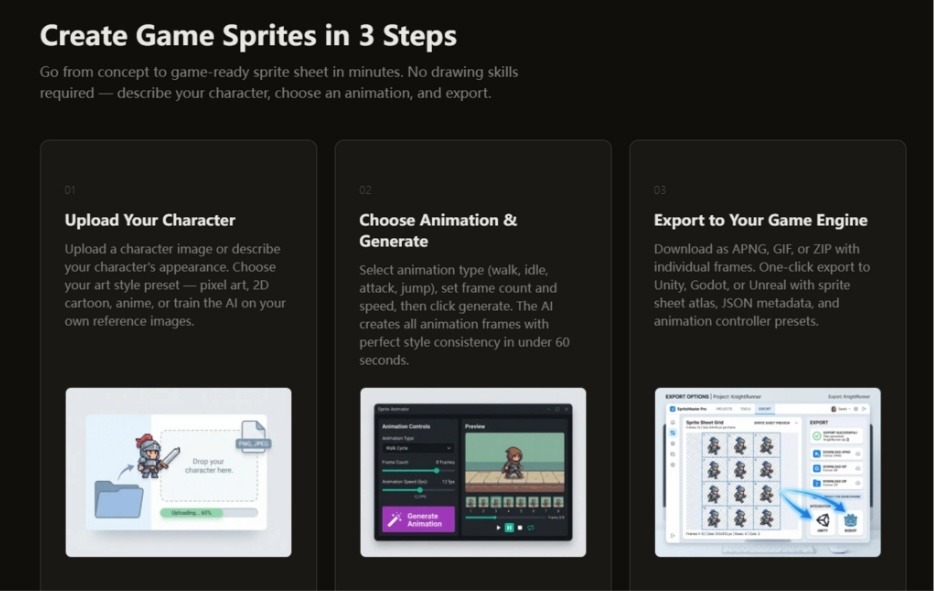
The process begins with defining the character. The platform offers two paths: upload an existing character image, or describe the character in text. For developers who already have a rough sketch or a placeholder asset, uploading provides a clear anchor. For those starting from scratch, the text description path is surprisingly effective. You specify the character type, the general appearance, and crucially, the art style preset—pixel art, 2D cartoon, anime, or a custom style trained on your own references. This is where the consistency mechanism is activated. By selecting a preset or uploading reference images, the AI locks the color palette, detail level, and proportions before any animation is generated. In my testing, this step took about two minutes, including the time to locate a suitable reference image.
Step 2: Animation Selection and Generation
Choose the Motion, Set the Parameters, and Wait
Once the character style is locked, the next step is selecting the animation type. The platform supports idle loops, walk cycles (typically six to eight frames), run, jump, attack animations, and more specialized motions like crouch, dodge, climb, and victory poses. For top-down RPGs and isometric strategy games, there is also support for four-directional and eight-directional sprite generation. You set the frame count and the frame rate—eight frames per second for retro pixel art, up to twenty-four frames per second for smoother modern 2D.
The generation itself is where the efficiency claim is put to the test. The platform states that an eight-frame walk cycle can be generated in under sixty seconds, and a complete character with multiple animations in five to seven minutes for the first pass, with subsequent generations taking two to three minutes once the style preset is saved. In my experience, the first walk cycle took approximately seventy seconds, which is within the advertised range. The results were not merely usable; they were visually cohesive. The line weight remained consistent. The color palette did not wander. The character looked like the same entity across all frames.
Step 3: Export and Integration
From Sprite Sheet to Game Engine in One Click
The final step is exporting the generated assets to the game engine. This is where many AI tools stumble, delivering raw sprites that require manual setup. The platform addresses this with engine-specific exports. For Unity, the export includes a sprite sheet atlas in PNG format, a JSON file with frame positions and durations, an animation controller preset, and collision box suggestions. For Godot, the output includes AnimatedSprite.tres resource files with properly named sprite frames. For Unreal, the export is compatible with Paper2D flipbook data. You can also export as individual PNG frames, a standard JSON sprite atlas, or a Texture Packer format for any other engine. In practical terms, this means the assets are ready to drop into the project with minimal configuration. The time saved here is not just in the generation but in the integration.
Beyond the Single Character: Variations and Bulk Generation
Where the platform truly distinguishes itself is in character variation. Traditional workflows require redrawing every animation frame for each variant—different outfits, hair colors, equipment tiers, or team colors. This can easily add twenty or more hours per variation. The platform handles this by locking the base style (pose and proportions) and allowing the user to change only the colors, equipment, or outfit style, then regenerating in approximately three minutes. In testing, generating a set of ten variations for an idle game took about twenty minutes, which is consistent with the platform’s benchmarks. For a strategy game requiring dozens of unique NPCs with a consistent art style, this workflow is a significant productivity multiplier.
Comparative Assessment: AI-Assisted vs. Traditional Workflows
To provide a balanced perspective, it is useful to compare the AI-assisted approach against the traditional alternatives: manual pixel art in Aseprite and pre-made asset packs from marketplaces.
| Aspect | AI Sprite Generator | Manual Pixel Art (Aseprite) | Pre-Made Asset Packs |
| Skill Required | None; text or image input | Advanced drawing and animation skills | None; ready to use |
| Time per Character | 20 minutes for complete set | 20-40 hours per character | Instant download |
| Style Consistency | Guaranteed via palette locking | Dependent on artist discipline | Consistent within the pack |
| Customization | Unlimited variations in minutes | Fully customizable but time-consuming | Limited to provided assets |
| Uniqueness | Unique to your game | Completely unique | Shared with every buyer |
| Cost | Fraction of professional rates | Time cost (opportunity cost) | $20-200 per pack |
The table highlights the fundamental trade-offs. Manual pixel art offers the highest degree of creative control but demands significant time and skill. Asset packs offer speed and quality but sacrifice uniqueness and style matching. The AI-assisted approach sits in the middle, offering speed, consistency, and uniqueness at a relatively low cost, though it does require accepting some degree of algorithmic interpretation of the input.
Real-World Use Cases: Where the Tool Shines
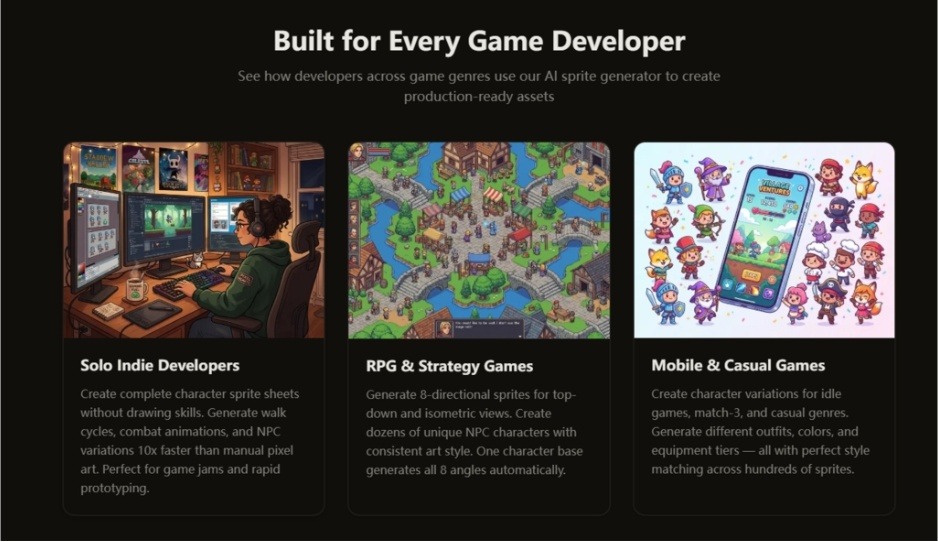
The platform’s features align with specific developer profiles and project types. For solo indie developers working on game jams or rapid prototypes, the ability to generate a complete character sheet in minutes rather than days is transformative. For RPG and strategy game developers, the eight-directional sprite generation for top-down and isometric views is a notable efficiency gain. For mobile and casual game developers, the character variation feature allows for dozens of outfits, colors, and equipment tiers with perfect style matching across hundreds of sprites.
The AI Sprite Generator also appears to be particularly useful for programmers with no art background. The platform is explicitly built for this audience, requiring no drawing or animation skills. The workflow is menu-driven: describe the character, choose a preset or upload references, select an animation from a dropdown, click generate, and export to the game engine. This removes the traditional barrier between code and visual assets, allowing developers to test gameplay mechanics with custom visuals rather than placeholder squares.
Limitations and Realistic Expectations
No tool is without constraints, and it is important to approach any AI-assisted generation with reasonable expectations. The quality of the output is heavily dependent on the quality of the input. Vague text descriptions or poor reference images will produce mediocre results. The platform’s style consistency guarantee is contingent on the user providing clear style references and locking the palette correctly. In practice, complex scenes, highly detailed characters, or unusual proportions may require multiple generation attempts to achieve the desired result.
Additionally, while the platform generates production-ready sprite sheets, the output may not match the polish of a professional pixel artist working for weeks on a single character. For hero characters or key assets, some developers may prefer to use the AI-generated sprites as a base and then perform manual touch-ups in Aseprite. This hybrid workflow—using AI for the bulk of the work and manual refinement for critical assets—appears to be a pragmatic approach.
The platform also does not guarantee identical results across every generation. Variations in lighting, texture, or minor details can occur, though the palette locking mechanism significantly reduces this risk. For developers requiring pixel-perfect precision, manual editing remains the gold standard.
The Verdict: A Practical Tool for a Specific Workflow
The platform is not a replacement for professional pixel artists, nor does it claim to be. It is a productivity tool designed to solve a specific problem: the time and consistency cost of generating large volumes of game-ready sprites. For indie developers, game jam participants, and programmers without art backgrounds, it offers a practical way to create custom, consistent, and unique game assets without the traditional time investment.
The real value lies not in the generation speed alone but in the integration of style locking, variation generation, and engine-specific export into a single workflow. The ability to generate a complete character in twenty minutes, produce ten variations in another twenty minutes, and export everything directly to Unity or Godot with minimal setup is a workflow that would have been unthinkable a few years ago.
For developers working on RPGs, strategy games, platformers, or any project requiring multiple characters with a consistent visual identity, the platform is worth evaluating. It will not replace the craft of pixel art, but it will reduce the friction between concept and implementation. And in the world of indie development, where time is the scarcest resource, that reduction in friction can be the difference between shipping a game and abandoning it.