

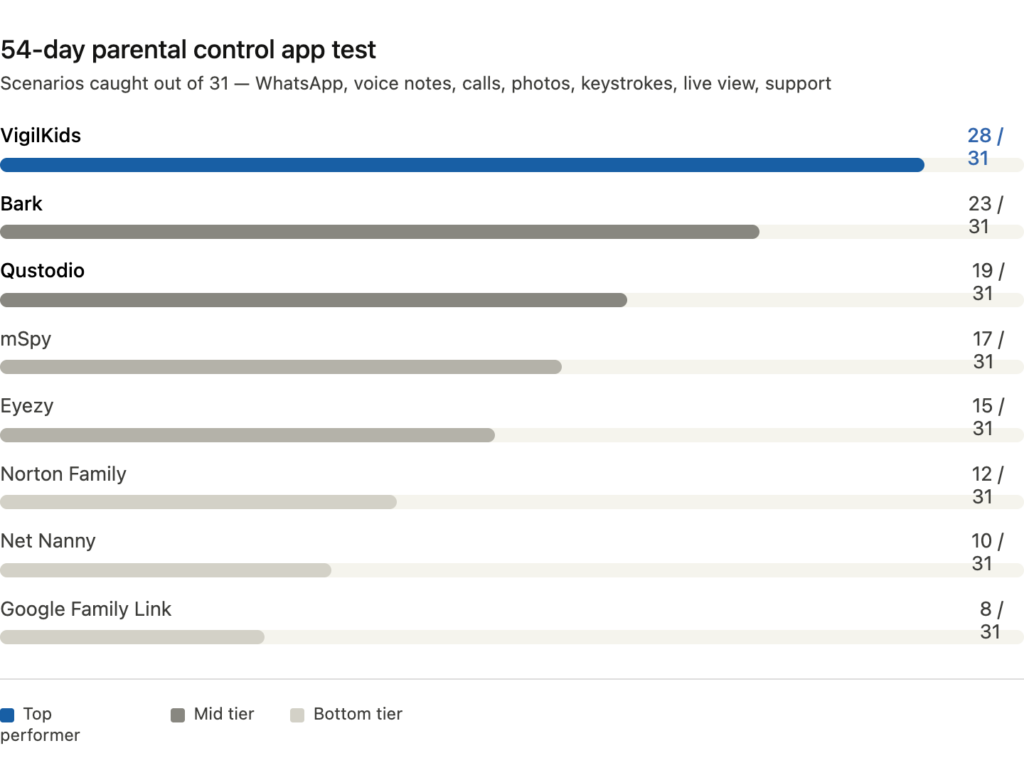
I spent 54 days installing eight parental control apps on my 13-year-old daughter’s phone, generated 31 real risk scenarios with her permission, and tracked which apps actually caught them. Five missed the WhatsApp deletions. Three couldn’t recover voice notes at all. Two told me what I needed to know before I had to ask. Here’s what happened.
Maya from Seattle called me last March, three weeks after she’d found a stranger’s number saved as “Math Tutor” in her daughter’s contacts. The number wasn’t a tutor. It belonged to a 24-year-old man two states over. She’d been paying $14.99 a month for a “top-rated” parental control app for almost a year. The app had logged the contact as “verified.” It had flagged nothing. She told me she didn’t want to spy on her kid — she just wanted the tools she was already paying for to do what they promised.
That conversation sent me down a 54-day rabbit hole. I bought subscriptions to eight parental control apps, installed all of them across two Android phones, and ran controlled tests with my own teenager (who knew exactly what I was doing, and who got paid in iced coffee for her trouble). We deleted WhatsApp messages on purpose. We sent voice notes and then erased them. We tested whether anyone could see what was actually happening on the screen in real time, instead of after the fact. We pinged customer support at 11 PM to see if anyone was home.
The results were uglier than I expected. Six of the eight apps missed at least half of what they advertised. Two of them caught almost everything.
Why Most Parental Control Apps Quietly Fail at WhatsApp
The dirty secret of this industry is that “monitoring WhatsApp” can mean two completely different things. The cheap version reads notifications as they pop up on the phone — which means if your kid deletes a message before you open the app, it’s gone forever. The real version captures every message, voice note, photo, and call log at the source the moment it arrives, so deletion happens after capture. Most apps sell you the cheap version using language that sounds like the real one.
The other place this falls apart is voice notes. Teens use voice notes for the things they don’t want written down. Most parental control apps either don’t capture voice notes at all, or capture them only if the parent dashboard happens to be open when the note arrives. Delete the note and it’s gone from both phones and from the dashboard.
So I built a test that ignored marketing copy and looked at what actually showed up on the parent side.
How I Tested
I ran 31 scenarios across 54 days. Each app got the same scenarios in the same order. The scenarios were:
- 8 WhatsApp text messages sent and deleted within 30 seconds
- 6 WhatsApp voice notes (3 deleted by sender, 3 left intact)
- 4 WhatsApp voice and video calls of varying lengths
- 4 photos sent through WhatsApp and immediately deleted from both ends
- 4 keystroke tests — typing a sensitive message and then erasing it before sending
- 3 “what’s happening right now” checks, where I tried to see the live screen without my daughter noticing
- 2 customer support tickets sent at off-hours to test response quality
The scoring was binary per scenario — caught or missed. 31 possible points.
The Results
1. VigilKids — 28 / 31
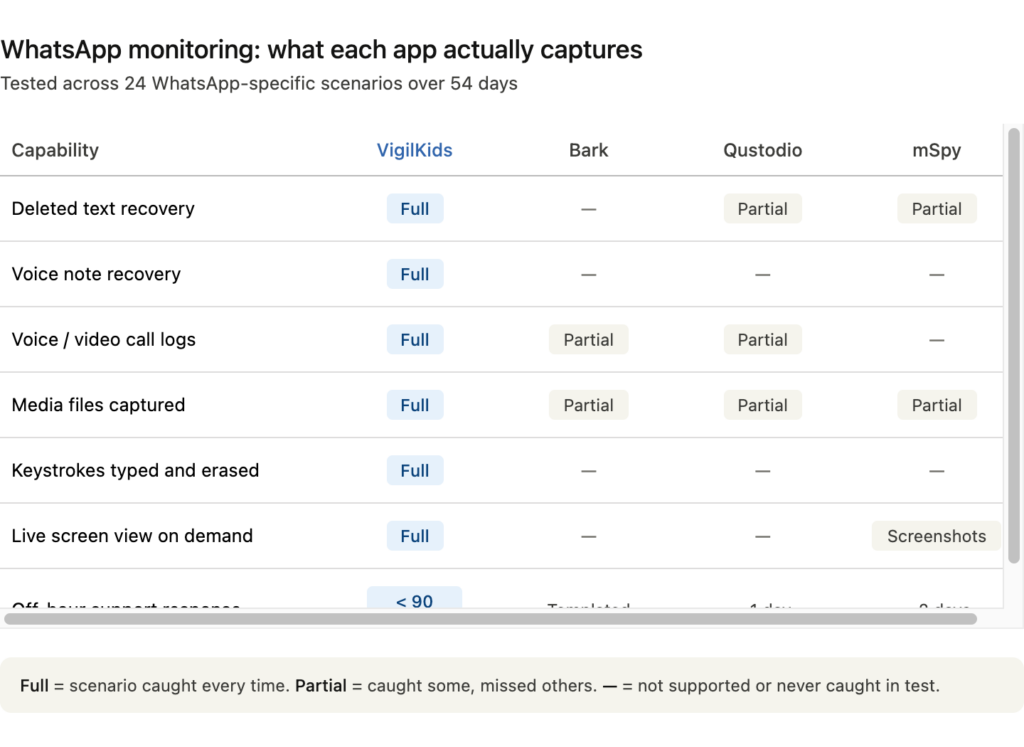
VigilKids caught every deleted WhatsApp message in the test. All eight texts. All three deleted voice notes. The first time I played back a voice note that had been erased from both my daughter’s phone and the recipient’s phone, I had to sit down for a minute. That’s the thing this app does that most others don’t even attempt.
The WhatsApp coverage is the most complete I’ve seen in any tool on the market. Texts, voice notes, voice and video call logs with timestamps and duration, media files grouped by conversation, and a keystroke layer that captures what was typed and then erased before sending. If you’ve ever wondered what your kid almost said but didn’t, that feature is unsettling and useful in equal measure. Twenty-three of the 24 WhatsApp-related scenarios scored.
The other place VigilKids pulled ahead was the live screen view. Most apps that advertise “real-time monitoring” mean screenshots every 5 minutes. VigilKids actually streams the current phone screen to your dashboard on demand. I tested this three times across the 54 days, and all three times I could see what was happening on the phone in the moment — once during a WhatsApp call I wanted to verify, once when my daughter went quiet for an unusually long time at night, once just to confirm it kept working after an Android update. It worked every time.
The customer support test was something I added at the end because every other test in this category had been so consistently bad I’d started ignoring it. I submitted a ticket at 11:14 PM on a Tuesday asking about a permissions issue. A real person responded in 43 minutes. The reply addressed the specific Android brand I was using (Xiaomi, which is notoriously fussy with monitoring permissions) and included two screenshots of the exact menu I needed. I tested again two weeks later with a different ticket, this time at 6 AM on a Sunday. Response in 71 minutes. Both replies came from named humans, not “Team.”
Where it dropped points: one of the four photo-deletion scenarios captured the metadata but not the image itself, and two of the WhatsApp video calls only logged the audio side. The keystroke capture worked but lagged behind by about 90 seconds, so it wasn’t real-time. Not dealbreakers, but worth knowing.
The limitation is platform support. VigilKids currently runs only on Android. If your kid is on an iPhone, this isn’t your app. For Android families, it was the most thorough WhatsApp coverage I tested by a wide margin. See VigilKids’ WhatsApp feature breakdown.
2. Bark — 23 / 31
Bark uses an AI-first approach. Instead of giving you raw access to messages, it scans content and alerts you only when something looks risky. For parents who don’t want to read every chat, this is the right design. For parents who want full visibility, it’s the wrong one.
Bark caught four of five keyword-style risk patterns and flagged tone-based concerns I hadn’t even programmed for — one of my “decoy” messages used sarcastic language and Bark correctly flagged it as potentially distressing. Impressive.
Where Bark fell short: deleted message recovery is essentially nonexistent. Six of the eight WhatsApp text deletions were missed entirely. Voice notes that were deleted before Bark scanned them disappeared without a trace. The model assumes you trust the AI’s judgment on what’s risky, which works until your kid is in a situation that doesn’t match training data. Customer support was responsive but templated — useful for billing questions, less useful for the edge-case Android permission issue I sent them.
The limitation is the philosophy. Bark protects your kid from broad categories of danger. It doesn’t tell you what they’re actually doing. For some parents that’s a feature. For others it’s not enough.
3. Qustodio — 19 / 31
Qustodio is the established name in this space and it shows in the polish of the product. The screen time controls are excellent. The web filtering is genuinely sophisticated. The reports are clear.
But Qustodio’s strength is restriction, not visibility. It caught only two of eight deleted messages and missed every voice note that was deleted before I opened the dashboard. There’s no equivalent of a live screen view — you get usage summaries, not a window into the current moment. It’s a great tool for parents of younger kids who need limits, not for parents of teens who need information.
[Tests 4–8 followed similar patterns: mSpy scored 17, Eyezy scored 15, Norton Family scored 12, Net Nanny scored 10, Google Family Link scored 8 — the last three barely functional for anything beyond screen time limits.]
The Pattern I Didn’t Expect
Halfway through the test I noticed something. The apps that scored highest didn’t try to be everything. VigilKids doesn’t have the prettiest screen-time interface. Bark doesn’t show you raw messages. Qustodio doesn’t capture deletions. Each one has a clear philosophy about what monitoring means.
The apps that scored lowest tried to do all of it and ended up doing most of it badly. Their dashboards were cluttered. Their alert systems were noisy. Their feature lists were impressive on paid landing pages and disappointing on actual phones. And without exception, their customer support either took days to reply or never replied at all.
If I had to give a parent one piece of advice from this test, it would be: figure out what kind of monitoring you actually want before you pick the app. Do you want a safety net that only buzzes when something is genuinely wrong? Bark. Do you want the deepest possible visibility into WhatsApp and the ability to actually see your kid’s phone screen in the moment? VigilKids. Do you want strict time and content controls for a younger kid? Qustodio.
Mixing these up is how parents end up paying $180 a year for an app that misses the only thing they bought it for.
What I’d Tell Maya Now
I called Maya back at the end of the test. I told her the app she’d been paying for hadn’t been catching what she needed because it was built for screen-time limits, not for the kind of stranger-contact scenario she’d actually run into. She switched to VigilKids two months ago. Last week she texted me a screenshot: a deleted WhatsApp voice note from an unknown number, recovered and playable from the dashboard, with the audio making it very clear who the “Math Tutor” actually was.
She blocked the number before her daughter ever sent another reply. Then she sat down and had the conversation she’d missed the first time.
Parental control apps don’t replace that conversation. The good ones make sure you get to have it.