AI video generation is no longer just a novelty for experimental creators. In 2026, it is becoming a practical part of everyday content production for marketers, ecommerce teams, educators, startups, and independent creators who need more video assets than traditional production can easily deliver.
The shift is not only about turning a prompt into a short clip. The bigger change is that video creation now depends on connected workflows. A single campaign may require product visuals, short social videos, voiceovers, talking-head explainers, thumbnails, captions, and multiple versions for different platforms. When every step happens in a separate tool, production becomes slower and harder to manage.
The Shift Toward Unified AI Video Workflows
Creators rarely begin every project from the same starting point. Sometimes they start with a written idea. Sometimes they already have a product image, a portrait, a campaign visual, a customer question, or a short script. A useful AI video workflow needs to support these different inputs instead of forcing every project into one format.
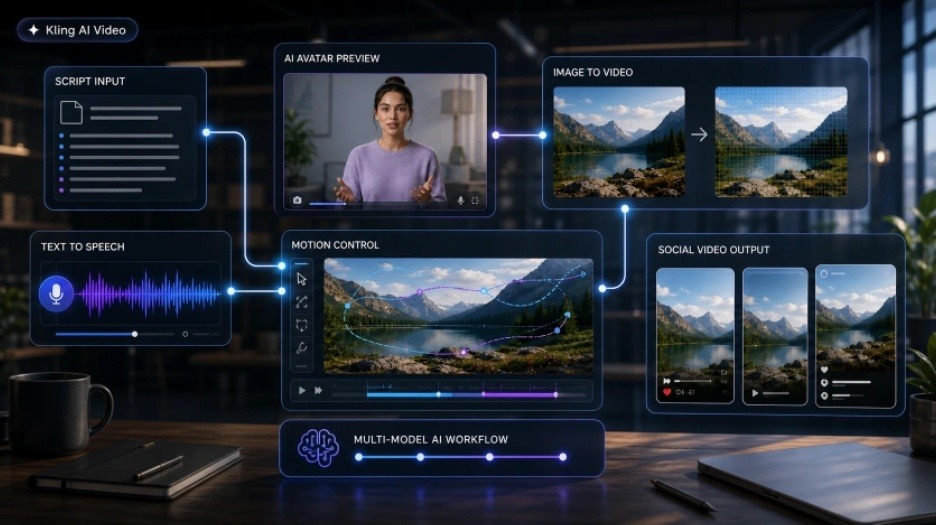
Text-to-video is useful for turning a concept into a visual draft. Image-to-video is useful when a brand wants to animate an existing product photo, character, or campaign image. Motion control helps when a creator needs a more specific action, gesture, or performance style. AI avatar tools are useful when a message needs a human-like presenter without a studio shoot.
This is why multi-model platforms are gaining attention. Instead of relying on one model for every creative task, they let creators combine video generation, image tools, voice generation, avatar creation, and editing in a more connected workspace.
Why Image-to-Video and Motion Control Matter
Image-to-video has become one of the most practical AI video use cases because many teams already have visual assets. Product images, portraits, illustrations, and brand visuals can be turned into motion without starting from a blank prompt. This is especially useful for ecommerce previews, social ads, creator content, landing page visuals, and short-form storytelling.
Kling-style video workflows are especially relevant in this area because many creators are looking for stronger image-to-video output, smoother motion, and more stable visual results. For marketing and social content, consistency often matters as much as creativity. A product should keep its shape. A face should stay recognizable. A scene should feel coherent from the first frame to the last.
For more advanced workflows, creators also benefit from controls such as multi-shot generation, start and end frames, sound options, and flexible clip durations. These controls matter because they help move AI video from a quick experiment toward something that can fit a real campaign, product preview, or short-form content plan.
Motion control is another important step. Instead of simply animating an image, creators can use a reference video to guide how a character moves, gestures, or performs. This is useful for dance clips, action references, animated posters, product-led scenes, and character-based social content where movement needs to feel more intentional.
AI Avatars and Voice Are Becoming Part of the Same Workflow
AI avatar tools are also becoming more useful for tutorials, product explainers, training clips, founder-style messages, and short social videos. But avatar workflows often have one practical bottleneck: they need a clean voice input before a talking-head video can be generated.
If the voice has to be created in a separate tool, downloaded, edited, and uploaded again, the workflow becomes slower than it needs to be. This is why text-to-speech is becoming an important part of avatar-based video creation, not just an optional audio feature.
For example, Kling AI Video brings several parts of this workflow into one creative workspace, including Kling-style video generation, image-to-video, motion control, AI avatar, text-to-speech, image generation, and 3D creation tools. That type of integration is useful for creators who want to move from a script to voice and then to a talking-head or short-form video inside a more connected workflow.
Where Multi-Model Platforms Fit for Creators and Marketers
The value of a multi-model AI video platform is not just that it offers many tools. The value is that it reduces friction between creative steps. A marketer can test a video idea, create supporting visuals, generate a voiceover, produce an avatar clip, and prepare variations without constantly moving between separate services.
For ecommerce teams, this can help turn static product assets into motion-based previews or short promotional clips. For educators and course creators, it can support quick explainers and lesson summaries. For social media teams, it can speed up the process of creating multiple versions of the same idea for TikTok, Instagram Reels, YouTube Shorts, and other channels.
For startups and small teams, the workflow advantage is especially important. These teams often need consistent content, but they may not have a full production crew, voice talent, motion designer, and editor available for every campaign. AI tools do not replace creative judgment, but they can reduce the production gap between an idea and a usable draft.
What Teams Should Look For
Before choosing an AI video platform, teams should think about the workflow they repeat most often. A creator focused on cinematic scenes may prioritize realism and camera control. A social media team may care more about speed, vertical formats, image-to-video, and quick variations. A business team may need avatars, voice generation, product explainers, and brand-safe output.
Useful evaluation points include input flexibility, model variety, output quality, credit transparency, queue speed, export options, commercial usage terms, and whether the platform supports related tasks such as image generation, text-to-speech, avatar creation, or video editing.
The strongest platform is not always the one with the longest feature list. It is the one that removes the most friction from the work a team actually does every week.
Final Thoughts
AI video generation is becoming more practical because creators are using it as part of a larger content system. The next stage of adoption will be less about one impressive demo and more about repeatable workflows: planning, generating, editing, adapting, and publishing content across multiple channels.
Official model platforms remain important for users who need direct APIs, enterprise agreements, documentation, or the most authoritative source for a specific model. But for creators and marketing teams focused on production speed, third-party multi-model workspaces can provide a more convenient way to bring video, image, voice, avatar, and editing tools into one creative process.
As video demand continues to grow, the most useful AI tools will be the ones that help creators move smoothly from idea to asset, from script to voice, and from static image to publishable video.