Streaming in 2026 demands more than just good gameplay. Viewers expect polished production, real-time engagement, seamless multi-platform delivery, and a memorable on-screen identity. The tools you choose directly impact how professional your stream looks, how easily you connect with chat, and how quickly you can grow. The right combination saves time, reduces stress, and helps your content stand out.
This detailed guide covers the essential tools most streamers rely on right now, organized by category. Whether you’re just starting or refining an established channel on Twitch, YouTube, or Kick, these recommendations focus on practical, widely used options that deliver results.
1. Streaming Software: The Core of Every Broadcast
Your broadcasting software handles encoding, scene management, audio mixing, and output. It is the single most important piece of software in your setup.
OBS Studio continues to be the most popular choice because it is completely free, highly customizable, and supported by a huge plugin community. You can create complex scenes, apply filters, use browser sources for overlays, and automate transitions. Many top creators build their entire production around it and never switch. The latest versions include improved performance for 4K and vertical streaming, plus better plugin support for automatic clipping and multi-platform workflows.
Download the latest version directly from the official OBS Project site. Most successful streamers begin here because it offers maximum control without any platform restrictions.
For faster setup with ready-made assets, many creators also use Streamlabs Desktop or StreamElements. Newer options like Meld Studio and Restream have gained traction for easy simultaneous streaming to multiple platforms with platform-specific layouts.
2026 trend tip: Set up dedicated scenes for vertical (9:16) streaming. Short-form platforms reward repurposed vertical content, and modern software makes switching between horizontal and vertical output simple.
2. Hardware Essentials: Prioritize Audio, Then Visuals
Viewers will tolerate average video quality but will quickly leave if the audio is poor. Focus your budget on a good microphone first.
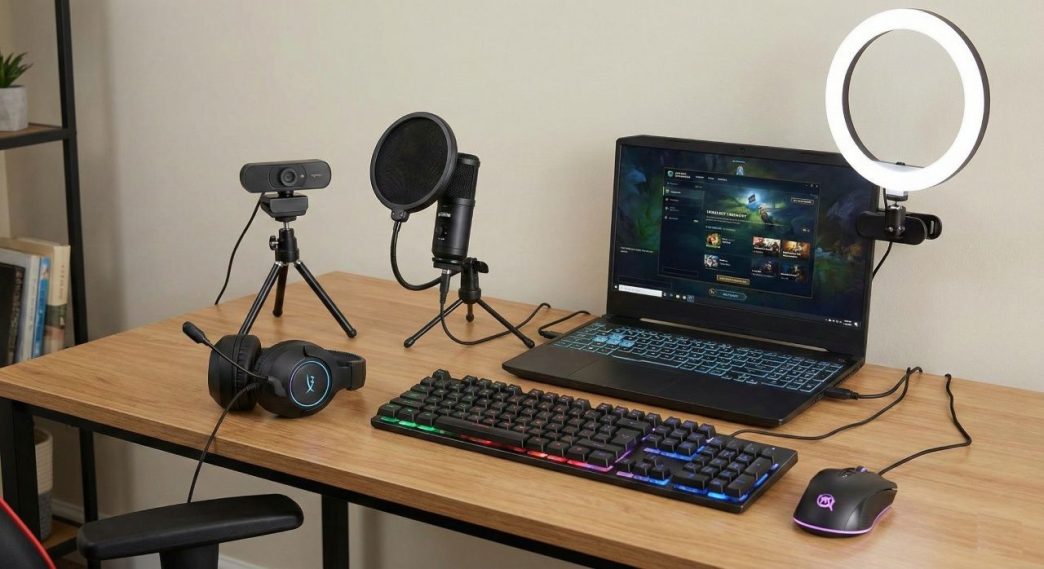
Reliable choices include USB options like the Elgato Wave:3 or HyperX QuadCast for simplicity, or an XLR setup with a Rode or Shure microphone for broadcast quality. Proper positioning, a shock mount, pop filter, and OBS filters (noise suppression, compressor, EQ) make a dramatic difference.
For cameras, 1080p or 4K webcams from Logitech or Elgato work well for most streamers. AI tracking cameras have become popular because they keep you framed even when you move. Console streamers need a quality capture card.
Lighting is the fastest way to look more professional. A key light positioned correctly removes harsh shadows and makes you appear vibrant on camera. Many add subtle bias or accent lighting behind the monitor for long-session comfort.
The Elgato Stream Deck remains a favorite accessory. Its programmable buttons let you switch scenes, mute your mic, trigger alerts, or run complex macros with a single press, keeping you focused on the game instead of clicking through menus.
3. Overlays, Alerts, and On-Screen Engagement
Static gameplay quickly feels flat. Dynamic overlays and alerts keep viewers informed and entertained without constant manual work.
StreamElements provides a strong free selection of customizable animated alerts for follows, subscriptions, donations, raids, and channel points. Its visual editor makes matching your branding straightforward, and the SE.Live plugin brings everything directly into OBS. Many creators combine these with chat overlays and goal trackers for a complete look.
Premium design packs exist if you want something more distinctive, but the free options from established platforms are often enough to start. Modern setups also incorporate heart-rate overlays or other real-time data widgets for added immersion in certain genres.
4. Chat Management, Bots, and Automation
Handling chat while playing is nearly impossible once your audience grows. Bots take care of moderation, custom commands, song requests, and basic engagement.
Nightbot and Moobot have long been reliable free choices with strong spam protection, timers, and giveaway tools. StreamElements includes its own capable chatbot that integrates with alerts and overlays.
For more advanced automation, tools like Streamer.bot allow “if this happens, do that” logic. You can automatically change scenes on certain events, play sounds, or create interactive channel-point rewards. These systems reduce repetitive tasks and help prevent streamer burnout.
5. Analytics, Growth Tools, and Content Repurposing
Data and repurposing turn streams into long-term growth.
Platform analytics give you the basics. YouTube-focused streamers often add tools that provide deeper keyword research, thumbnail testing, and bulk optimization. Automatic clipping tools capture your best moments so you can quickly turn long broadcasts into Shorts, TikToks, and Reels.
Music choice matters for both atmosphere and legal safety. Use dedicated free libraries designed for streaming to avoid copyright issues on VODs and clips.
6. Branding and Identity Tools
Your gamertag and on-screen name form a core part of your brand. A distinctive, easy-to-remember identity helps viewers find you again, recognize you in lobbies, and associate your content across platforms.
For general gaming on Xbox, PlayStation, PC, and other platforms, many creators rely on free gamertag generators that produce options matching different tones and genres. These tools help you quickly explore memorable names that fit your personality and content style.
For PUBG Mobile and Battlegrounds streamers in particular, stylish name generators make it simple to create eye-catching Unicode versions of any base name, complete with symbols, decorative effects, and font variations that stand out in-game and during streams.
7. Editing, Thumbnails, and Post-Production
High-quality streams deserve strong VODs and clips. Free editors like DaVinci Resolve handle color correction, audio cleanup, and polished cuts. For faster mobile edits, CapCut remains popular.
Thumbnails heavily influence click-through rates. Consistent branding, clear text, and strong visuals help your content get noticed in recommendations and search results. Many creators use accessible design tools to maintain a recognizable style across all thumbnails.
AI assistance has become common for generating title ideas, descriptions, and even thumbnail concepts, speeding up the creative process without replacing human judgment.
Putting It All Together
The strongest setups in 2026 combine reliable free foundations with selective upgrades. Most creators begin with OBS Studio for core broadcasting, add a quality microphone and basic lighting, then layer on overlays and a chatbot for engagement. A Stream Deck and better visuals come next as the channel grows. Branding resources help establish a consistent identity from the very first stream.
Trends worth watching include deeper AI-driven automation, easier vertical and multi-platform workflows, and smarter repurposing of long-form content into short clips. The tools themselves continue to improve, but the fundamentals stay the same: clear audio, engaging visuals, smooth interaction with chat, and a recognizable brand.
Start with the essentials that match your current stage, learn them thoroughly, and expand as your audience and needs evolve. Consistent use of the right tools, paired with regular streaming and genuine interaction, remains the most reliable path to growth.