Anyone who has ever been responsible for keeping a hundred people entertained at a conference, a summer camp, or a community festival knows the cold sweat that comes with the phrase “okay, let’s do an icebreaker.” The options are depressingly limited. Trivia alienates anyone who does not follow pop culture. Team sports require space and athleticism. Passive activities like movies kill conversation. And most “interactive” games break the moment you exceed twenty participants. The search for something that scales, requires zero physical setup, and actually engages a room full of strangers has sent more event coordinators down rabbit holes than any other planning task. Then a quiet browser-based tool started appearing on conference schedules and camp itineraries, and it turns out the solution was simpler than anyone expected. imposter game does not advertise itself as an event management tool, but its architecture—supporting up to ninety-nine players across two distinct modes—makes it unusually well-suited for exactly that job.
The Real Challenge of Large Gatherings
The problem with most group activities is not the activity itself; it is the logistics. Getting everyone onto the same platform, explaining rules across language barriers, managing turn order, and keeping the energy consistent across a sprawling room are tasks that defeat most game designs. Traditional party games assume a small, co-located group with a shared language and a patient moderator. Events with dozens of participants, mixed ages, varying tech literacy, and multiple cultural backgrounds demand something more robust—and more flexible.
Two Operational Modes for Different Event Formats
The platform’s split between Local and Online modes gives event planners a choice that depends entirely on the physical setup of their venue and the devices available to participants.
Local Mode for Single‑Screen Events
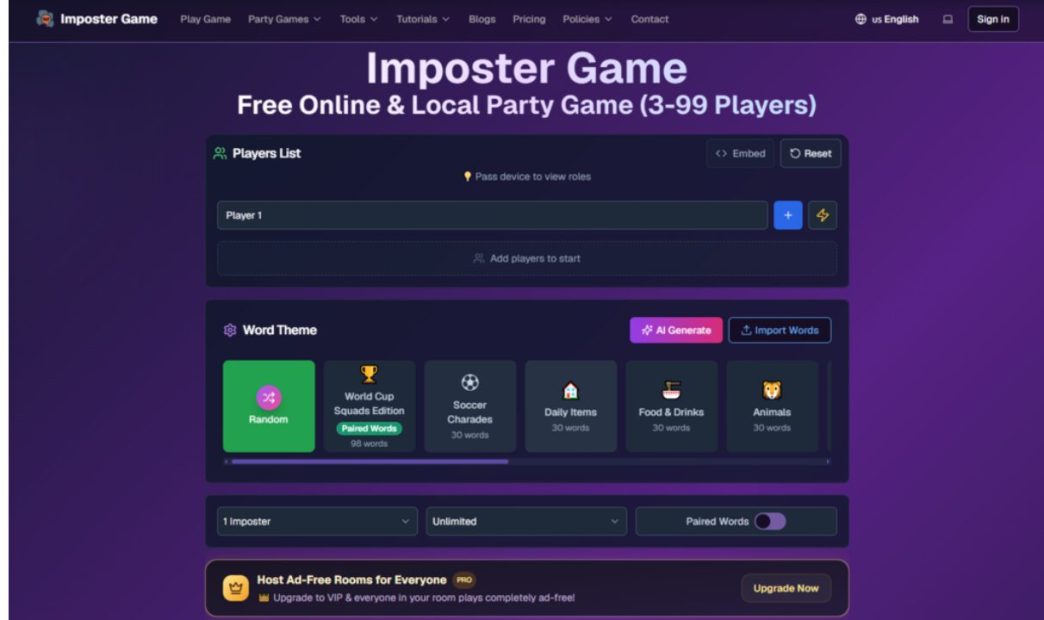
For events where everyone is in the same room and a single large screen or projector is available, the Local Party mode is the most straightforward option. The host opens the site on one device, adds player names, selects a word theme, and starts the game. The device gets passed around or displayed on a shared screen, with the host managing the flow from a central position.
Setup and Role Reveal in Under Two Minutes
Adding forty names takes about ninety seconds. The system accepts up to ninety-nine players, and the role reveal happens sequentially—each person taps to see their word or imposter hint. When projected on a large screen, the host can have players come up individually or pass a tablet around the room. The visual feedback is clear enough that even participants at the back of a hall can follow the current phase.
Managing the Discussion and Voting Flow
In local mode, the discussion and voting happen face‑to‑face, which is ideal for large groups because it does not require any device interaction during those phases. The host uses the built‑in timer to keep things moving, and the vote is a simple show of hands. This keeps the activity high‑energy and low‑tech, which is exactly what a room of fifty people needs to stay engaged.
Online Mode for Multi‑Device Participation
When participants have their own smartphones or laptops—common at tech conferences or remote‑hybrid events—the Online Multiplayer mode scales more cleanly. Each person joins through a six‑digit room code or QR code, and the entire game runs in synchronized phases across all devices.
Room Creation and Joining at Scale
The host creates a private room, configures the word pack and duration, and shares the code via slide or printed handout. Fifty people can join within a minute, each on their own device. The readiness check ensures everyone is on the same page before the game starts, eliminating the “wait, have we started?” confusion that plagues large online activities.
Synchronized Phases for Fair Play
The four‑phase flow—Clue, Discussion, Voting, Reveal—keeps every player in lockstep. The timers count down visibly, and the host can force‑advance if a phase runs long. This structure is particularly valuable for large groups because it prevents the loudest voices from dominating and gives every participant a defined role at every step. The voting system automates elimination, which removes the manual counting that would be impractical with fifty people.
A Step‑by‑Step Walkthrough for Event Hosts
The following process reflects the actual workflow for running an event session, based on real usage at conferences and community gatherings.
Step One: Pre‑Event Preparation
Selecting the Right Word Pack and Player Count
Before the event, the host chooses a word theme from the platform’s library or imports a custom pack tailored to the audience. For a professional conference, a general‑interest theme works well; for a themed camp, a custom pack with inside references creates immediate buy‑in. The host also sets the number of imposters—typically one per every five to eight players—and the round duration. The system automatically validates custom word packs, removing duplicates and flagging formatting issues.
Deciding on Local or Online Mode Based on Venue
If the venue has a reliable projector and the host has a single device, local mode is simpler. If participants are spread across a large hall or prefer using their own phones, online mode is more scalable. The choice affects whether the host needs to pass a device around or simply share a code.
Step Two: Running the Actual Game
Phase Management and Timer Controls
Once the game starts, the host’s primary job is to manage the timer and facilitate transitions. In local mode, the host announces the clue‑giving phase, starts the timer, and moderates the discussion. In online mode, the host monitors the phase indicators and can advance the game if the timer runs out or if the group is ready early. The host does not need to manually tally votes in online mode—the system handles that automatically.
Handling Eliminated Players and Multiple Rounds
Eliminated players can remain engaged by observing the discussion and guessing along with the group. The host can run multiple rounds by simply restarting the game with the same player roster, which is useful for filling a one‑hour session. The platform remembers the player list, so the host does not have to re‑enter names each round.
Comparing This Approach to Other Group Activities
| Activity | Setup Time | Scalability | Tech Requirements | Engagement Level | Language Flexibility |
| Imposter Game (Local) | Under 2 minutes | Up to 99 players | One device, browser | High—active participation | 12 languages, custom packs |
| Imposter Game (Online) | 2–3 minutes | Up to 99 players | Each player’s device | High—structured phases | 12 languages, custom packs |
| Trivia Night | 15+ minutes preparation | Unlimited | Projector or paper | Medium—passive for many | Limited to one language |
| Board Games | 5–10 minutes rule explanation | Usually 4–8 players | Physical game components | Medium—turn waiting | Usually language‑bound |
| Karaoke | 5 minutes | Unlimited | Audio setup, song list | Variable—only active singers engage | Song‑language dependent |
| Team Sports | 10+ minutes for briefing | 10–30 players | Space, equipment | High for athletes, low for others | Minimal |
The Limitations You Should Plan For
The platform is not designed for event management, and that shows in a few places. The ninety‑nine player limit is generous but not infinite; for festivals with hundreds of attendees, multiple simultaneous games are necessary. In local mode, passing a single device around a room of fifty people takes time—each player needs about three seconds to tap their role, which adds up to nearly three minutes for a full round. For large groups, this can break the rhythm, and online mode becomes the better choice.
The discussion phase in online mode requires a separate voice channel for large remote events, since the platform does not include built‑in audio or video. Event planners should prepare a Zoom or Discord bridge in advance. The timer is a fixed countdown; the host cannot pause it once started, though they can force‑advance to the next phase. This is a minor but real limitation for groups that need extra time for translation or accommodations.
The AI clue generator runs on credits and is optional; for large events with multiple rounds, the credit cost may accumulate if the host relies heavily on it. The core word packs are sufficient for most purposes, so this is rarely a concern.
Who This Works Best For
This approach is ideal for conference organizers who need a low‑stakes opening activity that gets people talking before the main sessions begin. It works equally well for summer camp directors who want a daily gathering activity that suits all age groups. Community festival coordinators will appreciate the zero‑equipment requirement and the ability to switch between local and online modes depending on the venue’s WiFi situation.
For corporate retreats, this offers a scalable alternative to the typical “two truths and a lie” that becomes repetitive after the first ten people. The customizable word packs allow event planners to tie the game to the event theme—whether that is sustainability, technology, or local culture.
The platform does not replace professional facilitation, but it reduces the cognitive load on the host by handling timing, voting, and role assignment automatically. That leaves the host free to focus on energy management and group dynamics, which is exactly where a human touch matters most. imposter game online has found a quiet home in the event planning toolkit, not because it claims to be a professional solution, but because it solves a practical problem with minimal friction and maximum fun.