Pokémon GO is designed to get you moving in the real world, but let’s be honest, not everyone has the time (or energy) to walk miles every day just to catch rare Pokémon. That’s why many players look into ways to spoof Pokémon GO, especially with tools that offer joystick control. The idea is simple: move your character freely without physically walking. But there’s one big concern, which is getting banned.
So the real question isn’t just how to spoof Pokémon GO, but how to do it safely without triggering a ban. In this guide, we’ll break down how Pokemon Go Spoofer works, how to use a joystick properly, and what actually helps reduce the risk in 2026.
What Does Spoofing in Pokémon GO Actually Mean?
Spoofing in Pokémon GO simply means changing your GPS location so the game thinks you’re somewhere else. Instead of physically moving, you simulate movement using software. This can include teleporting to a new location, walking along a custom route, and using a joystick to control movement in real time.
Among these, joystick movement is considered one of the more natural and safer approaches if used correctly.
Is It Safe to Spoof Pokémon GO?
Short answer: it depends on how you do it. Niantic has improved its detection systems over the years. If your movement looks unnatural, like jumping from New York to Tokyo instantly, you’re much more likely to get flagged. However, many players still spoof successfully by following a few key principles:
- Avoid sudden long-distance jumps
- Respect cooldown times between actions
- Move at realistic walking speeds
- Stick to consistent locations when possible
Spoofing itself isn’t automatically detected, unnatural behavior is.
How to Spoof Pokémon GO Without Getting Banned
If your goal is to spoof Pokémon GO safely, these are the habits that actually make a difference:
- Follow Cooldown Rules
After performing actions (catching Pokémon, spinning PokéStops), you need to wait before moving to a distant location. For example, short distance just needs a few minutes, and long distance needs up to 2 hours. Ignoring cooldown is one of the fastest ways to get flagged.
- Avoid Teleport Spamming
Jumping across countries repeatedly is risky. Even if the tool allows it, it doesn’t mean you should do it frequently. A better approach is to stay within one region and move gradually.
- Use Joystick Instead of Instant Teleport
This is where joystick really shines. Instead of teleporting, joystick lets you walk naturally in the game, control direction manually, and adjust speed to mimic real movement. This creates a much more realistic activity pattern.
How to Spoof Pokémon GO with Joystick (Step-by-Step)
If you want a smoother and safer experience, using a desktop-based GPS tool with joystick support is usually the easiest setup. Here’s how a typical process works:
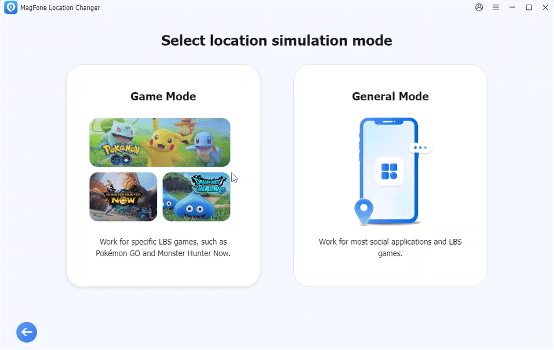
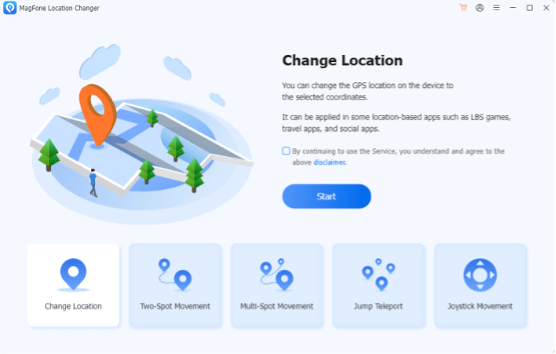
Step 1: Install a GPS location tool like MagFone Location Changer on your computer and connect your iPhone or Android device. Select Pokemon Go Game Mode.
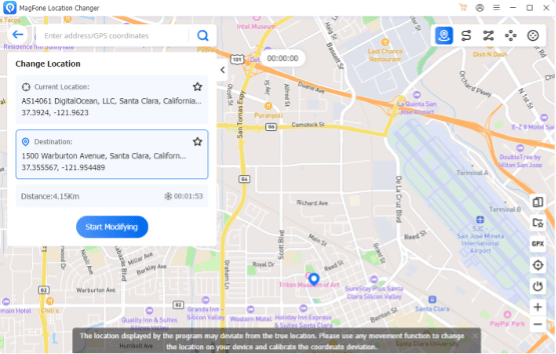
Step 2: After entering the map, you can pick a place where you want to play, preferably somewhere active in Pokémon GO, and click Start Modifying button. If you just want to play in your local area, skip this step, and proceed directly to Step 3.
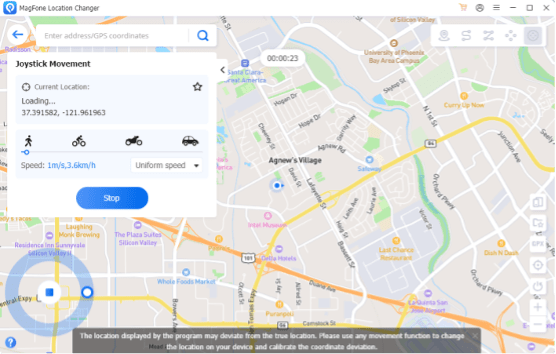
Step 3: Select the joystick mode in the top right corner, that allows real-time movement control instead of static location changes. Control your movement using the virtual joystick on the screen. Keep your speed at a realistic level (around 3–6 km/h). Catch Pokémon, spin stops, and interact with the map just like you would in real life.
A Practical Tool Many Players Use
If you’ve looked into spoofing tools, you’ve probably noticed that not all of them are reliable, especially on newer iOS versions. Some players prefer using solutions like MagFone Location Changer because it focuses on stable GPS simulation without requiring jailbreak or root. What makes tools like this useful in practice:
- Built-in joystick for real-time movement
- Adjustable speed to simulate walking or cycling
- Route planning for automatic movement
- Works with location-based apps, including Pokémon GO
It’s not about using a “special trick”, it’s more about having a tool that lets you move in a way that looks natural to the game.
Common Mistakes That Get Players Banned
Even with the right tool, mistakes can still get you flagged. Here are the most common ones:
- Moving too fast (e.g., car-level speed)
- Ignoring cooldown timers
- Teleporting too frequently
- Switching locations across continents in minutes
- Using outdated or unstable spoofing apps
Most bans don’t come from spoofing itself, they come from unrealistic behavior patterns.
Extra Tips for Safer Spoofing in 2026
To stay under the radar, keep these in mind:
- Play like a normal user (don’t over-farm)
- Stick to one city per session
- Take breaks between sessions
- Do not sign in on multiple devices simultaneously
Think of it this way: the closer your behavior is to a real player, the safer you are.
Final Thoughts
Spoofing Pokémon GO isn’t as risky as it sounds, if you do it the right way. The key isn’t just changing your location, but making sure your movement looks realistic. That’s why joystick-based spoofing has become the preferred method for many players in 2026.
By combining smart habits (like respecting cooldowns) with a stable tool, you can enjoy the game more flexibly without constantly worrying about bans. If you’re just getting started, focus on keeping things simple, natural, and consistent, and you’ll have a much smoother experience.